What should you consider when choosing?
First, assess the switch type and noise in the context of your shared workspace. Then choose between a compact size and a number pad, and finally check the layout and connection.
| What to consider |
What to check before buying |
Who is this important for? |
| Typing noise alongside colleagues |
Check the switch type on the exact version. A switch name doesn’t measure the noise made by the complete keyboard. |
If I type a lot of text alongside colleagues, I want to take noise into account rather than relying on the model name alone. Around 36% of consumers prioritise quiet typing. |
| Number pad and layout |
Check whether the version has a number pad and whether its physical keyboard layout suits your work. |
If I regularly enter stock numbers or measurements, a number pad may matter more than a smaller size. Around 29% of consumers prioritise entering figures. |
| Space and switching between devices |
Measure the available space and check the size, supported devices and connection options. |
If I need room for documents and a mouse, or switch between work devices, I want to make sure the size and connection are a good fit. Around 21% of consumers prioritise space or switching between devices. |
| Customisation |
Check the full version name and whether that specific version supports hot-swapping; programmable keys and interchangeable switches are not the same thing. |
If I want to change the switches or key assignments later, I want to know in advance what the version I’ve chosen actually supports. Around 14% of consumers prioritise customisation. |
Joybuy products
This selection includes wired models with a number pad and a compact keyboard. For each version, check the switch, layout and connection to make sure they suit your catalogue work and workspace.
 No image available
RK Royal Kludge R98 Pro Wired, Beige Switch
A wired version with a number pad for anyone who regularly enters figures and can use a cable connection.
The product description lists Beige linear switches and describes them as quiet; this isn’t a noise measurement of the complete keyboard.
The title mentions hot-swappable switches and a volume knob.
Joybuy
 No image available
RK Royal Kludge R98 Pro Wired, Cream Switch
A wired version with a number pad for anyone who regularly enters figures and can use a cable connection.
The product description lists Cream linear switches and describes them as quiet; this isn’t a noise measurement of the complete keyboard.
The title mentions hot-swappable switches and a volume knob.
Joybuy
 No image available
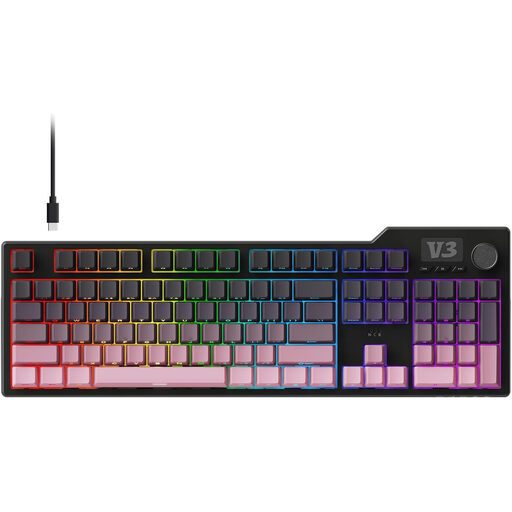
AJAZZ AK35I V3
A full-size keyboard with a number pad for anyone who regularly enters strings of figures and has room for a wired setup.
The product information lists a 104-key QWERTZ layout and a wired connection.
The product information mentions sound-absorbing layers; this isn’t a noise measurement of the complete keyboard.
Joybuy
 No image available
Redragon Wired, 94 keys, Full Metal
A wired option for typing tasks if the 94-key layout suits the way you work.
The title mentions 94 keys and a metal casing; the product information lists a hot-swappable PCB.
This version is wired and, according to the product information, doesn’t have a wireless connection.
Joybuy
 No image available
Redragon M68 Magnetic Switch, 68 keys, US layout
A compact version for anyone looking to free up desk space and wanting a US keyboard layout.
The title mentions 68 keys and a US layout. The product information lists Hall Effect magnetic switches and a detachable Type-C cable.
Joybuy
Frequently asked questions
Do I need a separate mechanical keyboard if I work on a catalogue using a laptop?
Not every laptop user does. Arboportaal states that for employees who work with a screen for more than 2 hours a day, the screen and keyboard must not be attached to each other; a separate screen or keyboard must be available when using a laptop. This doesn’t mean you need a mechanical switch.
Can a mechanical keyboard on its own help prevent problems caused by long hours of screen work?
Don’t treat it as a complete workplace solution. Arboportaal recommends, among other things, adjusting the workstation to suit the user, varying tasks and taking microbreaks. These recommendations aren’t proof that a particular keyboard prevents problems.
How do I choose a keyboard if I switch between computers?
First, check which connection types each device supports. Logitech lists device switching for the MX Mechanical models; Keychron lists Bluetooth, 2.4 GHz and wired use for the K3 Max. According to Ducky, the One 3 Matcha is wired.
What should I check before cleaning a keyboard in a shared workspace?
Follow the cleaning instructions for the exact model, and don’t automatically treat product information for a different model as general guidance. The cleaning tests described by Logitech apply to selected education products and don’t automatically apply to the MX Mechanical.
What can I do if I’m not happy with a keyboard I bought online, or it develops a fault?
For a distance purchase from a business as a consumer, you generally have a 14-day cooling-off period; check the terms of the specific purchase. In the Netherlands, faulty products are covered by a legal guarantee with no fixed statutory guarantee period, and the seller is your point of contact for a solution. The same rules don’t necessarily apply in the same way to a purchase from a private individual.


