
Pitch writer working alongside colleagues
Writes a lot at a shared desk and wants a mechanical typing feel without a conspicuous click. RTINGS recommends considering the sound of the switch you choose when working in a shared space.


For writing pitches at a shared desk, a compact mechanical keyboard with a switch described as quieter is often a sensible choice if you want to save space. If you regularly use numbers, a full-size model with a number pad may suit you better, but it takes up more room. RTINGS recommends considering the switch when working in a shared space: a ‘quiet’ label doesn’t guarantee that your colleagues won’t hear you typing.
Writes a lot at a shared desk and wants a mechanical typing feel without a conspicuous click. RTINGS recommends considering the sound of the switch you choose when working in a shared space.
Wants to leave room for a mouse and documents, and doesn’t need a number pad all the time. The Logitech MX Mechanical Mini is a more compact version without an integrated number pad.
Works on the same pitch across more than one device and values easy switching or customisable keys. Logitech says the MX Mechanical Mini can switch between up to three devices; Keychron describes key customisation for the K3 Max.
First, consider which switch is suitable for a shared workspace and how much desk space you need. Then decide whether you often switch between devices or use a number pad.
The percentages indicate, within this pitch-writing scenario, the proportion of consumers who put each purchasing priority first.
| What to consider | What to look for when buying | Who is this especially important for? |
|---|---|---|
| Noise when working alongside colleagues | Check the switch fitted to the exact version and, where possible, assess its sound in a similar environment. | When I type alongside colleagues, I want to work on my pitch without unnecessarily noticeable typing noise. Around 36% of consumers put reducing typing noise first. |
| Space for a mouse and documents | Compare the dimensions and key layout; don’t rely on a size label alone. | I want to keep my mouse and notes close by, and I can manage without a number pad if I don’t use one much. Around 29% of consumers put working in a compact space first. |
| Writing across multiple devices | Check the connections, keyboard layout and whether any key customisation works with your devices. | When I edit the same pitch on different devices, I want to switch easily or customise the keys. Around 21% of consumers put this writing workflow first. |
| Number pad | Consider whether you often enter numbers while working on pitches and whether a full-size keyboard will fit on your desk. | I enter numbers regularly and want those keys right next to the main typing area. Around 14% of consumers name the number pad as their top purchasing priority. |
The Logitech MX Mechanical Mini is available with different switch styles. A product name containing ‘mechanical’ or ‘linear’ doesn’t, by itself, mean that the keyboard is quiet.
Check the switch fitted to the specific version and, where possible, compare its sound in a similar working environment.
A compact model saves space, but may not have an integrated number pad.
Choose a compact model if space for your mouse and documents comes first; choose a larger one if you often enter numbers as part of your work. If you later find you need a number pad, you may need to buy one separately.
Keychron only lists hot-swap functionality for the specifically designated K3 Max version.
Check the full model variant before using replaceable switches as a selection criterion.
These brands offer useful options to compare; their inclusion doesn’t mean that a specific model is available.
The MX Mechanical Mini is designed for compact, wireless typing; according to Logitech, the MX Mechanical has an integrated number pad.
The K3 Max has a compact 75% layout and is worth considering if you’re weighing up connectivity options and key customisation.
The One 3 Matcha is a wired, full-size model available with a choice of switches.
The KC 200 MX is a wired mechanical office keyboard with extra keys.
This Joybuy selection includes mechanical keyboards in different sizes and with different connection options. For each version, check that its sound, layout and connection are suitable for your shared workspace.
 No image available
Could suit a permanent workspace if a wired connection works for you.
94 keys, wired, with a metal case, phone stand and wrist rest, according to the product name.
 No image available
Could suit you if desk space is a priority and the US layout works for your tasks.
68 keys, linear magnetic switches and US layout, according to the product name.
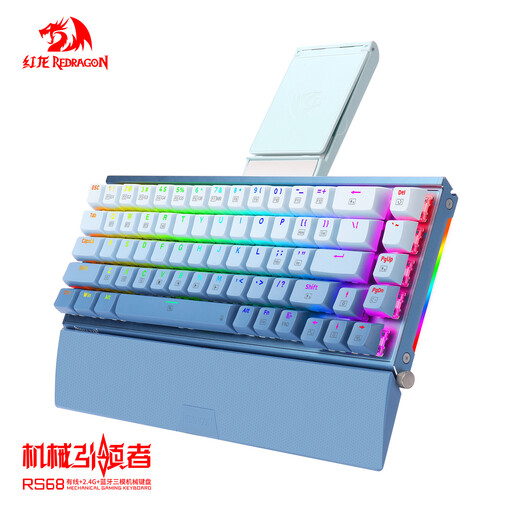 No image available
Could suit you if you’re looking for a compact keyboard and want the option of wired or wireless use.
68 keys, Bluetooth, and wired or wireless connectivity, according to the product name. The product name also mentions hot-plug functionality.
 No image available
Could suit you if a compact layout and wireless use work for your workspace.
75% layout, tri-mode and hot-swappable, according to the product name.
 No image available
Could suit you if you’re looking for a compact keyboard and the US QWERTY layout works for your writing.
75% layout, wired, Bluetooth and 2.4 GHz; the product name also mentions hot-swappable switches.
Compare the switch fitted to the exact version. Logitech distinguishes Tactile Quiet from Clicky; CHERRY describes MX Silent Red as a linear switch with sound dampening. These product descriptions don’t determine how much noise your colleagues will hear at your desk.
It depends on the version: Logitech says the MX Mechanical Mini can switch between up to three devices. Keychron lists Bluetooth, 2.4 GHz and wired use for the K3 Max; check which connections your devices support.
First disconnect the keyboard, then remove dust with a soft brush or compressed air, as Keychron recommends. Follow the instructions for your specific model when removing and replacing keycaps.
According to Arboportaal, for employees who work with a screen for more than 2 hours a day, the screen and keyboard must not be attached to each other. When using a laptop, it must be possible to use a separate screen or keyboard; this does not mean you have to buy a mechanical keyboard.
When you buy from a business online, you generally have 14 days to change your mind, according to the Dutch government. The Netherlands has no fixed statutory guarantee period, but you are entitled to a product that works properly and should be able to contact the seller first if something goes wrong. The exact cancellation period and any exceptions depend on the purchase.