What should you look for when buying?
Start by considering the sound and switch feel together. Then check that the layout and connection suit your writing and workspace.
| What to consider |
What should you check? |
Who should prioritise this? |
| Noise for your neighbour |
Check the exact switch option and assess the noise of the complete keyboard in a similar workspace. |
If I work alongside someone, I want to avoid distracting them with my keystrokes. Around 36% of consumers put being considerate of their neighbour when it comes to noise first. |
| Typing feel |
Compare tactile feedback with a smooth, linear keystroke. A Clicky option calls for a different approach to noise. |
If I write and edit for long periods, I want a comfortable keystroke without assuming that one type is better for everyone. Around 29% of consumers make typing feel their top priority. |
| Size and workspace |
Check the position of the arrow and function keys, and whether you need a number pad. TNO recommends a narrow keyboard for most tasks, so you can keep your mouse closer to your body. |
If I share a desk, I want to leave room for my mouse while keeping the keys I use. Around 21% of consumers put desk space first. |
| Connectivity and customisation |
Check the connection, device switching and whether hot-swap applies to the exact version. Don’t assume replacement switches are included. |
If I switch between computers or want the option to change switches later, I want to know in advance exactly what the version offers. Around 14% of consumers put connectivity or customisation first. |
Joybuy products
This selection includes compact mechanical keyboards with a range of layouts and connections. At a shared desk, also consider the noise of the complete version: size or switch type alone won’t tell you how quiet a keyboard sounds.
 Image unavailable
AULA WIN60HE 60% Hall Effect Keyboard
The compact 60% layout may suit you if you want to save desk space. Check that it includes the keys you need for writing and editing.
The product title lists Hall Effect magnetic switches, Rapid Trigger, an adjustable 0.01 mm actuation point, an 8K polling rate and RGB.
View at Joybuy
 Image unavailable
Royalaxe E75 Custom 75% Hall Effect
The 75% layout is worth comparing if you want a more compact workspace. Check in advance that the key layout suits the way you write.
The product title lists TTC Magnetic HE switches, hot-swappable switches and a wired mode with Rapid Trigger.
View at Joybuy
 Image unavailable
Redragon M68, 68 keys, US layout
The compact 68-key layout may appeal if you want to save desk space. Check that the US layout suits your preferences and how you work.
The product description lists linear Hall Effect magnetic switches. The product title mentions Rapid Trigger and a metal top plate.
View at Joybuy
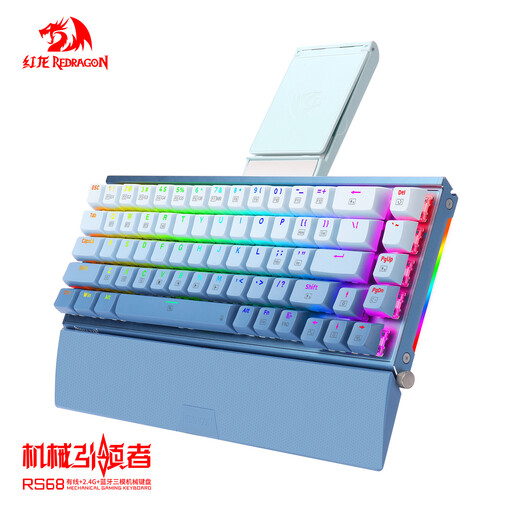 Image unavailable
RS68 The Third Mock Examination Wireless
The listed connection options may suit you if you want to switch between wired and wireless use. Check which connection works with your computer.
The product description lists a 65% layout, Bluetooth 5.0, 2.4 GHz, USB-C, tri-mode connectivity and hot-swappable switches.
View at Joybuy
 Image unavailable
AJAZZ AK820 MAX 75%, 82 keys
The 75% layout with 82 keys is an option if you’re looking for a more compact setup. Check that it includes the keys you need for essay writing and editing.
The product title lists magnetic switches, a wired mode, hot-swap support, Rapid Trigger, adjustable actuation and RGB.
View at Joybuy
Frequently asked questions
Is a ‘silent’ mechanical switch inaudible to someone sitting next to me?
No, that isn’t something you can conclude from Logitech and CHERRY’s descriptions. Logitech offers Tactile Quiet, Clicky and Linear options; CHERRY describes sound dampening in the MX Silent Red. Also assess the noise of the complete version in a similar workspace.
What should I check before connecting the keyboard to my computer?
Compare the connection and physical layout of the exact version with your computer and writing habits. Logitech says the MX Mechanical Mini can switch between up to three devices; Ducky lists a wired connection with a detachable USB-C cable for the One 3 RGB.
Can I replace the switches myself?
Ducky lists hot-swap support for the One 3 RGB. Before buying, check whether this applies to the version you’ve chosen and which replacement switches are compatible. Hot-swap support doesn’t automatically mean replacement switches are included.
What are my rights when buying online in the Netherlands?
For distance purchases, the Dutch government says you have a 14-day cooling-off period in many cases. You’re also entitled to a product that is fit for purpose. The Netherlands has no fixed statutory guarantee period, and the seller is your point of contact if a product is faulty. The exact rules depend on the transaction.
Do Dutch workplace health and safety rules require me to use a separate keyboard?
Not for every personal essay. For employees who work with a screen for more than 2 hours a day, Arboportaal explains that the screen and keyboard must not be attached to one another. When using a laptop, it must therefore be possible to use a separate screen or keyboard. The rules depend on the work context and how long you work.


