Start by checking the switch fitted to the exact version, then make sure the physical layout puts your punctuation, navigation keys and shortcuts within easy reach. A dampened switch is a focused choice if sound is your top priority; a compact, tactile or wireless model may suit you better if desk space, feedback or switching between devices matters more. A label such as ‘quiet’ alone doesn’t tell you how the complete keyboard will sound in your study.
Who is this relevant to?
Writer who prioritises quiet
You edit in a quiet room and want to assess the switch and the sound of the complete keyboard before considering extra features. Ducky, Logitech and CHERRY describe different switch options, and the exact version makes a difference.
Editor who relies on a familiar layout
You regularly use punctuation, navigation keys and shortcuts, and don’t want a compact size or a different physical layout to interrupt your work. Keychron and Logitech product information describes TKL, compact and larger versions, among others.
Typist tailoring their workspace
You care most about tactile feedback, a suitable setup or the option to customise switches and connections. Logitech, Keychron and CHERRY offer different features to weigh up against noise and ease of use; the Arboportaal also describes the repetitive actions involved in working with display screens.
What should you look for?
When editing biographies in a quiet study, the key considerations are typing noise, familiar text navigation and the typing feel you prefer.
| Consideration |
What should you check? |
Who is this important to? |
| Typing noise |
Check which switch is actually fitted and, if possible, assess the complete keyboard using a similar typing force. |
If I write in a quiet room, I don’t want the sound of typing to dominate. Around 36% of consumers prioritise a suitable typing sound. |
| Layout for editing text |
Compare the physical positions of punctuation, arrow keys and navigation keys with those on your current keyboard. |
Anyone who edits a lot of text will want to find familiar keys quickly. For around 29% of consumers, the physical layout is the top priority when choosing. |
| Typing feel and customisation |
Compare the feel of the switches and check whether the specific version is hot-swappable. |
If I prefer a particular typing feel or want to change switches later, I look at feel and customisation options. Around 21% of consumers prioritise this. |
| Space and connectivity |
Decide whether you need a number pad, measure the available space and check the connections on the exact version. |
Anyone short on desk space or switching between devices will want to know which size and connection will suit them. This is the top priority for around 14% of consumers. |
Common pitfalls
-
Assuming a switch name tells you how the whole keyboard has been measured
The sound of typing and other parts of the complete keyboard may still be audible. A manufacturer’s description of a switch doesn’t establish how the whole keyboard will sound in your study.
Check which switch is fitted and, if possible, assess the complete keyboard using a similar typing force.
-
Choosing a compact or ISO keyboard without comparing the layout
A compact keyboard may leave out keys you use often, while a different physical layout may move familiar keys.
Before buying, compare the images and variant details with your current keyboard and your computer’s configured layout.
-
Assuming hot-swap means quiet as standard
Hot-swap lets you replace switches, but it doesn’t tell you which switches are fitted or how quiet the complete keyboard sounds. The standard options listed for the Keychron K8 Pro ISO are Red and Brown; it hasn’t been confirmed that the CHERRY KW 300W MX comes with MX Silent Red switches as standard.
Check separately whether the exact version is hot-swappable and which switches are actually fitted.
-
Confusing an extended warranty with your statutory rights
An optional warranty is different from your right to a product that is fit for purpose. According to the Dutch government, there is no fixed statutory two-year warranty period in the Netherlands; the expected lifespan also depends on the product.
Check what extra cover includes, and contact the seller if you have a complaint about a faulty product.
Brands to compare
Ducky
The One 3 RGB range includes wired sizes and, according to Ducky, a version with Cherry MX Silent Red switches. This may be relevant if you want both a dampened linear switch and hot-swap capability.
- Ducky specifies hot-swap, a detachable USB-C cable and several sizes.
- Check which switch comes with the version on offer. Silent Red doesn’t make every One 3 version quiet.
Logitech
The MX Mechanical range includes a compact Mini and a larger model with a number pad. Logitech offers switch options including Tactile Quiet, Clicky and Linear.
- Logitech specifies low-profile mechanical keys, and the larger MX Mechanical can switch between up to three devices.
- Switch options vary. A review of an older, larger MX Mechanical doesn’t necessarily apply to the Mini or another version.
CHERRY
The KW 300W MX is a compact mechanical keyboard for work, with hot-swap and a case that CHERRY describes as dampened. CHERRY also makes the MX Silent Red switch.
- CHERRY lists Bluetooth and a wired connection as options for the KW 300W MX.
- A dampened case isn’t an independent sound measurement and doesn’t mean every fitted switch is Silent Red. Also check whether the version is intended for Windows or Mac.
Keychron
The K8 Pro ISO collection is a TKL alternative for anyone comparing physical ISO layouts, programmability and a hot-swappable version.
- Keychron specifies Bluetooth, a wired connection and several ISO variants.
- The listed standard Red and Brown options aren’t specified as quiet switches. Check the layout, switch and hot-swap capability of each version.
Joybuy products
This selection includes mechanical keyboards in a range of sizes, layouts and switch types. Compare the exact version and key layout with your workspace; a quiet label doesn’t determine how the complete keyboard will sound in your room.
 No image available
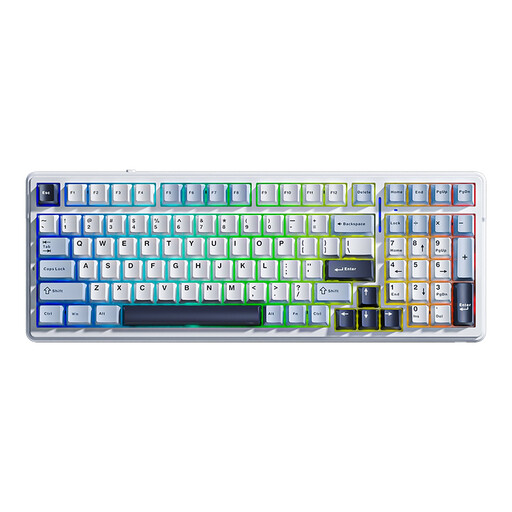
AULA F99 Wireless Mechanical Keyboard, Tri-Mode, 99 keys, QWERTY US
An option to compare if you’re looking for a mechanical keyboard with a number pad and arrow keys; the title lists 99 keys and hot-swap.
The title lists tri-mode, RGB and QWERTY US. Check that the physical key positions suit your current layout, and assess the sound of the exact version.
View at Joybuy
 No image available
Ticktype DP104, 108 keys, Silent Tactile, US layout
The title lists Silent Tactile switches and a full-size layout with 108 keys. Compare this model if you’re weighing up tactile feedback and a number pad.
The title lists hot-swap and tri-mode. The US layout may differ from the key positions you’re used to; the switch name doesn’t establish how the complete keyboard will sound.
View at Joybuy
 No image available
AJAZZ AK980 V2, 98% layout, QWERTY
A compact layout with a number pad may suit you if you want to keep many keys without choosing a larger full-size version.
The title lists hot-swap, a wired connection, Bluetooth and 2.4G. Check the key positions of the QWERTY layout and assess the sound of the exact version.
View at Joybuy
 No image available
Corsair K70 CORE TKL, BE AZERTY, MLX Red
The TKL layout is an option to compare if you don’t need a number pad and are looking for a wired model.
The title lists the BE AZERTY layout and MLX Red switches. Check that the physical ISO layout and key positions match your computer settings.
View at Joybuy
 No image available
RK ROYAL KLUDGE RK61, 60%, Quiet Red, white
A compact option to compare if you have limited desk space and want to look at the Quiet Red switches listed in the title.
The title lists 61 keys, hot-swap and tri-mode. The physical regional layout isn’t specified; check that the missing keys and key positions suit your editing work.
View at Joybuy
Frequently asked questions
Does ‘Tactile Quiet’ or ‘Silent Red’ guarantee that the whole keyboard is quiet?
No, these names don’t determine how the complete keyboard will sound. Logitech lists Tactile Quiet as a switch option, while CHERRY describes damping within MX Silent Red; check the exact version and, if possible, try the keyboard for yourself.
Which layout is useful for editing text?
Above all, compare the physical positions of punctuation, arrow keys and shortcut keys with those on your current keyboard. The Keychron K8 Pro ISO is TKL, so it has no number pad; the larger MX Mechanical does.
How do you pair a suitable Logitech keyboard using Bluetooth?
According to Logitech’s setup guide, switch on the keyboard and, if needed, hold down the Easy-Switch key for three seconds until the light flashes rapidly. Then complete the pairing in your computer’s Bluetooth settings.
Can a different keyboard replace a suitable working posture?
No, a keyboard on its own won’t prevent discomfort. The Dutch Arboportaal highlights repetitive finger and hand movements and static strain when working with display screens; set up your workspace appropriately and vary your tasks.
What are your rights when buying online in the Netherlands?
For eligible distance purchases, a 14-day cooling-off period applies in many cases, according to the Dutch government. You’re also entitled to a product that is fit for purpose; the Netherlands has no fixed statutory two-year warranty period, according to the Dutch government. If a product is faulty, contact the seller.


