First, choose a layout that makes it comfortable to enter text and punctuation and use your layout software’s keyboard shortcuts. Then check how easy the key legends are to read at your desk. A compact keyboard leaves more room for paper and a mouse, while a larger model may include a number pad. If you work close to other people, compare the switch type on the exact model: backlighting or a ‘silent’ name doesn’t prove that the legends will always be easy to read or that the keyboard will be quiet.
Who is this for?
Wedding booklet maker working by a bright window
You switch between text, your screen and printed examples, and want to be able to make out the key legends clearly. Check them in daylight at your own desk; Arboportaal advises positioning your line of sight parallel to the window when working at a screen.
Frequent text editing and page layout
You correct names and text and use keyboard shortcuts while laying out pages. A familiar physical layout and the presence of navigation or number keys may be important; Adobe also explains how to set up custom keyboard shortcuts in InDesign.
Working at a shared table
You want the feel of mechanical keys, but need to consider the people beside you and leave room for paper and a mouse. Compare the switch on the exact model: a product line with several switch options doesn’t have one fixed noise level.
What should you look for when choosing?
Start with the layout and keys you actually use when working on your pages. Then check how easy the legends are to read by your window. If other people work nearby, compare the switch type on the model you’re considering.
| What to consider |
What to check before buying |
Who is this important for? |
| Readability by the window |
Check the legends in daylight and with the lights off; also consider whether you can adjust your desk setup or window coverings. |
If you switch between your screen and printed examples, you’ll want to make out the keys without daylight from the window getting in the way. Around 31% of consumers prioritise readability by the window. |
| Layout for text and page design |
Check the national layout, punctuation key positions and the keys used by your software; ‘ISO’ doesn’t tell you which national legends you’ll get. |
If you edit a lot of text, it matters whether the keys suit your familiar habits and shortcuts. Around 25% of consumers prioritise a familiar layout and way of working. |
| Desk space and repeated tasks |
Decide whether you need a number pad and check whether your software’s keyboard shortcuts are already sufficient. |
If you use paper and a mouse beside your keyboard, or often repeat the same layout tasks, you’ll want enough desk space and controls that suit the way you work. Around 25% of consumers put space or repeatable tasks first. |
| Noise for others |
Check which switch you’re choosing; words such as ‘Quiet’ or ‘Silent’ don’t guarantee a particular noise level for the complete keyboard. |
If other people work at the same table, consider typing noise before choosing a model. Around 19% of consumers prioritise the potential noise for people sharing their table. |
Common pitfalls
-
Assuming backlighting guarantees readability
Keyboard backlighting may be a product feature, but light from a window can also cause glare on your screen. These are two separate issues and should be assessed separately.
Check the legends at your desk in daylight and with the lights off. Also consider where your screen is positioned in relation to the window and whether you can use window coverings.
-
Assuming ‘ISO’ means the familiar national layout
The Keychron V5 ISO collection reviewed includes several national layouts, but no Dutch version. The ISO label alone therefore doesn’t tell you which legends or punctuation key positions you’ll get.
Before buying, check the full model name and an image of the physical keys.
Different key legends or less familiar punctuation key positions could make typing feel less familiar.
-
Choosing a compact keyboard without checking how often you use numbers
The MX Mechanical Mini is the compact version; the full-size MX Mechanical has an integrated number pad. If you often enter numbers while working on your layout, not having one could matter.
Review the numbers and shortcuts you actually use, then decide whether the extra desk space is worth losing the number pad.
Relevant brands to consider
Logitech
The MX Mechanical comes in a full-size version and as a Mini, giving you the choice between an integrated number pad and more space on your desk.
- Logitech lists matte key surfaces, adaptive backlighting and connectivity with up to three devices.
- Tactile Quiet is a switch option, not a noise measurement for every model. The Mini doesn’t have an integrated number pad.
Keychron
The V5 ISO is a wired 96% keyboard with a number pad; the V6 Max is a separate, full-size ANSI range with wireless options.
- For the V5 ISO, Keychron lists hot-swappable switches, QMK/Launcher and translucent key legends.
- The V5 ISO collection lists several national ISO layouts, but no Dutch version. Don’t confuse this model with the ANSI V6 Max.
Ducky
The One 3 Matcha is a wired mechanical keyboard for anyone who wants to compare hot-swappable switches.
- Ducky lists hot-swappable switches and double-shot PBT keycaps for this model.
- The size and switch vary by model; Cherry Silent Red is one listed option, not the standard switch on every version.
CHERRY
The MX BOARD 3.0S is a wired model with different versions to compare.
- CHERRY lists a detachable cable and, depending on the version, different backlighting and keycap finish options.
- Check the backlighting and switches on the exact model; an image or brand name won’t necessarily make the version clear.
Joybuy products
These Joybuy products are mechanical keyboards for anyone considering a compact or near-full-size layout with customisable keys. For the version you choose, pay particular attention to the listed US layout, as it may differ from the Dutch key layout you’re used to.
 No image available
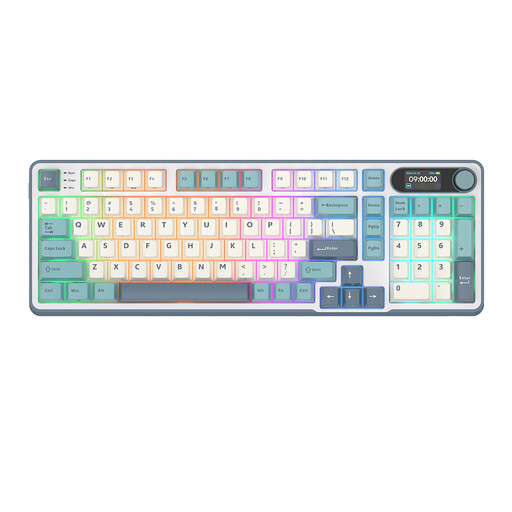
RK Royal Kludge S98, Snow Emperor Switch
The 96% layout with 98 keys could suit you if you want a near-full-size layout and customisable keys.
The product title lists hot-swappable switches, software control and wireless connectivity via Bluetooth or 2.4G, as well as USB-C.
The product description lists PBT keycaps with clear, wear-resistant legends; check for yourself whether they’re easy to read by your window.
Joybuy
 No image available
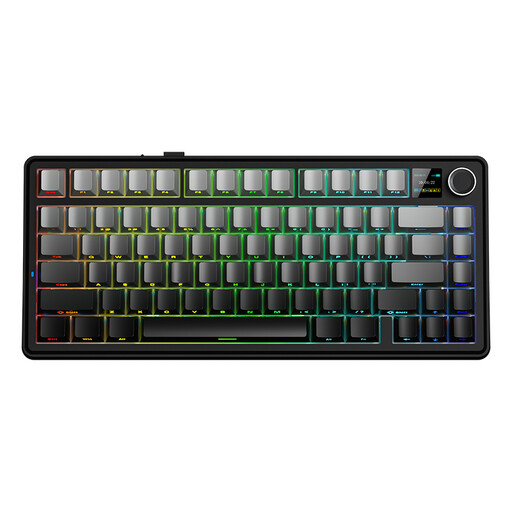
AULA F75 MAX, Gradient Grey, Reaper Switch
The 75% layout is a compact option if you want to leave more room for paper and a mouse.
The product title lists a US QWERTY layout, side-printed key legends and tri-mode connectivity via USB, Bluetooth or 2.4G.
The US layout may differ from the Dutch key layout you’re used to; check the physical keys and punctuation positions.
Joybuy
 No image available
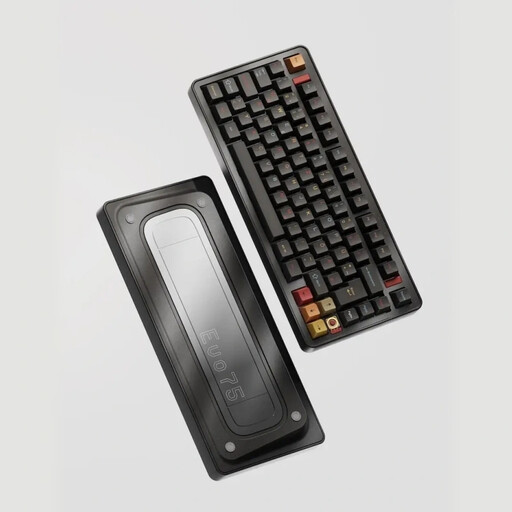
Ticktype EVO75, Spray-coated Nebula, Creamy Rye Switches
The 75% layout is designed for anyone considering a more compact keyboard with customisable keys.
The product title lists a US layout, hot-swappable switches, VIA compatibility and tri-mode connectivity via USB, Bluetooth or 2.4G.
The US layout may differ from the Dutch layout you’re used to; check the key legends before ordering.
Joybuy
 No image available
AJAZZ AK820 MAX, Flying Fish Switches
The 75% layout offers a compact option if you want to free up desk space.
The product title lists a US QWERTY layout, hot-swappable switches, RGB backlighting and tri-mode connectivity.
The title lists an 8000 mAh battery. The US layout may differ from the Dutch key layout you’re used to.
Joybuy
 No image available
AJAZZ AK820 Pro, Flying Fish Switch
The 75% layout is a compact choice if you want to make more room for paper and a mouse.
The product title lists a US QWERTY layout, hot-swappable switches, PBT keycaps, RGB backlighting and tri-mode connectivity.
The US layout may differ from the Dutch layout you’re used to; check the punctuation positions and key legends.
Joybuy
Frequently asked questions
Does keyboard backlighting help with glare from a bright window?
Not necessarily. Logitech describes adaptive backlighting for the MX Mechanical range, but that doesn’t prove the legends will be easier to read beside every window. Arboportaal also highlights the way your screen workstation is set up, so assess the keyboard and any glare on your screen separately.
Do I need a programmable keyboard for InDesign?
Not just to create custom shortcuts: Adobe explains how to set up shortcuts in InDesign itself. First check which commands you use often, then decide whether assigning extra shortcuts to the keyboard would be useful for your work.
What can I do if I’m unhappy with a keyboard bought online or it develops a fault?
For a standard online consumer purchase in the Netherlands, you generally have a statutory 14-day cooling-off period after delivery, with some exceptions. You’re also covered by the statutory guarantee if the product doesn’t perform as you could reasonably expect under normal use; this is separate from any seller’s or manufacturer’s guarantee. ACM ConsuWijzer explains these consumer rights.


