
Vandaag of morgen in huis

Kwaliteit gegarandeerd

Welkomstaanbiedingen ontgrendelen: GRATIS bezorging | Tot 80% korting | Gratis 30 dagen JoyPlus-proefperiode
Download de app
Tired of the mushy, imprecise keystrokes of your standard keyboard? Whether you're programming for long hours, gaming competitively, or simply typing a lot, the feedback and precision of your keyboard make a world of difference. A mechanical keyboard offers a noticeably better typing experience, is more durable, and is often fully customisable.
However, the market is vast, and the specifications can be overwhelming. That's why we at Joybuy have put together this guide. We'll explain the most important features and present a selection of popular models, so you can make an informed choice that suits your needs and budget.
Before we dive into the products, it's helpful to understand a few key concepts. This will help you determine what's important for you.
The layout determines the physical size and the keys available. A traditional full-size keyboard has everything, including a numpad. However, many users today prefer a more compact form factor.
A 75% keyboard is a popular middle ground. It retains the essential function keys (F1-F12) and arrow keys but places everything closer together. This saves desk space and keeps your mouse nearer, which can be more ergonomic.
How you connect your keyboard is a matter of preference.
One of the biggest advantages of mechanical keyboards is the potential for personalisation. A hot-swappable keyboard is a key feature in this regard. It means you can replace the mechanical switches (the mechanisms under the keycaps) without any soldering. Want a different typing feel? Just pull out the old switches and press in the new ones. This opens the door to a fully custom keyboard, allowing you to also change keycaps, the case, and even internal components. Features like an RGB keyboard (adjustable per-key lighting) and a keyboard with a volume knob further enhance personalisation and user convenience.
Based on specifications, functionality, and user needs, we've lined up some interesting options for you.
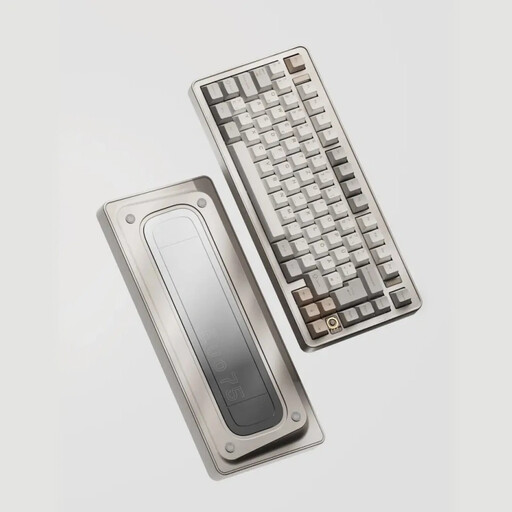
Why It Stands Out The Ticktype EVO75 is aimed at the enthusiast looking for premium build quality and a refined typing experience. Its full aluminium keyboard case gives it significant weight and a robust feel. The internal 'Leaf Spring' mount, a high-end technique, provides a flexible and soft typing experience. With a massive 8000mAh battery and full VIA compatibility for remapping, this is a powerhouse for the demanding user.
Pros
Who is this for? For keyboard enthusiasts, programmers, and remote workers seeking a high-quality, customisable, and aesthetically refined keyboard without the hassle of building it themselves.
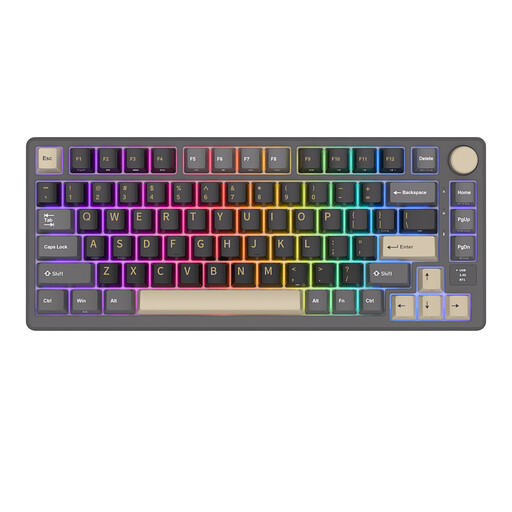
Why It Stands Out The Royal Kludge M75 combines a wealth of modern features into an accessible package. Its most eye-catching feature is the small OLED screen paired with a metal volume knob. This provides instant visual feedback on battery status, connection mode, and more. The 'gasket mount' construction, where the switch plate is sandwiched between gaskets, is designed to dampen vibrations and produce a more pleasant typing sound.
Pros
Who is this for? For gamers and tech enthusiasts who love gadgets and visual feedback. It's an excellent choice for those looking for a feature-rich, hot-swappable PCB and wireless options in an affordable 75% keyboard.
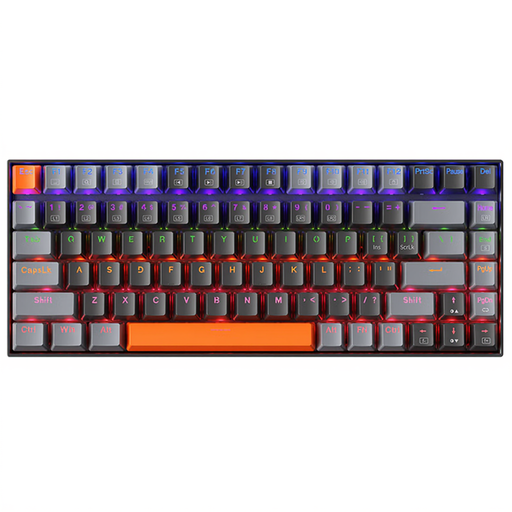
Why It Stands Out Sometimes, simplicity is key. The Machenike K500A-B84 focuses on the essentials: a reliable, wired typing experience in a compact form factor. Without the complexity of wireless connections or advanced software, this keyboard offers a solid entry point into the world of mechanical keyboards. The Brown switches provide a light tactile 'bump' with each keystroke, which many consider a pleasant middle ground between typing and gaming.
Pros
Who is this for? For students, office users, or beginner gamers who want to upgrade from their standard membrane keyboard without a major investment. An excellent choice for anyone looking for a functional and durable workhorse.
This selection is just a starting point. The world of keyboards is vast, with countless variations in switches, materials, and layouts. If your perfect match isn't here, or if you're curious about other options like full-size or ergonomic models, there's much more to discover.
? Explore more USB keyboards here
The main advantages are the typing experience, durability, and customisability. Each key has its own mechanical switch, which provides consistent and precise feedback. These switches are rated for millions of keystrokes, lasting much longer than the rubber domes in standard keyboards.
A hot-swappable keyboard allows you to change the mechanical switches without needing to solder. You can pull the switches out with a special tool and press new ones in. This makes it easy to customise your keyboard's typing feel or replace a faulty switch.
Yes, for most users. A 75% keyboard retains the F-key row, arrow keys, and some navigation keys (like Del, PgUp, PgDn). It only omits the numpad. This makes it a compact and efficient design that is highly suitable for both productivity tasks and gaming, while leaving more room for your mouse.
