
Vandaag of morgen in huis

Kwaliteit gegarandeerd

Welkomstaanbiedingen ontgrendelen: GRATIS bezorging | Tot 80% korting | Gratis 30 dagen JoyPlus-proefperiode
Download de app
A good mechanical keyboard can make all the difference, whether you're gaming, programming, or typing extensively. But the market is flooded with models vying for attention with bright lights and vague promises. Many buyers fall for marketing traps and end up with a keyboard that becomes irritating or breaks after just a few months. Let's look at the most common pitfalls and discover what you should really be paying attention to.
Pitfall 1: The "Gaming" Label Means Little An RGB keyboard with an aggressive design is quickly labelled as "gaming." In reality, many budget models lack essential features like N-key rollover (where all keystrokes are registered simultaneously) or durable switches. You're paying for the looks, not the performance.
Pitfall 2: Vague Specifications and "Mechanical-Feel" The term "mechanical" is sometimes misused. Keyboards with a "mechanical-feel" are often just membrane keyboards with a spring underneath for some extra resistance. They don't offer the precision, durability, or typing feel of a true mechanical keyboard.
To avoid a bad purchase, it's important to check three core features. These determine the functionality, feel, and lifespan of your keyboard.
The switches under the keycaps determine how each keystroke feels and sounds. There are three main types:
The size of a keyboard affects your desk setup and ergonomics.
Also, pay attention to the layout. Most keyboards here use the QWERTY US layout, which is standard in the Netherlands for programming and gaming.
A sturdy frame and good keycaps are crucial for longevity. Keycaps made of PBT plastic are more durable and feel better than standard ABS plastic, which can develop a shine over time.
A hot-swappable keyboard is also worth considering. This allows you to easily replace the switches yourself without soldering. This is ideal if you want to experiment with different switch types or repair a faulty switch. Finally, the choice between a wired keyboard for a stable connection and a wireless keyboard for a clutter-free desk is a personal preference.
Based on objective specifications, we have selected a few models that suit different needs and budgets.
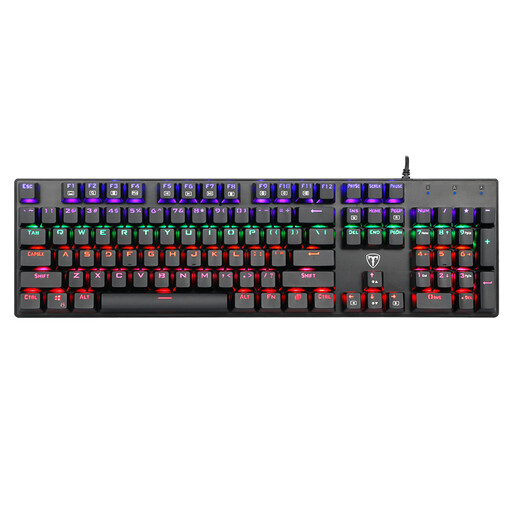
Why This Fits Their Persona: This model offers an authentic mechanical experience for an accessible price. It's a full-size keyboard, making it versatile for both typing and gaming. Ideal for those who want to find out if a mechanical keyboard is right for them without immediately paying a premium.
This is a true mechanical keyboard with clear specifications, not a vague 'mechanical-feel'. It has blue clicky switches and 100% anti-ghosting—features that actually matter for a good baseline experience.
Full-size with a numeric keypad and multimedia keys. The spill-resistant design with drainage holes is a practical bonus in this price range.
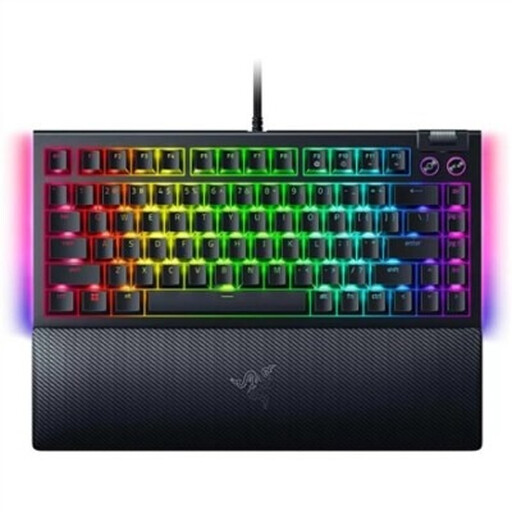
Why This Fits Their Persona: This gaming keyboard is engineered for performance. The compact 75% format provides plenty of room for the mouse, which is crucial in competitive games. The hot-swappable feature gives you the freedom to change switches for a customised feel.
This model focuses on performance-oriented features rather than just RGB lighting. The combination of a compact size, a solid build, and the hot-swappable PCB demonstrates that the priority is on functionality and customisation.
The hot-swappable sockets allow you to change 3- or 5-pin switches without soldering. The 75% format is a popular balance between compactness and functionality, retaining the arrow and function keys.
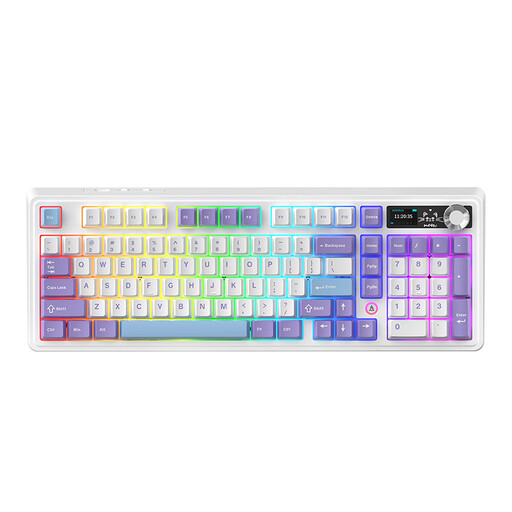
Why This Fits Their Persona: This wireless keyboard is a workhorse. The 98% layout retains the numeric keypad in a more compact form. Triple connectivity (wired, Bluetooth, 2.4G) and a large battery make it perfect for a flexible, clutter-free workspace. The volume knob and TFT screen are useful extras for productivity.
This model delivers tangible, functional value with its TFT screen, volume knob, and versatile connectivity. The focus is on a comfortable and quiet typing experience thanks to the 'gasket mount' construction and multiple sound-dampening layers, not just on visual flair.
Highly versatile thanks to its triple connectivity and 98% layout. The 'gasket mount' construction provides a noticeably softer and quieter typing feel, which is pleasant during long work sessions.
Your keyboard is only half the equation. A good mouse is just as important for comfort and precision. If you spend long days at the computer, an ergonomic mouse like the Anker CE100 Vertical Mouse can help reduce wrist strain. For those seeking a reliable, no-nonsense combination, there are also complete keyboard and mouse sets like the Lenovo Essential Wired Combo, which provide a solid foundation for office work.
We have compiled a complete, real-time list of products that fully satisfy these strict selection criteria and UK safety regulations.
How long does a mechanical keyboard last? A major advantage of mechanical keyboards is their longevity. The switches are often rated for 50 million or more keystrokes, which translates to many years of normal use. The final lifespan also depends on the build quality of the case and keycaps.
Is a hot-swappable keyboard worth the extra cost? For most users, yes. It gives you the freedom to customise your typing feel by trying different switches. More importantly, if a switch fails over time, you can easily replace it yourself instead of having to throw away the entire keyboard.
Which switch type is best for the office? For an office environment, Tactile (Brown) or Linear (Red) switches are the most popular choices. They are significantly quieter than Clicky (Blue) switches, so you won't disturb your colleagues. Tactile switches provide subtle feedback when typing, while linear switches are completely smooth.
