
Vandaag of morgen in huis

Kwaliteit gegarandeerd

Welkomstaanbiedingen ontgrendelen: GRATIS bezorging | Tot 80% korting | Gratis 30 dagen JoyPlus-proefperiode
Download de app
Tired of the mushy, unsatisfying keystrokes of a standard keyboard? Whether you're a gamer seeking faster response times, a programmer typing thousands of lines of code, or simply someone who wants a more pleasant typing experience, a mechanical keyboard can make all the difference. However, the market is vast, and the specifications can be overwhelming.
This guide is here to help. As a Joybuy Product Recommendation Officer, I'll filter through the options and explain the key features, so you can make an informed decision that suits your needs.
Before we dive into specific models, here are three key points to consider.
The physical size and layout of a keyboard determine its functionality and the amount of desk space it occupies. The standard is the QWERTY US layout. Popular sizes include:
One of the biggest advantages of a modern mechanical keyboard is the potential for personalisation. A hot-swappable keyboard is central to this. It means you can change the mechanical switches (the mechanisms under the keycaps) without any soldering. This allows you to experiment with different types of switches—like linear switches for smooth gaming or tactile switches for distinct feedback while typing—to find the perfect feel for you.
The way the internal components are mounted inside the case has a major impact on the typing feel and sound. A gasket mount is a construction method where the plate holding the switches is sandwiched between silicone or rubber gaskets. This isolates the plate from the case, dampening vibrations and creating a softer, more flexible, and often quieter typing experience.
Based on specifications, functionality, and user needs, we've lined up some compelling options for you.
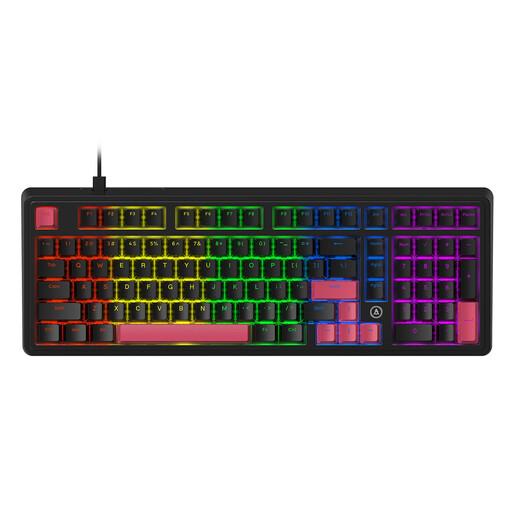
Why It Stands Out The AJAZZ AK980 offers an excellent balance between functionality and a compact design. Its 98% layout retains the essential number pad, making it a versatile choice. The gasket mount structure, combined with five layers of sound-dampening material, is designed to produce a refined and muted typing sound, free of hollow pings.
Pros
Who Is It For? For users who need the productivity of a number pad for work or data entry but still want a clean desk setup. A solid choice for programmers and all-around users alike.
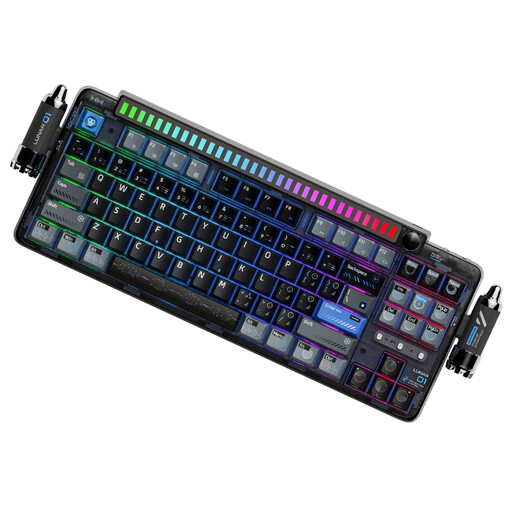
Why It Stands Out The KEYSME Lunar 01 is a feature-rich wireless mechanical keyboard for the true enthusiast. It combines a premium gasket-mount construction with tri-mode connectivity, allowing you to seamlessly switch between Bluetooth, 2.4GHz wireless, and a wired connection. Unique additions like the detachable rhythm light bar and a programmable knob make it a real standout.
Pros
Who Is It For? For the keyboard enthusiast, gamer, or creative professional who values flexibility, premium features, and a unique aesthetic. Ideal for anyone who works with multiple devices.
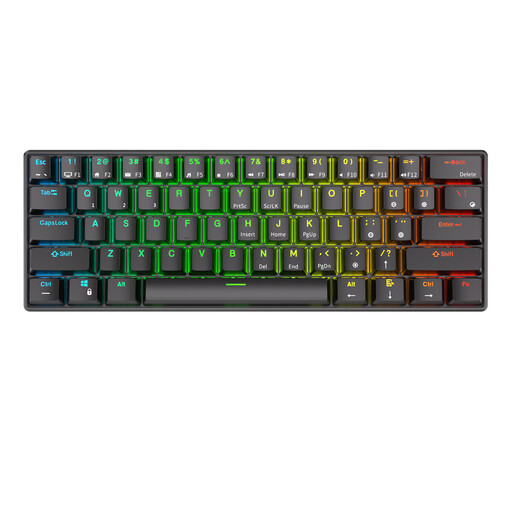
Why It Stands Out The RK61 is a popular compact keyboard known for its excellent value. Its 60% form factor frees up a tremendous amount of desk space, which is ideal for gamers who use low mouse sensitivity. Despite its small size, it offers tri-mode connectivity and is a fully hot-swappable keyboard, providing plenty of customisation options.
Pros
Who Is It For? For gamers who prioritise mouse space, or for anyone looking for a highly portable mechanical keyboard to use with a laptop, tablet, or for a minimalist setup.
These recommendations focus on functionality and customisability. Are you specifically looking for a sleek, minimalist look? Check out our selection of black keyboards for more options to match your desk.
With a hot-swappable keyboard, you can change the mechanical switches without soldering. This allows you to easily try different types of switches (like linear, tactile, or clicky) to find the perfect feel for you. You can also easily replace a faulty switch without having to buy a whole new keyboard.
"Better" is subjective, but a gasket mount offers a noticeably different typing feel. The 'gasket' between the PCB and the case dampens vibrations, resulting in a softer, more flexible, and often quieter keystroke. Many enthusiasts prefer this for long-term typing comfort.
Absolutely. Many models, like the ones mentioned above, are designed for versatility. A wireless mechanical keyboard with multi-device connectivity is ideal for work, while features like hot-swap and RGB lighting are popular with gamers. The key is to choose the right layout and switch type for your specific mix of tasks.
