
Vandaag of morgen in huis

Kwaliteit gegarandeerd

Welkomstaanbiedingen ontgrendelen: GRATIS bezorging | Tot 80% korting | Gratis 30 dagen JoyPlus-proefperiode
Download de app
Are you looking for a keyboard that offers more precision for gaming or more comfortable typing during long work sessions? Then a mechanical keyboard is worth considering. Unlike standard membrane keyboards, each key has its own mechanical switch. This provides better feedback, greater durability, and a more pleasant typing experience.
However, the market is vast, and the specifications can be overwhelming. This guide is designed to help you. As a Joybuy Product Recommendation Officer, I have compared the specifications of various models to provide you with practical information, so you can make a choice that suits your needs.
Before we look at the products, here are a few key points to consider. These will help you better understand the technical specifications.
The switch determines how a keystroke feels and sounds. There are three main types:
The choice between a wired or a wireless mechanical keyboard depends on your priorities.
Modern mechanical keyboards come with various features. Look out for the following terms:
Based on specifications, functionality, and intended use, we have lined up some interesting options for you.
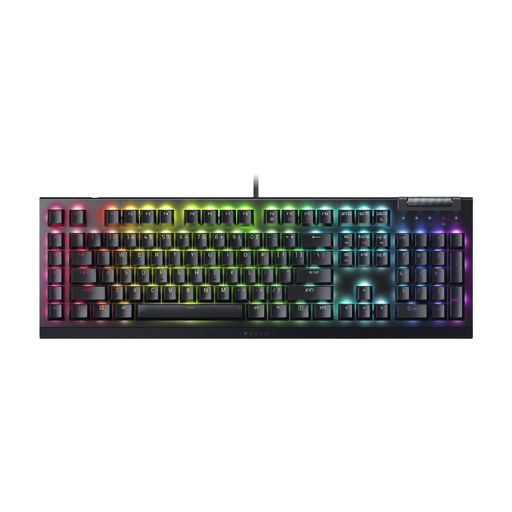
Why It Stands Out: This gaming keyboard is designed for speed and control. The Razer Yellow switches are linear and silent, with a very short 1.2 mm actuation point. According to Razer, this ensures a fast and smooth response, ideal for competitive games. The addition of 6 dedicated macro keys and a multi-function roller gives you direct access to complex commands and media controls.
Pros:
Who Is It For? This keyboard is a strong contender for serious gamers and streamers looking for a wired keyboard with fast performance, extensive customisation options, and a striking RGB keyboard.
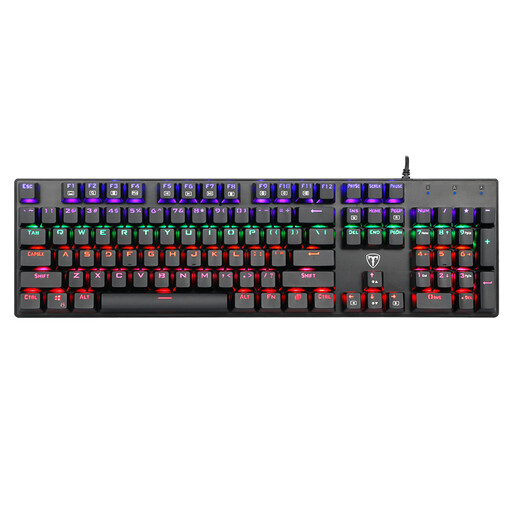
Why It Stands Out: This model offers the classic, satisfying 'click' of Blue switches. It is a full-size QWERTY keyboard with 104 keys, including a numeric keypad. The manufacturer, Eastern Times Technology, highlights its durability with a lifespan of up to 50 million keystrokes and a spill-resistant design thanks to four drainage holes.
Pros:
Who Is It For? Ideal for typists, programmers, and gamers who love the tactile and audible experience of Blue switches. It's a solid and functional entry-level model into the world of mechanical keyboards.
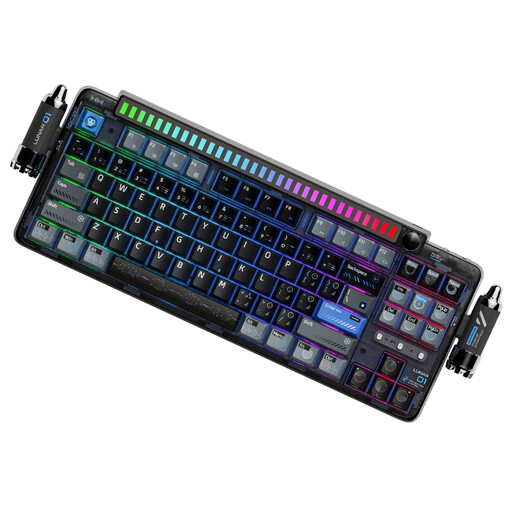
Why It Stands Out: The KEYSME Lunar 01 is aimed at the enthusiast seeking flexibility and a premium typing feel. It is a wireless mechanical keyboard with tri-mode connectivity (Bluetooth, 2.4GHz, wired) and a hot-swappable keyboard design. Its 'gasket-mount' structure, combined with multiple layers of dampening foam, provides a soft and deep typing sound, according to the manufacturer.
Pros:
Who Is It For? This keyboard is aimed at keyboard enthusiasts, creative professionals, and users who want a versatile, customisable, and premium wireless mechanical keyboard for both work and leisure.
This selection is a starting point to give you an idea of the possibilities. Everyone has different preferences when it comes to switches, size, and features.
Can't find what you're looking for here? No problem. Check out our wider selection in the mechanical keyboard layout category for more choices.
1. What is the main difference compared to a regular keyboard? The biggest difference lies beneath the keys. A mechanical keyboard uses individual mechanical switches, whereas a standard (membrane) keyboard uses a rubber layer that pushes the keys back up. Mechanical switches offer more precision, a better typing experience, and last significantly longer.
2. How long does a mechanical keyboard last? Mechanical switches are designed for durability. Most switches are rated for 50 to 100 million keystrokes per key. In comparison, membrane keyboards often have a lifespan of 5 to 10 million keystrokes. A mechanical keyboard is therefore a long-term investment.
3. Is a hot-swappable keyboard useful? Yes, if you enjoy customisation or want to be able to repair your keyboard. With a hot-swappable keyboard, you can try out different switches (for example, changing from linear to tactile) without buying a whole new keyboard. If a switch becomes faulty, you can easily replace it yourself.
