
Vandaag of morgen in huis

Kwaliteit gegarandeerd

Welkomstaanbiedingen ontgrendelen: GRATIS bezorging | Tot 80% korting | Gratis 30 dagen JoyPlus-proefperiode
Download de app
A mechanical keyboard can be a clear upgrade for gaming, programming and everyday typing. However, not every compact model is genuinely mechanical, and a term such as “gaming” says little about the components you use every day.
The biggest buying mistakes usually result from three misunderstandings:
Checking the layout, connection and upgrade options in advance helps prevent an attractive keyboard from becoming awkward to use later.
A 75% keyboard is a practical middle ground between a full-size keyboard and a very compact model. You generally retain the arrow keys and some navigation keys, while the number pad is removed. This leaves more room for your mouse and fits better on smaller desks.
A compact 60% mechanical keyboard is even smaller, but requires you to use Fn combinations more often. Programmers and users who frequently use Home, End, Insert or the function keys may therefore be better off choosing a 75% or TKL model.
Also pay attention to the layout. A US QWERTY keyboard has an ANSI layout and may differ from the Dutch ISO layout. Check the shape of the Enter key, the position of special characters and the labels on the keycaps. You can change the language setting in Windows or macOS, but this does not alter the physical keys.
Mechanical switches determine factors such as the keystroke, sound and pressure required. Linear switches move without a noticeable click and are often chosen for gaming and smooth typing. Clicky switches produce a distinct clicking sound; this can be satisfying, but may be less suitable for a shared workspace.
With a hot-swappable keyboard, you can replace switches without soldering. Check whether the board supports 3-pin, 5-pin or both. The AJAZZ AK820 states that it supports 3- and 5-pin switches. This makes future customisation easier, but you still need to work carefully: disconnect the USB cable and do not use excessive force.
A stated lifespan, such as 50 million keystrokes, is a manufacturer’s product specification. It is not a guarantee that every component will last that long under all conditions.
A gasket mount keyboard uses flexible support around the plate or PCB. According to AJAZZ’s product description, the AK820 features a gasket construction and multiple layers of foam. This can contribute to a softer typing feel and less resonance, but the final experience also depends on the switches, stabilisers and surface beneath the keyboard.
PBT keycaps are generally more resistant to developing a glossy finish through prolonged use than ABS keycaps. That does not mean they are indestructible. Also consider the profile, such as OEM, and how easy the legends are to read.
For gaming and a permanent home-working setup, a wired keyboard is often straightforward: there is no battery to charge and the connection runs via USB. Check whether the cable is detachable and whether your computer has a suitable USB port. If you use a Mac and PC, it is worth checking compatibility and any function-key combinations.

Why it suits this profile: This model combines a 75% layout with a wired Type-C connection, linear switches and a volume knob. You get plenty of functionality without having to move straight to a larger keyboard.
The product specifications mention mechanical switches, hot-swap support and a 75% layout. Even so, check the exact version and layout when it arrives.
75% format, PBT keycaps, RGB lighting, gasket construction and support for 3- and 5-pin switches.
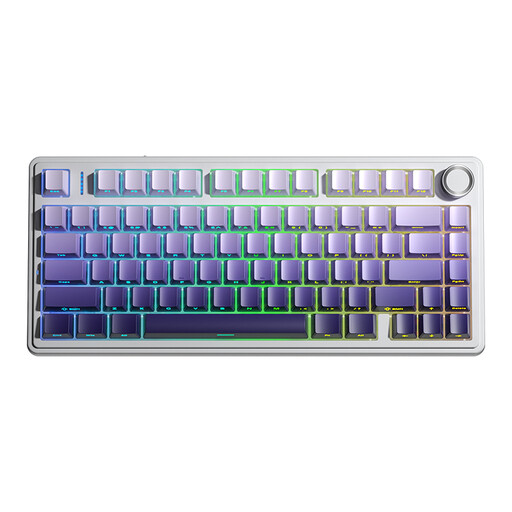
Why it suits this profile: The F75 PRO is designed for users who want to combine a 75% layout with multiple connection options and customisable components.
The hot-swap design means you do not need a new keyboard just to change the feel of the keystroke. The product information states support for 3- and 5-pin switches.
Wired, Bluetooth and 2.4GHz wireless; 75% format; RGB; PBT keycaps and a multifunctional knob.
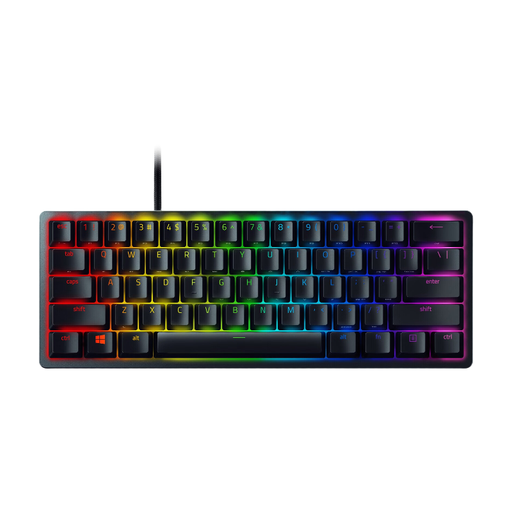
Why it suits this profile: This 60% model is intended for gamers and users with a small desk who mainly want a compact design and RGB settings.
The product information explicitly states a 60% layout with 61 keys. This tells you in advance that the arrow and function keys are accessed through combinations.
Optical switches, wired USB connection, per-key RGB, detachable USB-C cable and PBT keycaps according to the product specifications.
We have put together a complete, up-to-date list of products that fully meet these strict selection criteria and the applicable European safety regulations.
This depends on the connection and software. A wired keyboard with USB will usually work with systems that support USB input. You should also check whether the manufacturer lists Windows and macOS. According to the product information, the AJAZZ AK820 is compatible with Windows and Mac. Function keys and layouts may respond differently depending on the system.
Its lifespan is mainly affected by switch quality, usage, dust, moisture and the way keycaps or switches are replaced. Manufacturers sometimes provide a figure in millions of keystrokes. Treat this as a technical specification under certain conditions, not as a fixed service life. A hot-swappable model can be easier to maintain if individual switches start causing problems.
With a wired keyboard, power comes through the USB port. RGB lighting uses more power than having the lighting switched off, but you do not need to charge a separate battery. If you want to save energy or reduce distractions, you can usually dim or switch off the lighting. Check the Fn combinations or the accompanying software to do this.
