
Vandaag of morgen in huis

Kwaliteit gegarandeerd

Welkomstaanbiedingen ontgrendelen: GRATIS bezorging | Tot 80% korting | Gratis 30 dagen JoyPlus-proefperiode
Download de app
A mechanical keyboard can be comfortable for gaming, programming, working from home or everyday typing. However, RGB lighting or a long product name says little about whether it is right for your desk. A compact keyboard can save space, for example, but it may also lack important keys. And while a wireless mechanical keyboard is convenient, you need to consider battery life, connectivity and compatibility.
As a Joybuy Product Recommendation Officer, I therefore focus mainly on verifiable specifications: layout, connectivity options, switches, size and compatibility. That way, you can avoid paying for features you will hardly use.
Not every gaming keyboard with a mechanical appearance has mechanical switches. The MageGee TS91, for example, is described as a membrane keyboard with a mechanical feel. That may be suitable on a limited budget, but technically it is different from a mechanical keyboard with replaceable switches.
So check that the product information clearly refers to mechanical switches, specifies the switch type and, where relevant, confirms hot-swappable support.
A 60% keyboard generally has no separate function row, arrow keys or navigation block. These functions are often accessed using the Fn key. This saves space, but may be less practical for spreadsheets, programming or extensive text editing.
A 75% keyboard usually retains the arrow keys and function row in a more compact design. An 80% model, such as a tenkeyless keyboard, omits the numeric keypad but generally offers more traditional keys.
Battery life, noise level, response speed and comfort depend on usage, lighting, software and surroundings. A manufacturer’s wording is not a universal guarantee. A brand may claim a certain battery life based on its own testing, but always check the conditions under which that figure applies.
Terms such as “ergonomic”, “quiet” and “waterproof” also deserve careful attention. A product description may only mention a splash-resistant circuit board, for example. That does not mean the entire keyboard is waterproof.
A QWERTY keyboard is common among international models and works with many American and English-language keyboard settings. Dutch users should pay extra attention to the position of punctuation marks, the Enter key and support for dead keys and accents.
A German QWERTZ model may look like a good-value option, but it differs from the layout many Dutch users are accustomed to. So check both the photo and the stated keyboard language. If you are looking for a keyboard for Mac, you should also check the Command, Option and function keys. The Apple Magic Keyboard with Touch ID is specifically designed for Mac models with Apple Silicon and macOS 11.4 or later. Touch ID does not automatically work on every PC.
Use this layout as a practical guide:
Do not focus solely on the percentage. The number of keys, dimensions and position of special keys can vary between models.
A wired mechanical keyboard does not need a battery and provides a consistent connection. This suits a fixed PC setup or competitive gaming. A Bluetooth keyboard is convenient for laptops, tablets and phones, but check how many devices you can pair and how you switch between devices.
A wireless keyboard with a 2.4G receiver, Bluetooth and USB offers greater flexibility. Check whether the receiver is included, whether the USB cable is detachable and whether the stated battery life is measured with the lighting on or off.
Linear switches generally feel smooth and consistent, while tactile switches provide a noticeable bump as you press them. Clicky switches are usually louder. The right choice depends on your preference and working environment; a loud switch may be less suitable in a shared office.
A hot-swappable keyboard allows you to replace compatible switches without soldering. Check whether the board supports 3-pin, 5-pin or both types. RGB lighting is primarily an adjustable visual feature. It can improve visibility in a dark room, but affects power consumption on wireless models.
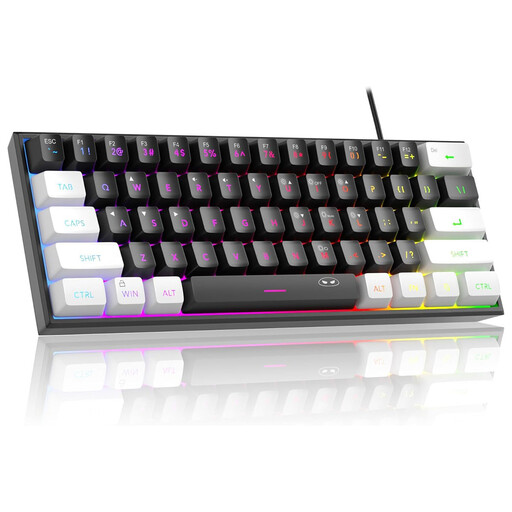
Why it suits this profile: This compact model is designed for users with limited desk space who prefer a wired connection. However, note that the product information describes a membrane design with a mechanical feel, rather than a fully mechanical switch system.
The description makes the membrane design and 60% size clear, so you do not judge the product solely by the term “mechanical feeling”.
61 keys, RGB lighting and USB connectivity; according to the product information, suitable for PCs, Macs and various consoles.
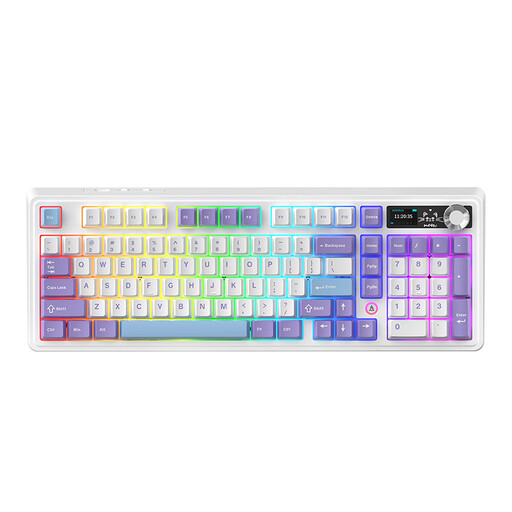
Why it suits this profile: The 98% layout provides plenty of keys in a relatively efficient case. This is practical for work and gaming when you do not want to go without a numpad and volume control.
The three connection modes reduce your reliance on a single connection. However, check the actual battery life with RGB lighting switched on.
97 keys, hot-swappable PCB, volume knob, RGB and USB/Bluetooth/2.4G connectivity.
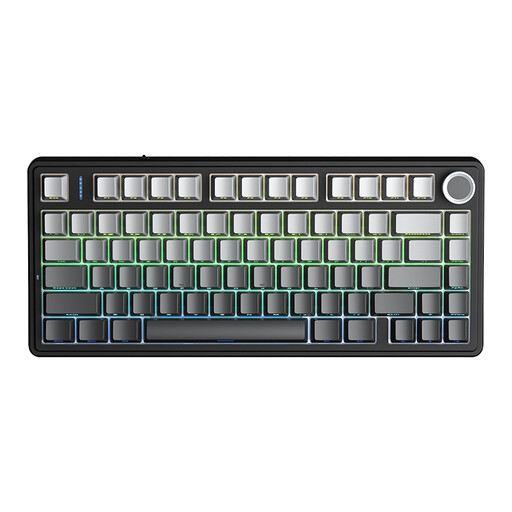
Why it suits this profile: Programmers, gamers and home workers get a compact layout with arrow keys, RGB and multiple connection options.
The product information explicitly states hot-swappable support, a 75% layout, and Bluetooth, 2.4G and wired modes.
81 keys, 4000mAh battery, three connection modes, RGB and support for 3- and 5-pin switches.
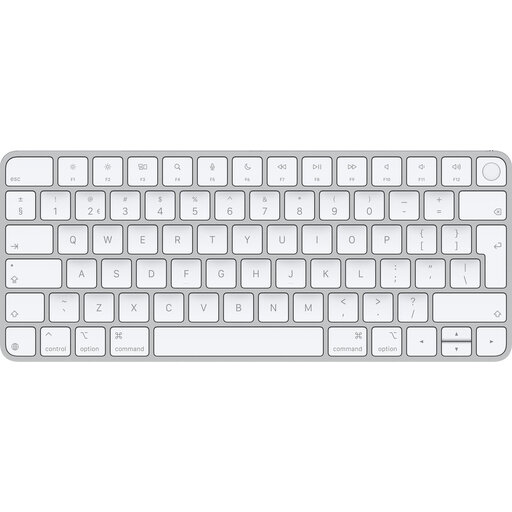
Why it suits this profile: For anyone looking for a slim, lightweight wireless keyboard for Mac who does not need mechanical switches.
Compatibility is clearly limited to Mac models with Apple Silicon and macOS 11.4 or later. Checking this in advance is therefore essential.
Bluetooth, USB-C charging, QWERTY layout, tenkeyless design and a battery life of around one month stated by Apple.
We have put together a complete, up-to-date list of products that fully meet these strict selection criteria and the applicable European safety requirements.
Yes, but choose the switch type carefully. Linear or quiet tactile switches may be more comfortable in a shared space than clicky switches. Also check the layout, wrist position and whether you can switch off the lighting.
Its lifespan depends on the switches, keycaps, electronics and how it is used. A hot-swappable keyboard may remain usable for longer because you can replace compatible switches. Claims such as “50 million keystrokes” are manufacturer specifications and not a guarantee of the lifespan of the entire keyboard.
Power costs are generally limited. However, you should take charging into account, as well as the possibility of replacing the internal battery in the longer term. If you use RGB lighting heavily, the battery may run down more quickly. For a fixed workstation, a wired model may therefore be simpler.
