
Catalogue editor with long typing sessions
Wants to alternate between sitting and standing, so pays attention to the keyboard’s height, width and position. Arboportaal highlights the importance of varying your posture.


Start by choosing a layout with the keys you need for writing and formatting, then check that your arms and wrists stay relaxed when you’re sitting and standing. A compact, low-profile keyboard leaves more room on your desk. A split model lets you position the two halves separately, while a larger model may be useful if you enter figures often. Check the layout and switch type for each version: the model name alone won’t tell you exactly which keys it has or how it sounds when you type.
Wants to alternate between sitting and standing, so pays attention to the keyboard’s height, width and position. Arboportaal highlights the importance of varying your posture.
Switches between text, navigation keys and mouse, and wants a layout that retains the necessary keys without taking up too much desk space. Models from brands such as Keychron, Logitech and Ducky vary in size and layout.
Wants to assess the feel and sound of the chosen switch before using the keyboard around other people. Logitech and Ducky offer different switch options, but a switch’s name doesn’t measure the sound of the complete keyboard.
Choose this if: you mainly type text, want to keep the navigation keys and need space beside the keyboard.
Bear in mind: check the exact layout and whether the height suits your posture. Compact doesn’t automatically mean it has all the keys you want.
Choose this if: you want to position the two keyboard halves separately to suit your arm and wrist position at your workstation.
Bear in mind: you may need time to get used to the position and layout; check that both halves fit on your desk.
Choose this if: you often enter figures while creating your catalogue and an integrated number pad is important to you.
Bear in mind: a larger keyboard takes up more space beside your mouse; compare the specific version and layout.
| What to consider | What should you check? | Who should pay particular attention? |
|---|---|---|
| Working posture | Assess the height, available space and your posture both sitting and standing. A low-profile or split design doesn’t guarantee you’ll work without discomfort. | If I alternate between sitting and standing, I want to be able to position the keyboard comfortably in both modes. Around 28% of consumers prioritise working posture. |
| Layout and keys | Check the physical keys, the ISO or ANSI layout and the characters you need for writing and formatting. | I want to know exactly which keys the version has for my shortcuts, navigation and number entry. Around 22% of consumers prioritise having the layout they need. |
| Typing sound and feel | Check the switch type and, if possible, assess the complete keyboard in the space where you work. | When I work around other people, I want to assess the sound and feel before choosing a version. Around 22% of consumers prioritise typing sound and switch feel. |
| Connectivity and controls | Check the connection options and whether any programming features work with your devices. | If I switch between devices or workspaces, I want to know which connections and settings are available. Around 17% of consumers prioritise connectivity and controls. |
| Customisation | Check whether the exact version is hot-swappable and compatible with the switches you want. | I may want to adjust the typing feel later without having to choose a different keyboard. Around 11% of consumers prioritise customisation. |
The same product range may include versions with different sizes, layouts and switches. Choosing the wrong version could mean missing keys or characters you need for catalogue work.
Compare the version you’re planning to buy with the keys and characters you use in your catalogue software.
Hot-swap doesn’t mean that every switch fits every version. Keychron, for example, states that only the RGB Hot-Swappable version of the K3 Max is suitable for interchangeable low-profile switches.
Before buying switches, check the exact keyboard model, version and compatible switch type.
A keyboard’s specifications don’t show how it sits on your desk or how your posture will be when using it. A split design, on its own, isn’t a proven solution for individual discomfort.
Check the position in both sitting and standing modes, and change your posture regularly. Arboportaal recommends varying your posture.
An additional manufacturer’s warranty doesn’t automatically replace your statutory rights. According to the Dutch government, if a product is faulty, the retailer is your point of contact.
Before buying, check what an additional warranty covers and what solution the retailer offers if the product doesn’t meet reasonable expectations.
Keychron offers, among other models, the low-profile K3 Max ISO and the Q11 ISO split keyboard, which can be positioned in separate halves.
Logitech describes the MX Mechanical Mini as a compact mechanical model; the MX Mechanical is the larger version.
The One 3 RGB is a wired product range available in different sizes, including a 100% version.
According to CHERRY, the MX BOARD 3.0S is a wired mechanical keyboard available in versions with different switches and lighting.
Kinesis describes the Freestyle Edge RGB+ as a split mechanical keyboard whose halves can be positioned separately.
This selection includes wired mechanical keyboards in different sizes. Focus on comparing the keys and layout you need with the demands of your catalogue work.
 No image available
This wired 94-key version may suit you if you’re looking for a more compact layout and want a wrist rest.
The product information lists a detachable wrist rest, pre-lubed switches and hot-swap functionality. Check the exact layout and the compatibility of replacement switches.
 No image available
The wired 60% layout may suit you if you want to save desk space and are comfortable with the listed US layout.
The product title lists Hall Effect magnetic switches and a US layout. Check that the physical layout and characters suit your writing and formatting tasks.
 No image available
This wired 82-key model may suit you if you want a compact layout and are considering interchangeable switches.
The product information lists hot-swappable switches. Before replacing them, check which switches are compatible with this version.
 No image available
The wired 75% layout may suit you if you’re looking for a compact size and the US QWERTY layout works for you.
The product title lists magnetic switches. Check that the physical layout and characters are suitable for your catalogue work.
 No image available
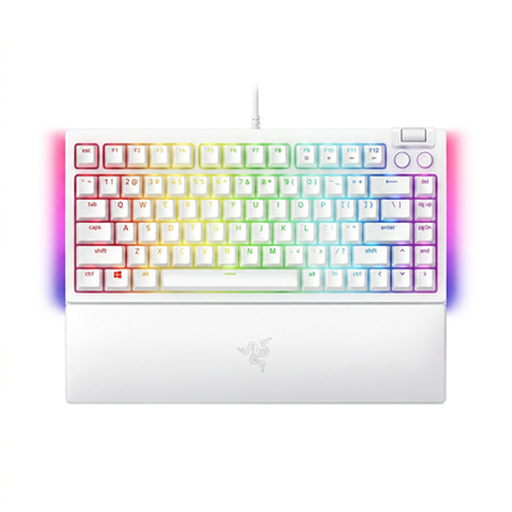
This wired 75% version may suit you if you’re looking for a compact layout and the US QWERTY layout works for your tasks.
The product title lists hot-swappable mechanical switches. Check the physical layout and compatibility before choosing replacement switches.
No. Alternate your posture and set up your workspace so that you can work comfortably. Arboportaal highlights varying your posture; working while standing doesn’t mean you have to stay in one position for a long time.
No, the switch must be compatible with the specific version. Keychron states that, for the K3 Max, only the RGB Hot-Swappable version can take compatible low-profile switches. Check the exact model before buying parts.
According to the Dutch government, a 14-day cancellation period applies in many cases to distance purchases. You also have statutory rights under consumer law if a product doesn’t meet reasonable expectations; the retailer is your point of contact. The Dutch government states that there is no fixed statutory warranty period of two years. Check the terms of the specific purchase.
For employees who work with a screen for more than two hours a day, Arboportaal lists requirements concerning a keyboard or screen that can be used separately from the screen, as well as workplace setup. Whether these requirements apply to you depends on your situation; they aren’t general product specifications for every keyboard.
For radio equipment, the European Commission describes the European regulatory framework under the Radio Equipment Directive. This framework doesn’t confirm that a specific version complies with it. Check the product information for the exact model and version.