
Vandaag of morgen in huis

Kwaliteit gegarandeerd

Welkomstaanbiedingen ontgrendelen: GRATIS bezorging | Tot 80% korting | Gratis 30 dagen JoyPlus-proefperiode
Download de app
A mechanical keyboard can be ideal for gaming, typing and everyday computer use, but not every model with RGB lighting or a gaming label will suit your needs. For example, a compact model can save desk space, while missing arrow keys or a number pad may become frustrating later on.
When buying, pay particular attention to these three common pitfalls:
The size determines how much desk space you have left and which keys are available.
A compact keyboard or 75% keyboard is suitable if you want more room for your mouse. This can be practical for FPS players, while students and professionals who enter lots of figures may benefit more from a full-size model.
Also check the language layout. A US layout is not automatically the same as a Dutch keyboard layout. Look at the photos and product specifications before ordering, especially if you frequently use special characters.
Mechanical switches determine the key feel, sound and amount of pressure required. Linear switches generally feel smooth and consistent, while clicky switches can produce a clearly audible click. The choice is personal, but your surroundings matter too: a loud keyboard can be distracting in a shared workspace.
A hot-swappable keyboard allows you to replace compatible switches without soldering. Check whether the PCB is compatible with 3- or 5-pin switches, and whether the included keycaps and switches can actually be swapped.
Also look out for terms such as gasket mount and sound dampening. These features can make the keystroke feel softer and reduce hollow resonance, but the final sound also depends on the switch, keycaps, surface and typing style.
A wired keyboard connected via USB-C is straightforward and does not need a battery. A wireless keyboard offers greater flexibility for a tidy desk, but check the following:
RGB lighting is primarily a visual feature. Check whether brightness, effects and colour settings can be adjusted using key combinations or software. A keyboard with a volume knob can be more practical for gaming and working from home than repeatedly using media keys or system settings.
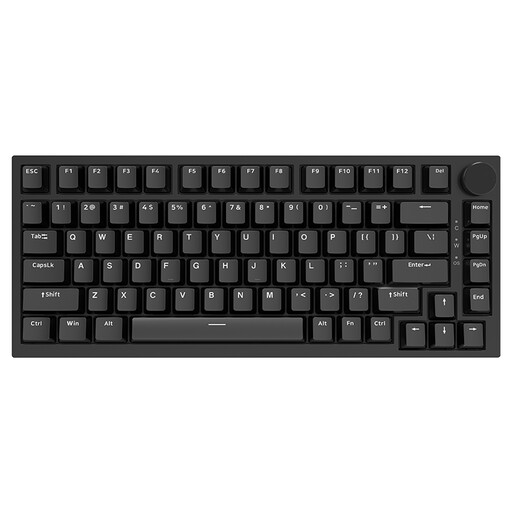
Why it suits this profile: The 75% layout provides arrow and function keys in a compact format. The wired USB-C connection keeps setup simple for PC and Mac users.
The product information clearly states the US layout, 75% size and hot-swappable switches. This means you can check the layout and customisation options before buying.
Gasket construction, PBT keycaps, a volume knob and a choice of RGB or white lighting, depending on the version.
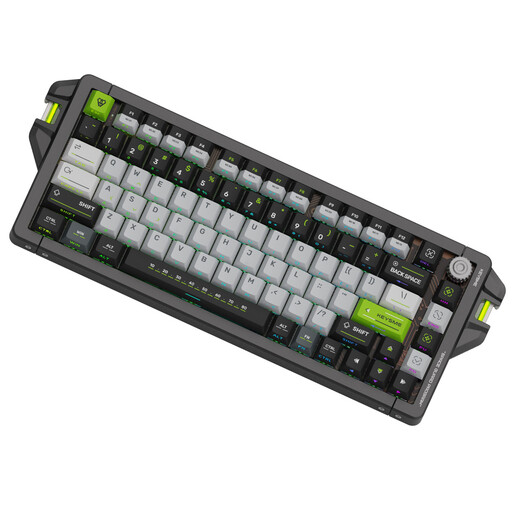
Why it suits this profile: According to the product information, this wired model is aimed at players looking for adjustable actuation and rapid input features, particularly for competitive FPS games.
The specifications list a 75% layout, US QWERTY, hot-swappable keycaps and switches, plus an adjustable trigger setting of 0.1–4.0 mm. Check beforehand that your game and software support these features.
CNC aluminium case, PBT dye-sub keycaps, Rapid Trigger, SOCD support and a stated polling rate of 8,000 Hz when used wired.
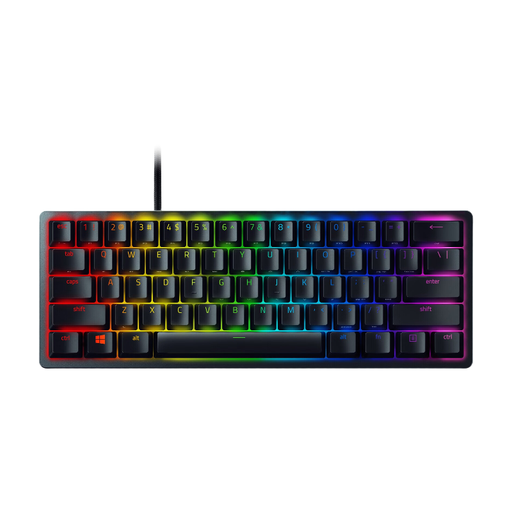
Why it suits this profile: The 60% form factor is designed for gamers and users with limited desk space. The keyboard connects via USB-C and features optical switches and individually customisable RGB lighting.
The product page specifies the 60% size, 61 keys, US layout and USB-C connection. This tells you which keys are missing before you order.
Aluminium case, PBT keycaps, built-in memory for up to five profiles and N-key rollover according to the product specifications.
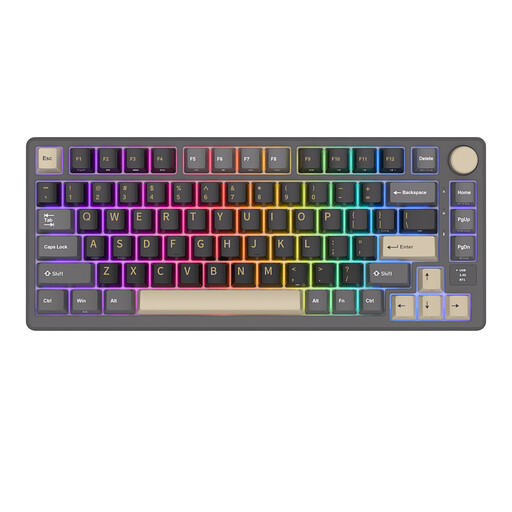
Why it suits this profile: The 75% layout combines a compact size with practical navigation keys. Bluetooth, 2.4GHz and USB-C provide different connection options for working from home and gaming.
The listed tri-mode connection means you are not limited to a single connection method. However, check the current included accessories and compatibility.
Hot-swappable cream switches, RGB lighting, a metal volume knob and a display showing battery and connection information, among other details, according to the product description.
We have put together a complete, up-to-date list of products that fully meet these strict selection criteria and the applicable European safety regulations.
Yes, but pay attention to the noise level and layout. Linear or dampened switches are often less noticeable than clicky switches. A 100% model is practical for entering lots of figures, while anyone who mainly writes can save space with a 75% keyboard.
Its lifespan depends on the switch type, construction, usage and maintenance. Manufacturers sometimes state a rated number of keystrokes. This is a product specification measured under certain conditions, not a guarantee that every individual keyboard will last exactly that long. Keep the keyboard free from dust, do not pull on the cable and disconnect it before cleaning.
That depends on how you use it. Wired is suitable if you do not want to charge a battery and prefer a fixed connection. A wireless mechanical keyboard is more convenient for multiple devices and a tidy desk. Some users choose wired for competitive gaming, while tri-mode models also provide flexibility for work and leisure.
