
Vandaag of morgen in huis

Kwaliteit gegarandeerd

Welkomstaanbiedingen ontgrendelen: GRATIS bezorging | Tot 80% korting | Gratis 30 dagen JoyPlus-proefperiode
Download de app
A mechanical keyboard can be a practical upgrade for gaming, programming or long working days. However, you sometimes end up paying mainly for RGB lighting, an eye-catching case or marketing terms that say little about everyday use. The right choice depends primarily on the layout, switch type, connection method and whether components can be replaced.
A 75% keyboard saves space, but usually does not have a number pad and may not include separate media keys. Navigation keys may also be positioned differently from what you are used to. So do not just check the percentage: also look at the number of keys, the position of the arrow keys and the available function layer.
A compact keyboard is particularly useful when you want more space beside your mouse or regularly travel with your keyboard. If you work with numbers frequently, a 96% or full-size model may be more practical.
Gasket mount, foam layers and factory-lubricated switches can affect the typing feel and sound. However, they do not automatically make a keyboard quiet. The noise level also depends on the switch, keycaps, desk and the way you type.
Look for verifiable details such as:
According to product information from various brands, these components are designed to influence the feel, stability or acoustics. That does not guarantee the same experience in every room.
A wireless mechanical keyboard often works via Bluetooth or 2.4 GHz. Check whether a receiver is included, how many devices you can pair and how the keyboard is charged via USB-C. A wired mechanical keyboard does not need a battery and offers a straightforward connection, but limits your flexibility at your desk.
Some users prefer a cable for competitive gaming. For working from home with multiple devices, tri-mode connectivity, such as Bluetooth, 2.4 GHz and USB-C, can be more convenient.
Many compact models in this range use a US QWERTY keyboard. The ANSI layout differs from a Dutch ISO layout in several respects. Consider the shape of the Enter key, the position of symbols and the absence of a separate key for certain Dutch characters.
Check the following in advance:
Linear switches move smoothly without a tactile click. They are often suitable for gaming and fast typing, but the sound depends on the specific variant and the keycaps used. Tactile switches provide a noticeable bump. Clicky switches also produce a distinct clicking sound and are less suitable for shared workspaces.
A hot-swappable keyboard allows you to change compatible switches without soldering. Check whether the PCB supports 3-pin and/or 5-pin switches. When replacing switches, always use the correct switch puller and disconnect the cable.
PBT keycaps generally have a matt finish and, according to manufacturers’ product descriptions, are less prone to developing a shiny appearance than ABS keycaps. Their precise lifespan depends on use and maintenance. Also consider the profile, such as OEM, Cherry or MDA, because the height and shape affect the typing feel.
An RGB keyboard offers illuminated keys and lighting effects. This is useful in low ambient light, but RGB increases power consumption on wireless models. A keyboard with a volume knob is practical for music, video calls and games, as you can adjust the volume directly.

Why it suits this profile: The 75% layout combines compact dimensions with function keys and arrow keys. The wired USB-C connection keeps set-up simple for PC, Windows and Mac use.
The product information lists a hot-swap PCB for 3-pin and 5-pin switches, so you are not tied to a single switch type from the outset. The layout and dimensions are also specified.
82 keys, PBT keycaps, gasket mount and a CNC volume knob according to the product specifications.
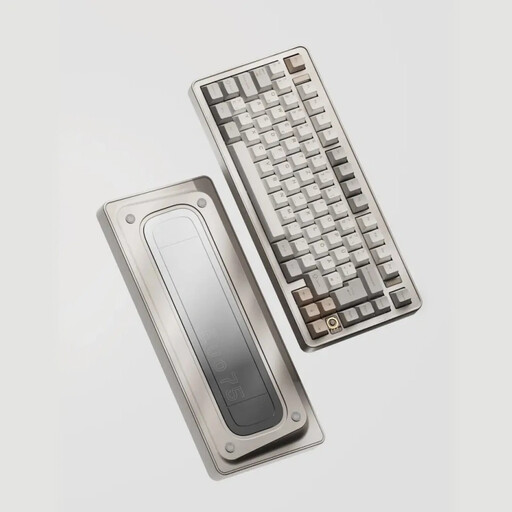
Why it suits this profile: This model is aimed at users who want to combine wireless freedom and customisation with an aluminium case and a 75% layout.
The three connection options are clearly specified: 2.4 GHz, Bluetooth and USB-C. Hot-swap support for 3-pin and 5-pin switches is also listed.
8000mAh battery according to the specifications, VIA compatibility and a leaf spring mount.
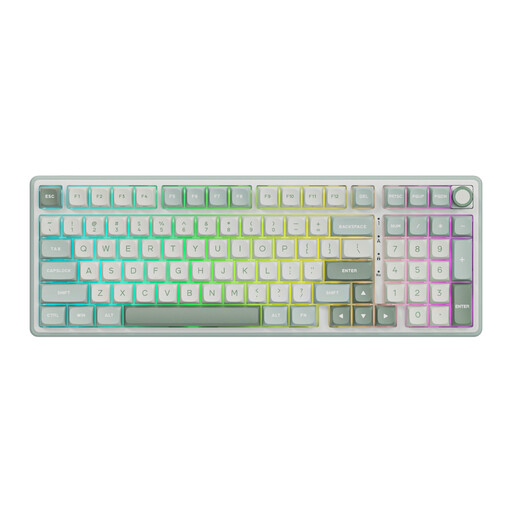
Why it suits this profile: The 98% layout provides a number pad alongside the compact main layout. This suits office work, spreadsheets and gaming where you want to retain a volume knob and RGB lighting.
The product specification lists hot-swappable switches, PBT keycaps and a programmable online driver. Before buying, check that the US layout and software support meet your requirements.
Gasket mount, MDA profile, PBT keycaps, RGB and a number pad according to the product description.
A keyboard may be technically suitable yet awkward to use if your desk does not have enough depth. An ergonomic keyboard holder can position your keyboard and mouse beneath or beside a monitor. For wall, desk or ceiling mounting, always check the 75 × 75 mm VESA pattern, the maximum load and whether the width is suitable.
The Neomounts KEYB-V050 is 50 cm wide and has a maximum load of 10 kg according to the specifications. The KEYB-V100 is 75 cm wide and designed for a keyboard and mouse. Use the supplied mounting materials according to the instructions and regularly check that the mount remains secure. Also browse the full range of keyboard holders.
We have put together a complete, up-to-date list of products that fully meet these strict selection criteria and the applicable European safety regulations.
Yes, but choose the switch type and noise level carefully. Linear or quiet tactile switches are often less noticeable than clicky switches. A volume knob and programmable keys can be useful for video calls and productivity.
Its lifespan depends on the switches, PCB, keycaps, use and maintenance. Some manufacturers state a switch rating, such as 50 million keystrokes. According to the brand’s own information, this is a technical rating and not a guarantee for every usage scenario. Keep the keyboard dry, disconnect it before cleaning and remove dust with suitable materials.
Besides the purchase price, the main cost is your time spent charging it and potentially replacing the battery in the long term. A wired model does not need a battery. For wireless models, therefore, check the battery capacity, charging method and whether a USB-C mode is available before placing your order.
