
Vandaag of morgen in huis

Kwaliteit gegarandeerd

Welkomstaanbiedingen ontgrendelen: GRATIS bezorging | Tot 80% korting | Gratis 30 dagen JoyPlus-proefperiode
Download de app
A mechanical keyboard can be comfortable for gaming, programming, office work and creative tasks. However, making a quick choice is not always wise. Terms such as “gaming”, “RGB” and “wireless” say little on their own about everyday usability. The layout, connection and compatibility often matter more than the appearance.
A 60 per cent keyboard takes up very little space, but usually has no separate arrow keys, function row or navigation block. These functions are often accessed via an Fn layer. That works well for a minimalist gaming or work setup, but can be less practical for spreadsheets, keyboard shortcuts and software development.
A 75 per cent keyboard generally retains the function row and arrow keys. A 96 per cent keyboard usually adds a numeric section, with a more compact layout than a traditional full-size model. So, do not just check the number of keys; check the exact layout as well.
A wireless mechanical keyboard can use Bluetooth, 2.4 GHz or both. Bluetooth is convenient for laptops, tablets and phones. A 2.4GHz receiver may be more practical for a desktop computer or gaming, but requires a free USB port and a supplied receiver.
Also check how many devices you can pair. According to the product information, the RK61 supports three Bluetooth devices and switches between them using Fn+Q/W/E. Also check the battery capacity, charging port and whether the keyboard can be used in wired mode.
An RGB keyboard can improve the visibility or appearance of your desk, but RGB says nothing about the quality of the switches, stabilisers or case. Check which lighting modes can actually be adjusted and whether this is done via software, keyboard shortcuts or built-in memory.
Claims about lighting or sound should be understood as product specifications or brand communications. According to the brands’ and manufacturers’ own product information, some models offer multiple colours, effects or music-synchronised modes. This does not guarantee a particular user experience.
The switch determines the feel and sound of each keystroke:
A “quiet red switch” or “cream switch” is not a universal quality standard. Check the stated switch name, type and actuation force. For example, the Razer Huntsman Mini uses an optical clicky switch with a stated actuation force of 45 grams. The RK61 is supplied with quiet red switches according to the product listing.
With a hot-swappable keyboard, you can replace compatible switches without soldering the switches directly to the circuit board. However, check which type of connection is used and whether your preferred switches are compatible. Hot-swap does not mean that every switch will automatically fit.
This system is useful if you may want to try a softer, quieter or more tactile feel later on. It can also make it possible to replace an individual worn switch.
For users in the Netherlands, the physical layout is important. A keyboard may be offered as a QWERTY keyboard with a US, UK, ANSI or EU layout. Check the position of characters such as @, €, “ and ?. A model with US International may feel different from a Dutch QWERTY layout.
Also check compatibility:
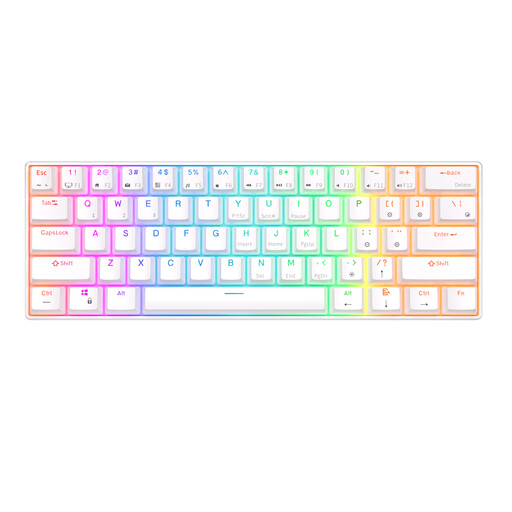
Why it suits this profile: The 61-key layout saves desk space and offers Bluetooth, USB and RGB lighting for everyday use or gaming.
The product information lists three Bluetooth devices, a detachable USB cable and hot-swappable switches. However, check that the compact layout suits your work.
61 keys, RGB with multiple modes, a 1450mAh battery according to the product listing, and compatibility with Windows, Mac, iOS and Android.
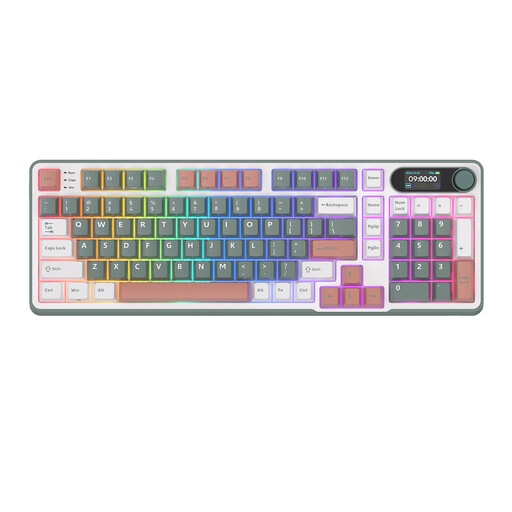
Why it suits this profile: This wireless mechanical keyboard combines a 96% layout with Bluetooth, 2.4G and USB-C for work and leisure.
The wide choice of connections prevents reliance on a single connection method. The 98-key layout reduces the compromise between compactness and functionality.
Volume knob, smart display, RGB lighting and hot-swappable support according to the product information.
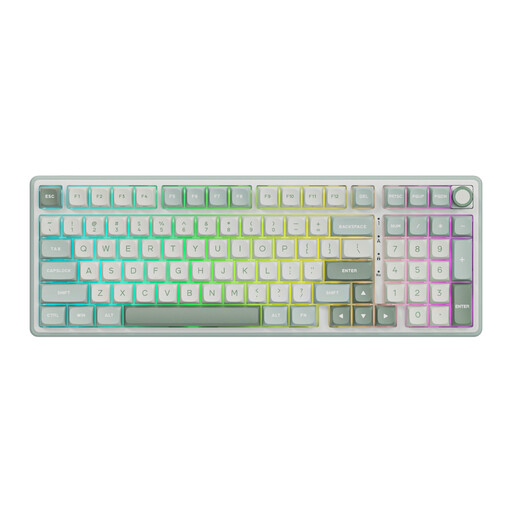
Why it suits this profile: The 98-key layout with numeric section and volume knob is practical for spreadsheets, programming and long desktop sessions.
The layout avoids losing a numeric block, which can be important for data work. The USB connection removes reliance on battery life.
Numeric section, RGB, hot-swap, PBT keycaps and a volume knob according to the product description.
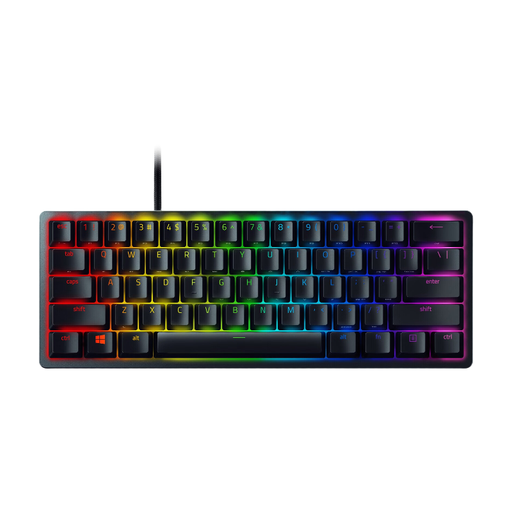
Why it suits this profile: The 60% form factor, optical switches, USB-C cable and N-key rollover are well suited to a compact gaming setup.
The product specifications list anti-ghosting, N-key rollover and built-in memory for up to five profiles. It remains a wired model.
61 keys, individually backlit RGB keys, aluminium case and detachable USB-C cable according to the product information.
We have compiled a complete, up-to-date list of products that fully meet these strict selection criteria and the applicable European safety regulations.
For a Mac keyboard, Command and Option keys, Bluetooth profiles and macOS support are relevant. According to the product information, Apple Magic Keyboard models with Touch ID are intended for Mac models with Apple Silicon and use Bluetooth.
An iPad keyboard may be a standalone Bluetooth model, but it may also be a keyboard case with Smart Connector. Always check the exact iPad model and screen size. The same applies to Surface Pro: models such as the Microsoft Surface Pro Keyboard QWERTY are linked to specific Surface Pro generations. A magnetic connection does not automatically mean that every Surface model will fit.
Its lifespan depends on the switch type, usage, maintenance and construction. Some manufacturers state a specific number of keystrokes; according to the product information, the Razer Huntsman Mini is rated for 100 million keystrokes. This is a technical manufacturer specification, not a guarantee of the lifespan of the entire keyboard.
Yes, but choose the switch and sound level carefully. Linear or quiet switches are generally more practical in a shared space than clicky switches. A 75 or 96 per cent layout may also be more convenient if you frequently use arrow keys, function keys or a numeric block.
Power consumption varies according to the model, battery, connection and use of RGB lighting. RGB at high brightness can reduce battery life. A model with USB-C and a wired mode remains usable when the battery is empty. Therefore, always check the stated battery capacity and charging method before placing your order.
