
Vandaag of morgen in huis

Kwaliteit gegarandeerd

Welkomstaanbiedingen ontgrendelen: GRATIS bezorging | Tot 80% korting | Gratis 30 dagen JoyPlus-proefperiode
Download de app
A mechanical keyboard can be ideal for gaming, programming and long working days, but product pages do not always make comparisons straightforward. Terms such as RGB, gasket mount, tri-mode and hot-swap sound appealing, while important details are sometimes less clearly presented.
The biggest mistakes usually come down to three pitfalls:
The layout determines how much space the keyboard takes up and which keys are immediately available.
Also pay attention to the layout. A QWERTY mechanical keyboard has a different key arrangement from QWERTZ. So check that you are actually buying a US QWERTY or German QWERTZ layout. Dutch key combinations may vary depending on your operating system and selected language.
Mechanical switches register each key press through a separate switching mechanism. Your choice affects the keystroke feel, sound and amount of force required.
A hot-swappable keyboard allows compatible 3- or 5-pin switches to be replaced without soldering. However, check that the supplied PCB and your chosen switches are compatible. Use a suitable switch puller and pull the switch straight upwards. Excessive sideways force can damage the circuit board.
A wired mechanical keyboard connected via USB-C is simple to use and does not require a battery. A wireless mechanical keyboard offers greater flexibility, but pay attention to the available modes:
A tri-mode keyboard usually combines Bluetooth, 2.4GHz and USB. Always check how many devices can be paired at the same time and how you switch between connections.
With an RGB keyboard, colour settings and lighting effects are usually controlled via software or key combinations. RGB does not change the mechanical keystroke feel, however. Also consider the construction. A keyboard with gasket mount uses flexible mounting points between parts of the case. According to the product description, this can make the keystroke feel softer and help reduce vibration, but the final experience also depends on the plate material, foam, switches and keycaps.
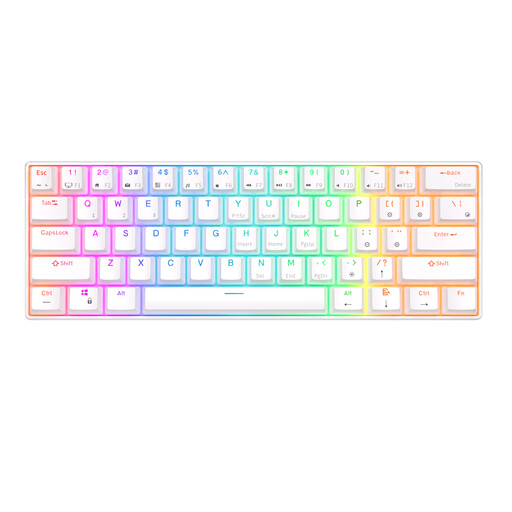
Why it suits this profile: The 61-key layout takes up very little desk space and is suitable for users who mainly game or work with keyboard shortcuts. According to the product description, this model supports Bluetooth and RGB lighting.
The connectivity options and 1450 mAh battery capacity are stated. Bear in mind that the compact layout does not provide a separate function row or arrow keys.
60% layout, RGB lighting, hot-swappable design and connection to up to three Bluetooth devices according to the product information.
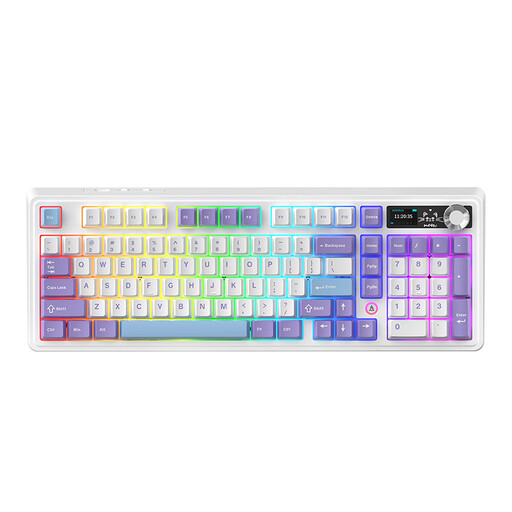
Why it suits this profile: For users looking for a more compact layout with plenty of features. According to the product description, this 97-key model combines tri-mode connectivity, a volume knob, a gasket structure and hot-swap functionality.
The product information lists specific connection options and different battery capacities depending on the version. Check the selected variant before purchase.
97 keys, metal knob, RGB lighting, USB-C, Bluetooth, 2.4GHz and a hot-swappable PCB according to the product description.
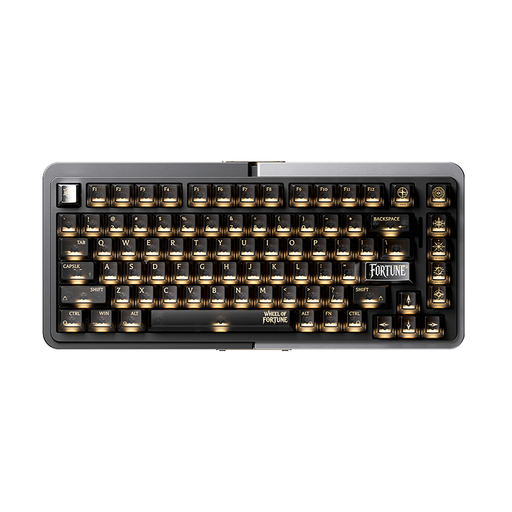
Why it suits this profile: This model is aimed at users looking for a 75% layout and magnetic Hall Effect switches for competitive gaming. The product name mentions Rapid Trigger and a wired connection.
The connection is wired, so you do not need to estimate battery life. However, check beforehand that the specific Hall Effect switches and software suit your intended use.
75% size, aluminium case, TTC magnetic HE switches, hot-swap and Rapid Trigger according to the product listing.

Why it suits this profile: The 80% layout retains important navigation keys while keeping your desk tidy. Tri-mode connectivity is useful when switching between a computer, tablet and wired use.
The product listing explicitly mentions the US QWERTY layout, 4000mAh battery, gasket mount and hot-swap functionality. This allows you to check the key purchase criteria in advance.
80% layout, PBT keycaps, programmable knob, gasket mount and tri-mode wireless and wired connectivity.
We have compiled a complete, up-to-date list of products that fully meet these strict selection criteria and the applicable European safety regulations.
Yes, but choose the switch and layout carefully. Linear or tactile switches can be suitable for typing, while clicky switches may be considered too loud in a shared space. A 75%, 80% or 96% model generally provides more readily accessible keys than a 60% keyboard.
Its lifespan depends on the switches, PCB, keycaps, usage and maintenance. Some product listings, for example, state a lifespan of 50 million keystrokes, but this is a manufacturer’s product specification and not a guarantee for every user. Keep the keyboard dry, remove dust carefully and do not use harsh cleaning products.
Power consumption depends mainly on the connection and lighting. RGB lighting generally uses more energy than a backlight that is switched off. Check the battery capacity in mAh, but remember that the stated usage time depends on brightness, connection mode and usage pattern. A USB-C cable allows you to use the keyboard while charging when the model supports this.
