
Vandaag of morgen in huis

Kwaliteit gegarandeerd

Welkomstaanbiedingen ontgrendelen: GRATIS bezorging | Tot 80% korting | Gratis 30 dagen JoyPlus-proefperiode
Download de app
A mechanical keyboard can be a great choice for gaming, programming and long working days, but the product name doesn’t tell the whole story. Some models use genuine mechanical switches, while others simply imitate the feel of a mechanical keyboard. Terms such as 8K polling, RGB and ergonomic design may sound appealing, but they’re not relevant to everyone.
It’s worth looking out for three common pitfalls:
A mechanical keyboard generally has an individual mechanical switch beneath each key. This differs from a membrane or scissor-switch keyboard, so check the product specifications rather than relying on the title alone.
Some models are described as having a “mechanical feel”, but their specifications say they use a membrane construction. The MageGee TS91 is one example. It could be a good choice if you want a low-profile keyboard with RGB, but it isn’t the same as a fully mechanical keyboard.
The right size depends on your workspace and how you use your keyboard:
Check the language layout too. A QWERTY keyboard with a US International layout is not the same as a Belgian AZERTY keyboard. If you touch-type, you may find shortcuts and punctuation in different places.
A wired model that connects via USB is easy to set up and doesn’t need charging. A wireless keyboard gives you more flexibility on a small desk, but you’ll need to consider the batteries, charging time and connection type.
Look out for the differences between:
A high polling rate can matter for competitive gaming. The AJAZZ AK820 V2, for example, lists an 8,000 Hz polling rate and adjustable actuation. According to the product description, these settings are mainly intended for fast in-game inputs. For typing, a stable connection is usually more important than the highest possible figure.
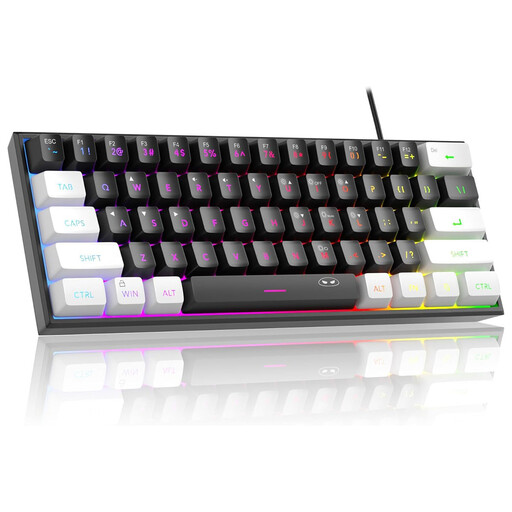
Why it suits this user: This compact wired model takes up little desk space and combines RGB lighting with a US QWERTY layout. The product information lists a membrane system with a mechanical feel.
The specifications make it clear that this isn’t a fully mechanical keyboard. You know what you’re buying upfront and won’t pay for a vague claim about its switches.
60% layout, 61 keys, RGB lighting, wired connection and a circuit board rated IPX4 according to the product information.
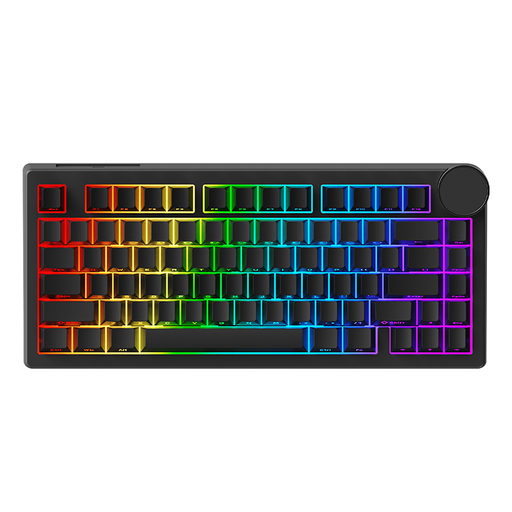
Why it suits this user: This 75% model is designed for users who want adjustable actuation, fast input and a metal rotary knob in a compact desk-friendly format.
The product description specifies a 75% layout, wired USB-C connection and magnetic Bingyu switches. Be sure to check compatibility before buying replacement switches.
81 keys, adjustable actuation according to the product information, RGB with 20 modes, 8KHz polling and a programmable rotary knob.
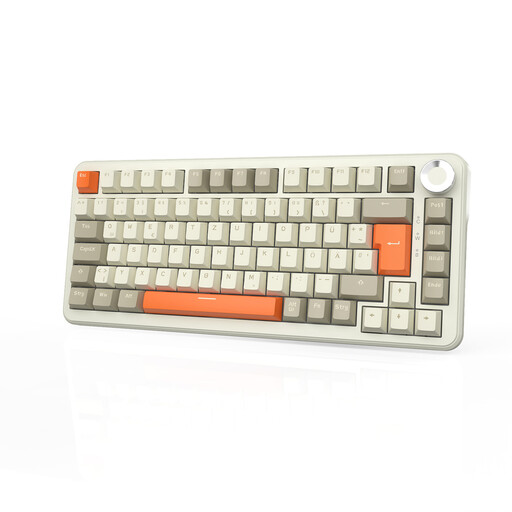
Why it suits this user: This model is designed for users who need a wireless connection, RGB, a rotary knob and customisable switches for gaming and productivity.
Tri-mode connectivity means you’re not limited to Bluetooth. Do check the QWERTZ layout, though; it may not suit the QWERTY layout you’re used to.
75% layout, Bluetooth, 2.4GHz and USB-C, a 8,000 mAh battery according to the product information, and a fully hot-swappable design.
A wireless keyboard is useful if you regularly switch between a laptop, tablet and desktop. A keyboard and mouse set also reduces the number of USB receivers you need. According to the product information, the Trust Lyra can be paired with up to three devices using its USB receiver and Bluetooth. Its scissor switches differ from mechanical switches, but may be a good choice for quiet office work.
For a dedicated gaming PC, a wired gaming keyboard is often simpler: no batteries, no charging and a single direct USB connection. If you choose a wireless model, make sure the receiver isn’t blocked by metal objects.
An ergonomic keyboard isn’t just about its shape. The height, tilt, wrist position and distance from your monitor all play a part. An adjustable foot or separate wrist rest can help you set up your workspace, but won’t replace good posture.
Don’t pour liquid directly onto the keyboard. Keep crumbs away from the switches, and check the battery or batteries regularly on wireless models. If you’re using a wall or desk mount, such as a Neomounts KEYB-V050, also check the maximum load of 10 kg and the correct VESA size of 75 × 75 mm.
We’ve put together a complete, up-to-date list of products that meet these strict selection criteria and the applicable European safety regulations.
Yes, but choose your switches and noise level carefully. Tactile or quiet linear switches are often more practical in a shared space than clicky switches. Also check that the layout suits the way you work every day.
Its lifespan depends on the switches, build quality, how intensively you use it and how well you maintain it. Manufacturers sometimes quote a high number of keystrokes, but this is a product specification, not a guarantee for every user. Dust, liquid and heavy use can shorten its lifespan.
Power consumption is usually low, but RGB lighting can reduce battery life. When buying, battery capacity, charging time, connectivity and the option to use the keyboard while wired are more important than the quoted maximum battery life alone.
