Choosing a mechanical keyboard can seem complex. With terms like switches, layouts, and connectivity options, it's easy to buy a model that doesn't suit your needs. A keyboard that's too loud for the office, or too large for your gaming setup, can be a source of daily frustration. This guide provides a practical overview of the key specifications, so you can make an informed decision that aligns with your requirements.
What to Look For
The right choice depends on how you plan to use the keyboard. Below are the four most important factors to consider.
1. Switches: The Feel and Sound of Every Keystroke
The switches are the mechanisms beneath each key and define the typing experience. The three most common types are:
- Blue (Clicky): These switches produce a distinct 'click' and a noticeable tactile bump upon actuation. They offer significant feedback, which many typists find satisfying. However, the sound can be disruptive in a shared space.
- Brown (Tactile): A middle ground. They have a tactile bump like Blue switches but without the loud click. This makes them a popular all-rounder for both work and gaming.
- Red (Linear): These switches move smoothly downwards without any bump or click. They require minimal force and actuate quickly, making them a favourite for gamers who need fast, repeated keystrokes.
2. Form Factor: From Compact to Full-Size
The size of the keyboard, also known as the form factor, impacts functionality and the amount of desk space it occupies.
- Full-size (100%): The traditional layout with all keys, including the numeric keypad (numpad). Ideal for those who work extensively with numbers.
- Tenkeyless (TKL, 87%): A full-size keyboard without the numpad. This frees up more space for the mouse, a popular feature among gamers.
- Compact (75%, 65%, 60%): These layouts are even smaller. A 75% keyboard retains the function and arrow keys in a compressed block. A 60% keyboard often omits these, integrating them into a function layer (Fn key). Ideal for a minimalist setup or for portability.
3. Connectivity: Wired or Wireless?
The choice between a wired or wireless mechanical keyboard depends on your need for flexibility versus stability.
- Wired (USB): Offers the most stable and fastest connection with zero latency. You never have to worry about a dead battery.
- Wireless (Bluetooth / 2.4GHz): Creates a clean, cable-free desk setup and makes it easy to switch between devices. A 2.4GHz connection via a dongle typically offers lower latency than Bluetooth, which can be crucial for gaming.
Modern mechanical keyboards often come with extra functionalities that can enhance the user experience.
- RGB Lighting: An RGB keyboard offers per-key lighting that can be set to millions of colours. This isn't just for aesthetics; it can also be used to highlight specific keys for games or software.
- Hot-swappable: A hot-swappable keyboard allows you to change the switches without any soldering. This offers maximum customisation and makes it easy to repair a faulty switch.
- Layout: Most keyboards use the QWERTY layout, but regional variations exist. Check this at purchase to ensure compatibility.
Our Top Picks for 2026
Below is a selection of mechanical keyboards that represent different needs and specifications.
1. ET 100% Wired Mechanical Keyboard - Blue Switch
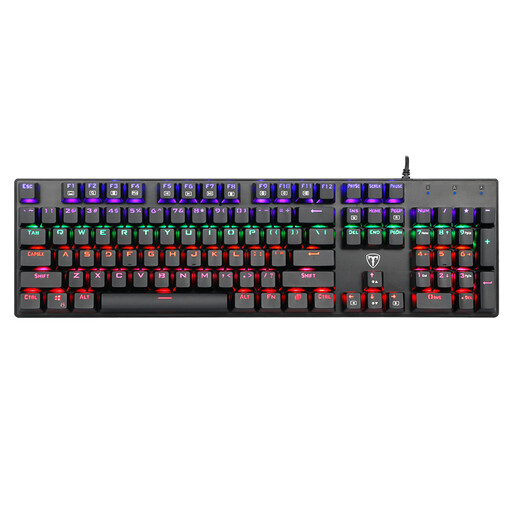
- Why we chose it: This model is a functional, full-size keyboard focused on the classic typing experience. The Blue switches provide clear, audible feedback with every keystroke.
- Pros:
- Full-size layout: Includes a numeric keypad, practical for data entry and productivity.
- Clicky feedback: The Blue switches deliver a satisfying tactile and auditory response, ideal for typists.
- Anti-ghosting: All 104 keys can be registered simultaneously, which is essential for fast typists and gamers.
- Who it's for: Users seeking a reliable, wired keyboard for general office work or home use who prefer the distinct feedback of clicky switches.
2. MageGee 60% Mechanical Gaming Keyboard - Red Switch
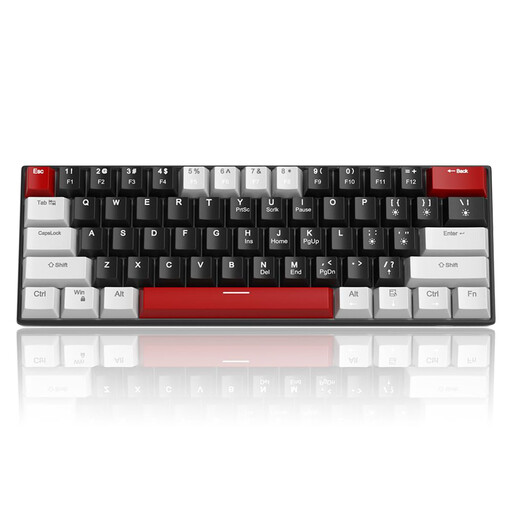
- Why we chose it: This compact keyboard is designed for efficiency and maximum desk space. The 60% layout eliminates all non-essential keys, while the Red switches provide fast and smooth action.
- Pros:
- Compact 60% form factor: Leaves significantly more room for mouse movement, a major advantage in competitive gaming.
- Linear Red switches: Offer fast, fluid, and relatively quiet keystrokes, ideal for rapid actions in games.
- Portable: The detachable USB-C cable makes the keyboard easy to take with you.
- Who it's for: Gamers who want a minimalist setup with maximum freedom of movement for their mouse. Also suitable for users looking for a small, portable keyboard for on-the-go use.
3. Ajazz AK820 Pro 75% Tri-Mode Keyboard
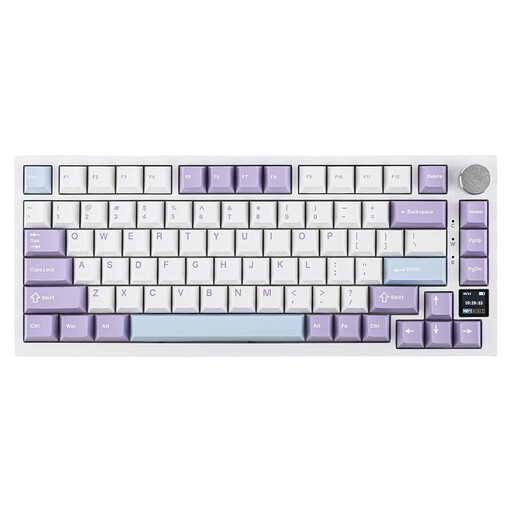
- Why we chose it: The AK820 Pro combines a compact 75% form factor with advanced features. It offers tri-mode connectivity, a hot-swappable PCB, and a unique TFT screen for status updates.
- Pros:
- Versatile Connectivity: Seamlessly switch between wired (USB-C), 2.4GHz wireless, and Bluetooth 5.1.
- Gasket Mount & Damping: The internal gasket structure and multiple layers of damping foam provide a soft, muted, and quiet typing experience.
- Customisability: The hot-swappable design lets you change switches without soldering. The TFT screen can display status information or custom GIFs.
- Who it's for: Keyboard enthusiasts, programmers, and demanding users looking for a premium, versatile, and highly customisable keyboard for both work and gaming.
Haven't Found What You're Looking For?
The selection above covers a range of use cases, from gaming to productivity. However, the market for mechanical keyboards is vast, and countless configurations are available. For users who prefer a stable, direct connection without worrying about batteries, a traditional wired model remains a solid and reliable choice.
Explore our full range for more options that suit your specific needs. ️ See more Wired USB Keyboard models
Frequently Asked Questions
1. What's the difference between a mechanical and a membrane keyboard? A mechanical keyboard uses individual mechanical switches under each key, providing greater precision, durability, and better tactile feedback. A membrane keyboard uses a rubber layer under the keys. This is cheaper to produce but often feels 'mushy' and wears out faster.
2. Are mechanical keyboards better for gaming? Many gamers prefer a gaming keyboard with mechanical switches due to their faster response times, durability, and consistent feedback. Features like N-key rollover (where all keystrokes are registered simultaneously) are also a major advantage in games. The choice of a specific switch type (e.g., linear Red) can further optimise performance.
3. What does 'hot-swappable' mean? A hot-swappable keyboard means you can remove and replace the mechanical switches without having to disassemble the keyboard or use a soldering iron. This makes it easy to try out different types of switches, to customise your typing experience, or to replace a faulty switch.
Written by: Joybuy Product Recommendation Officer


