
Vandaag of morgen in huis

Kwaliteit gegarandeerd

Welkomstaanbiedingen ontgrendelen: GRATIS bezorging | Tot 80% korting | Gratis 30 dagen JoyPlus-proefperiode
Download de app
A mechanical keyboard can be a great choice for gaming, programming, studying and everyday typing. But a long product title tells you very little about what it’s like to use. Terms such as RGB, hot-swappable and gasket mount may sound appealing, but they won’t necessarily suit the way you use your keyboard.
Keep an eye out for these three common pitfalls:
Choosing between a 60% keyboard, 75% keyboard and full-size keyboard affects how you work.
A compact keyboard frees up space for your mouse, but check its width and depth in centimetres too. A keyboard with a volume knob or extra screen may take up more desk space than its layout suggests.
Mechanical switches come in different types:
A hot-swappable keyboard lets you replace compatible switches without soldering. Check whether the PCB supports 3-pin switches, 5-pin switches or both. Use a suitable switch puller when changing switches, turn the keyboard off and avoid applying sideways force.
PBT keycaps are often chosen for their resistance to wear. That doesn’t mean every PBT set feels the same: thickness, profile and legends matter too. With a US QWERTY layout, also check that the key legends match your operating system’s key combinations.
A wired keyboard usually uses USB-C and doesn’t need a battery or wireless receiver. That’s handy for a permanent desktop setup. A wireless keyboard is more flexible for a laptop, tablet or mobile workspace, but check the battery capacity, charging time and supported connections.
Some models offer Bluetooth, 2.4 GHz and USB. Check how many devices you can pair and how to switch between them. Compatibility with Windows, macOS, iPadOS, Android and games consoles can vary by model and connection type.
An RGB keyboard, or a mechanical keyboard with RGB, offers lighting effects. This is mainly a visual feature, but it can also help you type in a dark room. Check whether you can adjust the brightness and effects using key combinations or software. Lighting can vary between versions: for example, the AJAZZ AK820 listing mentions white lighting in the title as well as RGB in the specifications. So make sure you check which version you’re choosing.
The following picks are based on the listed layout, connections, switches, keycaps and extra features. Brand claims about features such as lifespan or noise reduction are presented as product information, not as guaranteed real-world results.
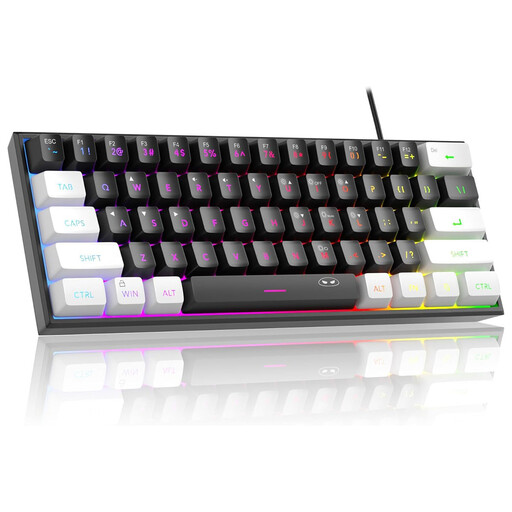
Why it suits this type of user: This wired 60% model is a good fit for a small workspace or a first gaming setup with limited desk space.
The wired connection means you don’t have to rely on a battery. However, note that the manufacturer describes it as having a “mechanical feel”, so it isn’t the same as a fully mechanical keyboard.
61 keys, RGB lighting, USB connection and compatibility with Windows and Mac, according to the product listing.
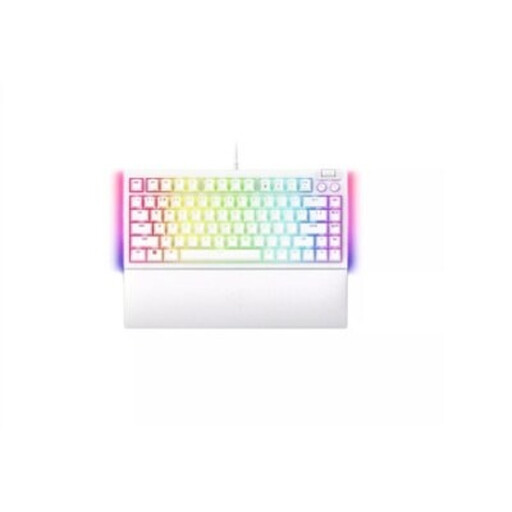
Why it suits this type of user: The 75% layout combines a compact size with a more practical key arrangement for gaming, writing and everyday computer use.
The product listing explicitly states that it has a US QWERTY layout, hot-swappable mechanical switches and a wired USB connection. Check the layout before you buy.
75% layout, hot-swap functionality and Razer Chroma RGB, according to the product specifications.

Why it suits this type of user: Programmers, typists and gamers who want a volume knob and customisable switches get a wired USB-C setup with a 75% layout.
The product information lists a gasket construction, hot-swap support for 3-pin and 5-pin switches, and PBT keycaps. AJAZZ states that the lifespan is 50 million keystrokes; this is a product specification.
CNC volume knob, OEM PBT keycaps, USB-C and compatibility with Windows and Mac, according to the listed specifications.
We’ve put together a complete, up-to-date list of products that meet these strict selection criteria and current European safety regulations.
Often, yes, but check the stated compatibility and layout. A model may work with macOS, while its key legends follow a US QWERTY layout. You can change the input source in macOS, but this won’t change the physical key legends.
That depends on the switches, keycaps, electronics and conditions of use. Manufacturers sometimes state a specific number of keystrokes. AJAZZ states that the AK820 is rated for 50 million keystrokes. Treat this as a technical claim from the manufacturer, not a guaranteed lifespan. Dust, moisture, heavy typing and poor maintenance can shorten its life.
With a wired keyboard, you’ll mainly notice a small increase in USB power use. With a wireless keyboard, RGB can reduce battery life, depending on the brightness and lighting effects. If you mainly work on the go, you can turn RGB off or choose a model with a larger battery. For a permanent desktop setup, a wired keyboard is often simpler: no battery to charge and no wireless connection to set up.
Finally, always check the exact version, language layout, connection type and included accessories. That way, you can choose a mechanical keyboard that suits your desk, devices and everyday working habits.
