What should you look for when choosing?
Start with a layout that suits your writing, then check the key legends in the light you work in. Next, consider switch variants, sound and connectivity if they matter for your workspace.
| What to consider |
What to look for |
Who should prioritise this? |
| Readability by the window |
Check the exact key legends in the light that reaches your desk. If you experience reflections, try repositioning your workspace or using blinds or curtains. |
If I write beside a bright window, I want to make out the characters clearly without relying on lighting alone. Around 31% of consumers in this scenario say daylight readability is their main purchasing concern. |
| Layout and feel |
Check the position of the arrow and navigation keys, as well as the punctuation keys, along with the exact language and switch variant. |
When I do a lot of editing, I want keys that suit the way I navigate and type, without taking up unnecessary desk space. Around 31% of consumers in this scenario prioritise layout and feel. |
| Sound while recording |
Check the exact switch variant and, if possible, assess the sound using your microphone and typing style. |
If I type while recording, I want to know how the keyboard sounds in my own setup; a product description can’t tell me that. Around 25% of consumers in this scenario say recording noise is their main purchasing concern. |
| Connecting to devices |
Check whether the version on offer supports the wired or wireless connections and device switching you need. |
When I switch between devices, I want the right connectivity options for my workspace. Around 13% of consumers in this scenario say this flexibility is their top priority. |
Keyboards on Joybuy
These options include different layouts and connection types for scriptwriting. Check the key layout and switch for each version to find the right fit for your workspace.
 No image available
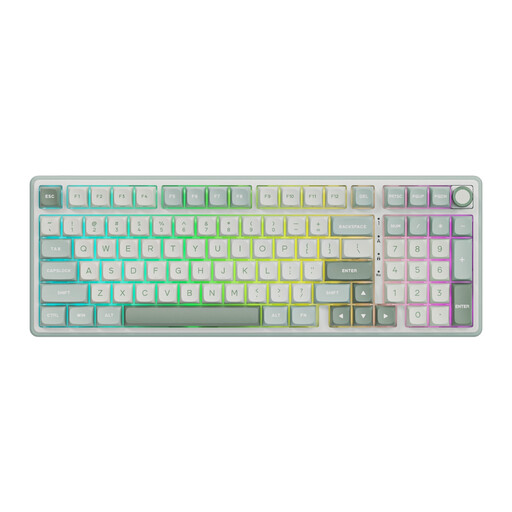
RK ROYAL KLUDGE R98 Pro, wired, Beige Linear switches
A wired option to compare if you want a number pad and a linear feel.
The product name lists Beige Linear switches; the product description mentions dampened keystroke sounds. This doesn’t tell you how the keyboard will sound with your microphone.
The product information lists a 98% layout with number pad, PBT keycaps and hot-swappable switches.
Joybuy
 No image available
AULA F75 MAX, 75%, US QWERTY, Reaper switch
A compact layout to consider if you want to save desk space while keeping your navigation keys.
The title lists US QWERTY. The product information describes a 75% layout with essential navigation keys and wired, Bluetooth and 2.4 GHz connectivity.
Check that the US layout matches the characters you use when writing.
Joybuy
 No image available
Ticktype DP104, 108 keys, US layout, Silent Tactile switches
A full-size option to compare if you want a spacious layout and a variant described as Silent Tactile.
The product name lists 108 keys, a US layout and hot-swappable switches. The product description presents the switches as suitable for quieter typing, but doesn’t tell you how they’ll sound in your room during a recording.
Check that the US layout suits the way you use the keyboard.
Joybuy
 No image available
AJAZZ AK980 V2, Starry Night Gray, Gift Switch V2
An option to consider if you want to compare a 98% layout with multiple connectivity options.
The product name lists QWERTY, Bluetooth, 2.4 GHz and USB-C. The product information mentions PBT keycaps and clear key legends.
Check the key legends and make sure the layout suits the characters you need.
Joybuy
 No image available
AULA Hero 68, 60%, US layout, King Magnetic Switch
A compact option to consider if you want to use less desk space and are looking for a magnetic switch.
The product name lists a 60% layout, US layout and Hall Effect Magnetic Switch. The product description mentions side-printed keycaps and a wired connection.
Check that the compact layout gives you direct access to the keys you use when editing.
Joybuy
Frequently asked questions
Does RGB lighting make keys easier to read beside a bright window?
You can’t tell from the presence of lighting alone. Logitech and CHERRY describe lighting options; for reflections or glare, Arboportaal recommends measures including repositioning your workspace and using blinds or curtains. So check the key legends and contrast in the daylight you write in.
How should you set up your writing space by a window?
For screen-based work, Arboportaal recommends positioning your line of sight parallel to the window. If light still causes reflections or glare, the portal suggests moving further away from the window and using suitable blinds or curtains.
Can you fit different switches to the Keychron K3 Max later?
You can with the version Keychron describes as hot-swappable. Before buying, check that the specific version on offer has this feature and find out which low-profile switches are compatible. The K3 Max name alone isn’t enough to confirm this.
What if the key sound or layout disappoints you after buying online?
For a standard online consumer purchase, ACM ConsuWijzer says you generally have a statutory cooling-off period of up to 14 days after delivery, with some exceptions. If a product is faulty, you also have a statutory guarantee from the seller; what you could reasonably expect from the product is taken into account.
What product regulations apply to a wireless keyboard in the Netherlands?
The Rijksinspectie Digitale Infrastructuur outlines European requirements for electrical, electronic and radio equipment. The inspectorate reports that stricter requirements for wireless equipment have applied since 1 August 2025. According to Ondernemersplein, most of the other Cyber Resilience Act rules will apply from 11 December 2027, so that date isn’t a current condition of purchase.


