
Writers beside a bright window
If your workspace gets plenty of daylight, consider screen glare and the legibility of the key legends separately. Your workspace position and the keys themselves need different solutions.


Start by arranging your workspace so daylight doesn’t reflect directly off your screen; keyboard lighting won’t solve screen glare. Then choose based on how easy the key legends are to read, the sound and feel of the specific switches, and which keys you want within easy reach. A compact model or one with a quieter feel might suit your workspace, but check which keys and features come with the version you’re considering.
If your workspace gets plenty of daylight, consider screen glare and the legibility of the key legends separately. Your workspace position and the keys themselves need different solutions.
If you have long writing sessions with other people nearby, the sound of each keystroke may matter. Compare the switch type and the specific version, not just the model name.
A more compact keyboard can free up space, but first think about which arrow, function and navigation keys you want to use straight away.
| What to consider | What to check before buying | Who is this important for? |
|---|---|---|
| Daylight and legibility | Check the key legends on the exact version in daylight. Where possible, position your screen so your line of sight is parallel to the window; use blinds or curtains if glare is still a problem. | If I write beside a bright window, I want to be able to see my screen and read the keys without relying on lighting alone. Around 36% of consumers prioritise legibility in daylight. |
| Feel during long sessions | Compare the height and switch type of the version on offer; mechanical switches can feel different from one another. | During long writing sessions, I want to choose a feel that suits the way I type. Around 29% of consumers prioritise typing feel when writing for long periods. |
| Noise in a shared space | Check which switch type is actually fitted. A model name or lighting doesn’t, by itself, tell you how loud the keystrokes will be. | If other people work in the same room, I want to take typing noise into account without losing sight of the feel I want. Around 21% of consumers put noise first. |
| Layout and desk space | Compare the keys on the exact layout with the ones you use, such as the number pad, arrow keys and function keys. | At a small desk, I want to save space without losing keys I need to use straight away while writing. Around 14% of consumers give layout and desk space top priority. |
Keyboard lighting won’t prevent glare on your screen. The visibility of the legends can also depend on the keycaps and the way the light falls.
Check the key legends on the exact version in daylight. Tackle screen glare separately by adjusting your setup or using blinds or curtains.
A model may be available with different switches. The Logitech MX Mechanical, for example, comes in Tactile Quiet, Clicky and Linear versions.
Check the full version name and switch type before choosing a keyboard for a shared space.
Compact models may omit keys you use often. The country-specific layout can also vary by version.
Compare the image and specifications for the exact version with the keys and shortcuts you normally use.
The MX Mechanical is available in a full-size version and as a Mini, for anyone looking for a low-profile mechanical keyboard.
The K3 Max ISO is a low-profile, compact alternative with a 75% layout.
The One 3 RGB is a wired model with a choice of sizes and switches.
The Air75 V3 is a low-profile 75% alternative for a compact workspace.
This selection focuses on mechanical keyboards with interchangeable switches or a compact layout for a writing desk.
 No image available
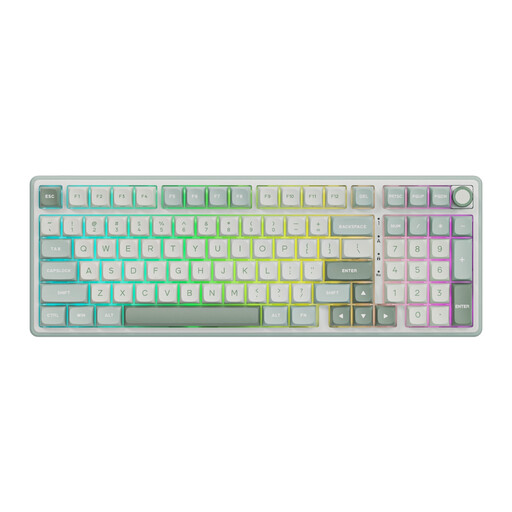
An option if you want to keep a number pad while writing and are looking for interchangeable switches.
98% layout with number pad; wired; hot-swappable switches; gasket-mount construction; MDA-profile PBT keycaps; Beige Switch.
 No image available
A compact choice if you want to save desk space and are looking for a version with interchangeable switches.
75% layout; wired; hot-swappable K Silver Switch; Cherry-profile PBT keycaps; gasket-mount construction.
 No image available
A compact option if you’re looking for a 75% layout and several connectivity options; check the key legends on your chosen version in daylight.
75% layout; wired, Bluetooth or 2.4 GHz; US QWERTY layout; side-printed keycaps; Reaper Switch.
 No image available
An option if you want a full-size layout with 108 keys and need either a wireless or wired connection.
Full-size; 108 keys; hot-swappable; wired, Bluetooth or 2.4 GHz; US layout; Silent Tactile Switches; 8000 mAh.
 No image available
A compact choice if you’re looking for several connectivity options and interchangeable switches.
75% layout; wired, Bluetooth or 2.4 GHz; US QWERTY layout; hot-swappable; PBT keycaps; compatible with Win/Mac/PC.
No, keyboard lighting won’t prevent glare on your screen. The Dutch Arboportaal recommends, among other things, positioning your line of sight parallel to the window and using suitable blinds or curtains if daylight is causing a problem. Also check how easy the key legends are to read in daylight.
According to the Arboportaal, if you use a display screen for more than two hours a day at work, your screen and keyboard must not be attached to one another. If you use a laptop, you must be able to use a separate screen or keyboard. This isn’t a general buying rule for everyone who writes at home.
That depends on the exact model and version. Ducky describes the One 3 RGB as hot-swappable; check whether the keyboard you’re considering has this feature and whether the replacement switches are compatible.
For many online purchases from a business, you have a 14-day cooling-off period, according to the Dutch government. Dutch statutory guarantee rights also apply: if a product breaks sooner than could reasonably be expected under normal use, the seller must put it right in line with the applicable conditions. There isn’t one fixed time limit that applies to all keyboards.