
Vandaag of morgen in huis

Kwaliteit gegarandeerd

Welkomstaanbiedingen ontgrendelen: GRATIS bezorging | Tot 80% korting | Gratis 30 dagen JoyPlus-proefperiode
Download de app
A mechanical keyboard can be a clear upgrade for gaming, programming, writing or everyday office work. However, it is easy to pay too much for features you will barely use. Striking RGB lighting, for example, says little about build quality, while the layout, switches and connection have a much greater impact on your experience.
When comparing models, pay particular attention to these three pitfalls:
A 75% mechanical keyboard usually includes the function row, arrow keys and a compact navigation section. The numeric keypad is generally omitted. This leaves more room for your mouse while retaining the functions you need most.
An 80% mechanical keyboard is often also referred to as tenkeyless. Its layout is slightly wider and may be more comfortable if you regularly use navigation keys. For spreadsheets and frequent numeric input, a keyboard with a numpad is more practical.
Also check:
A compact model is not automatically suitable for every user. Programmers, writers and gamers can benefit from a smaller footprint, while administrative users may get more value from a full-size keyboard.
Mechanical switches determine, among other things, the keystroke feel, noise level and actuation force. Linear switches move smoothly without a tactile click. They are often chosen for gaming and fast typing, but the best option ultimately comes down to personal preference.
A hot-swappable keyboard allows you to replace compatible switches without soldering. Check whether the PCB supports 3-pin switches, 5-pin switches or both. According to the product specifications, the AJAZZ AK820 supports both 3-pin and 5-pin mounting.
Also consider how the manufacturer presents switch lifespan. According to AJAZZ’s own information, the AK820’s switches are rated for up to 50 million keystrokes. This is a brand-provided product specification, not a guarantee for every usage scenario.
A wired mechanical keyboard with USB-C is practical for a fixed workstation and eliminates the need to recharge a battery. A wireless mechanical keyboard offers greater flexibility when switching between multiple devices. With tri-mode models, you can generally choose between a cable, Bluetooth and a wireless receiver.
PBT keycaps are popular because, according to the product specifications, they develop a glossy finish less quickly than ABS keycaps. Always check the profile and compatibility of replacement keycaps.
A gasket mount keyboard uses cushioning elements between parts of the construction. This can make keystrokes feel softer and help reduce resonance. It is not a guarantee of a quiet typing experience: the switch type, case, stabilizers and desk surface also play a role.
Other practical features include:
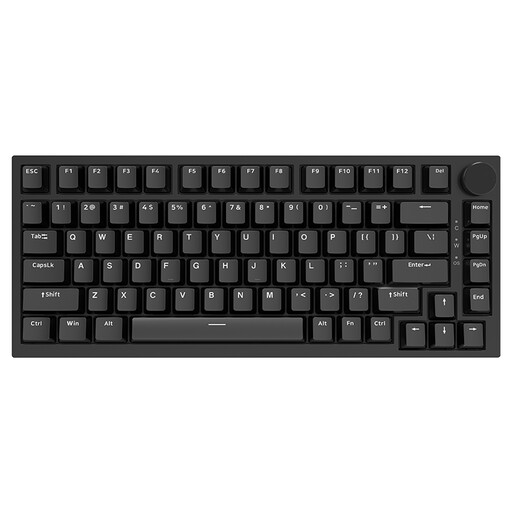
Why it suits this profile: This compact wired mechanical keyboard combines a 75% layout with a US QWERTY layout, linear switches and a volume knob. It is suitable for a fixed PC or Mac workstation without the need to manage a battery.
The product specifications clearly state the layout, USB-C connection, hot-swap function and compatibility with Windows and macOS. This makes key purchasing information visible in advance.
75% format, linear switches, hot-swap support for 3-pin and 5-pin switches, PBT keycaps and a CNC volume knob.

Why it suits this profile: The Lunar 01 is designed for users who switch between a PC, laptop and other devices. Its tri-mode connection, gasket-mount construction and programmable knob provide multiple configuration options.
The connection options and 4000 mAh battery capacity are listed in the product specifications. This allows you to assess in advance whether wireless use and recharging fit your routine.
80% US QWERTY layout, Bluetooth, receiver and wired connectivity, hot-swappable switches, PBT keycaps and a programmable knob.

Why it suits this profile: For gamers, programmers and content creators who type frequently and want direct volume control, this variant offers a compact, fixed setup with a flex-cut PC plate, Poron foam and RGB lighting.
The specifications mention the gasket mount, multiple layers of cushioning, PBT keycaps and wired Type-C connectivity. You therefore do not have to rely solely on terms such as gaming or RGB.
PBT keycaps, hot-swap support, gasket mount, volume knob, RGB modes and compatibility with Windows and Mac.
Start by choosing the connection. If you work almost exclusively at one desk, a wired mechanical keyboard is simple and predictable. If you use multiple devices, a wireless mechanical keyboard gives you greater freedom of movement.
Next, determine how many keys you need. A 75% model saves space, but check the position of the arrow and navigation keys. Choose an 80% model if you are comfortable with a little extra width in exchange for a more traditional layout.
Finally, consider maintenance and safety. When replacing switches, use suitable tools, do not pull keycaps with excessive force and disconnect the keyboard before cleaning it. Keep the device away from liquids and extreme temperatures.
We have compiled a complete, up-to-date list of products that fully meet these strict selection criteria and the applicable European safety regulations.
Many models work with Windows and macOS, but the physical layout remains important. Also check whether function-key combinations and any configuration software work with your operating system. The AJAZZ and KEYSME models mentioned above specify compatibility with Windows and Mac.
A 75% model is usually slightly more compact and places the navigation keys closer to the main key cluster. An 80% model often provides a roomier tenkeyless layout. The exact key arrangement can vary by manufacturer, so always review the product images and specifications.
You do not have the ongoing power requirements of a wired connection, but you do need to recharge the battery regularly. Actual battery life depends on capacity, lighting and connection mode. If you do not want to plan charging sessions, a wired model is the better choice.
