
Vandaag of morgen in huis

Kwaliteit gegarandeerd

Welkomstaanbiedingen ontgrendelen: GRATIS bezorging | Tot 80% korting | Gratis 30 dagen JoyPlus-proefperiode
Download de app
A mechanical gaming keyboard can be comfortable for gaming, programming and long typing sessions, but not every keyboard with RGB lighting and “mechanical feeling” uses genuine mechanical switches. The size, layout and connection also determine whether a model is suitable for your day-to-day use.
Joybuy Product Recommendation Officer helps you translate marketing terms into verifiable product specifications. This helps you avoid buying a compact keyboard without arrow keys, or a wireless model whose battery and layout do not suit the way you use it.
Some compact models use a membrane mechanism with a mechanical feel. This can be suitable if you are mainly looking for an accessible keyboard for the office, school or casual gaming. If you want to replace switches, adjust the typing feel or expect a specific response, you need a genuinely mechanical model with replaceable or fixed switches.
Therefore, check the product details for terms such as mechanical switch, hot-swappable or Hall Effect magnetic switch. RGB lighting alone says nothing about the type of switch.
Many gaming keyboards have a QWERTY US layout. This means they do not use the Dutch ISO layout and may lack certain keys for accents. For gaming, this is often not a problem, but touch typing, programming or everyday office work may require some adjustment to the different key positions.
A German QWERTZ layout is different again. For example, the AJAZZ AK820 MAX explicitly states that it has a German QWERTZ layout. Always check both the image and the written specification before ordering.
A wireless gaming keyboard can work via Bluetooth, 2.4 GHz or both. Bluetooth is useful for laptops, tablets and phones. For gaming, many users prefer 2.4 GHz or a USB cable. A tri-mode keyboard generally offers these three options: Bluetooth, wireless 2.4 GHz connection and wired use.
Also pay attention to the battery capacity, charging and whether a receiver is included. A 4,000 mAh or 8,000 mAh battery is a verifiable specification, but actual battery life depends on RGB brightness, connection type and usage patterns.
The size determines how much room you have left for your mouse and which keys are immediately available.
A 60% keyboard gives you more desk space, but requires more key combinations. For working from home and programming, a 75% or 80% layout may therefore be more practical.
With a mechanical gaming keyboard, the switches determine the typing feel, sound and pressure required. Pay attention to the difference between linear, tactile and clicky switches. The product information should state which version is included; terms such as “creamy sound” or “thocky” mainly describe the expected sound and are not standardised measurements.
A hot-swappable keyboard allows suitable 3-pin or 5-pin switches to be replaced without soldering. However, check that the switches you want are electrically and mechanically compatible.
A gasket mount keyboard uses a flexible mounting system between the plate and the case. According to the brands’ own product information, this is intended to provide a softer typing feel and less resonance. The experience varies depending on the construction, plate material, damping and keycaps. Treat it as a design feature rather than a guaranteed measure of quality.
An RGB gaming keyboard can offer different lighting effects, brightness levels and speeds. Check whether these can be controlled directly using Fn keys or whether software is required. RGB is mainly a visibility and set-up feature; it does not automatically increase response speed.
For added convenience, a programmable keyboard and a keyboard with a volume knob are worth considering. Check whether macros, profiles and key functions are set up in software or via a web driver, and whether they can be saved to internal memory.
For wireless models, also check:
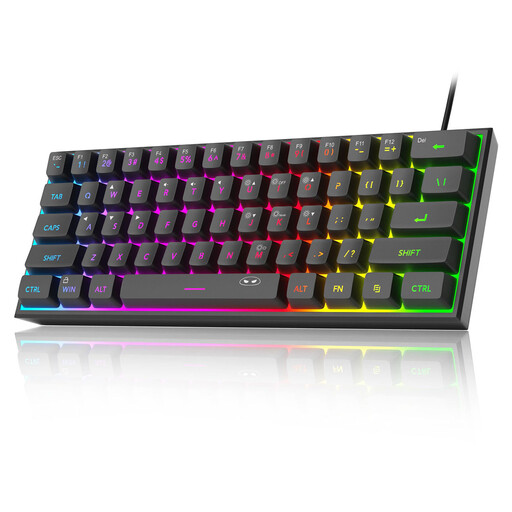
Why it suits this profile: This wired 60% model is small, lightweight and easy to connect to a PC, Mac or compatible console. The product information states that it uses a membrane mechanism with a mechanical feel, so it is suitable for beginners who mainly want a compact keyboard with RGB, rather than users who want to swap genuine switches.
The description makes it clear that this is a “mechanical feeling” model. It also states that the USB connection is not waterproof, despite the circuit board’s stated IPX4 rating.
61 keys, US layout, RGB modes and a compact size of approximately 29.2 × 10.1 cm. The wired connection means there is no battery to manage.
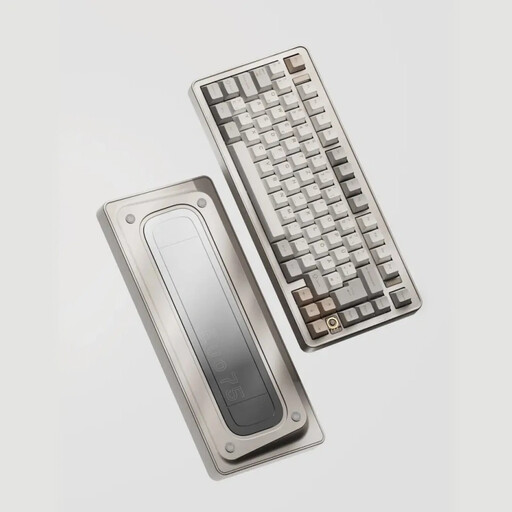
Why it suits this profile: The EVO75 combines a 75% US layout with an aluminium case, hot-swap support and three connection options. It is well suited to users who want to customise their keyboard for both work and gaming.
The specifications clearly list 3- and 5-pin hot-swap switches, 2.4 GHz, Bluetooth and USB-C. This makes the key customisation and connectivity features verifiable.
75% layout, leaf spring mount, 8,000 mAh battery, PBT keycaps and VIA compatibility according to the product details.
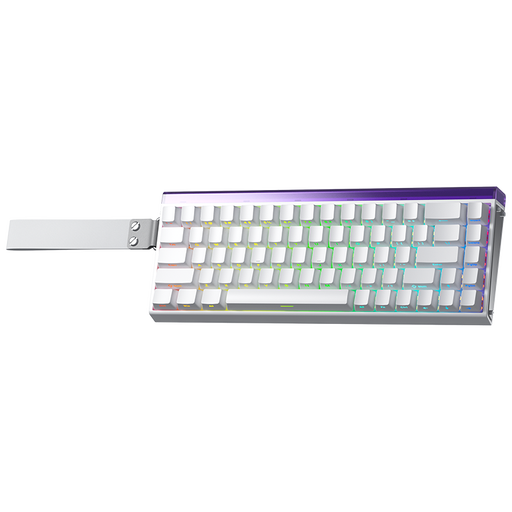
Why it suits this profile: This 60% model uses Hall Effect magnetic switches and is aimed at players looking for adjustable actuation, Rapid Trigger and a high polling rate. The USB cable suits a fixed gaming set-up.
The product name states specific actuation and polling-rate values. Before buying, check that your game and software support these functions and that the lack of a dedicated arrow-key block suits you.
Hall Effect switches, adjustable actuation down to the stated 0.01 mm, Rapid Trigger, 8K polling rate and RGB lighting according to the product listing.

Why it suits this profile: The 80% QWERTY US layout retains the arrow keys and function row, while omitting the number pad. This frees up desk space without removing the navigation keys you use most often.
The connection options and battery capacity are clearly specified: Bluetooth, wireless receiver, cable and 4,000 mAh. The hot-swap function means you do not need to buy a new keyboard just to change the typing feel.
Tri-mode connection, gasket-mount design, hot-swappable mechanical switches, PBT keycaps and programmable knob according to the product details.
We have put together a complete, up-to-date list of products that fully meet these strict selection criteria and the applicable European safety regulations.
Use this quick checklist:
It can be, but you will often use Fn combinations for functions that are directly available on larger models. For a lot of office work, programming and navigation, a 75% or 80% keyboard is easier to use if you regularly need arrow keys and function keys.
Its lifespan depends on the switch type, usage, cleaning and whether it uses a cable or battery. Do not rely solely on marketing claims about millions of keystrokes. Also check whether replacement switches, keycaps and cables are available. With a hot-swappable model, you can generally replace a faulty switch without replacing the entire keyboard.
RGB uses extra power, particularly at high brightness and when used wirelessly. With a wireless keyboard, switching off or dimming the lighting can extend battery life. If you do not want to recharge a battery, choose a wired model.
