
Vandaag of morgen in huis

Kwaliteit gegarandeerd

Welkomstaanbiedingen ontgrendelen: GRATIS bezorging | Tot 80% korting | Gratis 30 dagen JoyPlus-proefperiode
Download de app
A mechanical gaming keyboard can make your desk tidier and give you loads of customisation options. Even so, eye-catching RGB lighting or a long product title doesn’t automatically say anything about whether it’s right for your setup. Dutch buyers in particular tend to run into three recurring pitfalls: the wrong key layout, a compact size without a clear function layer, and wireless features that don’t suit how you use it.
Joybuy Product Recommendation Officer therefore selects on verifiable characteristics such as layout, connections, switch type, battery capacity and adaptability. That way you compare products on practical value rather than marketing terms.
Many models use a QWERTY US keyboard. The physical layout differs from what you’re used to with a Dutch or ISO layout. Pay particular attention to the shape and position of the Enter key, the left Shift key and special characters. You can change the software layout in Windows, but the legends on the keycaps will not change.
For gamers who mainly use WASD, this is sometimes not an issue. For programmers, home workers and people who type a lot, it can take some getting used to.
According to the product description, the MageGee TS91 is described as a membrane keyboard with a mechanical feel. That’s not the same as a keyboard with individual mechanical switches. If you’re specifically after a mechanical gaming keyboard, make sure the product actually mentions mechanical switches.
With models featuring hot-swappable switches, you can also replace switches without soldering. That offers more customisation, but always check whether the board supports 3‑pin, 5‑pin or both types.
A 60% keyboard usually lacks dedicated arrow keys, a function row or a navigation cluster. Those functions are then accessed via an Fn combination. A 75% keyboard generally keeps the arrow keys and function row, while a 96% keyboard also offers a numpad in a more compact design.
A smaller keyboard isn’t automatically more convenient. Think in advance whether you often use Home, End, Delete, F keys or a numeric keypad.
Choose the size based on your desk and how you use it:
Also check whether the keyboard is suitable for Windows, macOS, PlayStation or Xbox. “Compatible” can, depending on the model, only refer to basic functions; macros, RGB profiles and software control don’t always work on every platform.
A wireless mechanical keyboard can work via Bluetooth, 2.4 GHz or both. Bluetooth is handy for laptops, tablets and multiple devices. A 2.4 GHz connection with a USB receiver is aimed at wireless use with a PC or console. A cable connection prevents you from ending up with a flat battery mid‑game.
A tri‑mode keyboard usually combines USB‑C, Bluetooth and 2.4 GHz. Check how many devices can actually be paired at once, how you switch between them and whether the receiver is included. For wireless models, also look at battery capacity. A value such as 4000 mAh or 8000 mAh tells you something about battery size, but not on its own about runtime. RGB brightness and connection mode affect power consumption.
Linear switches press down evenly. Tactile switches provide a noticeable bump. Clicky switches usually make more noise. The right choice depends on your preference and environment, not on a universal ranking.
With a hot‑swappable keyboard, you can fit different switches later. Check whether the included switches are pre‑installed and whether the socket supports 3‑pin or 5‑pin variants.
A gasket‑mount keyboard uses a construction where the plate is supported by flexible materials. Manufacturers often describe this as a softer or more damped typing feel. The result also depends on plate material, foam layers, keycaps and switches. See a gasket mount as a construction feature, not a guarantee of a specific sound.
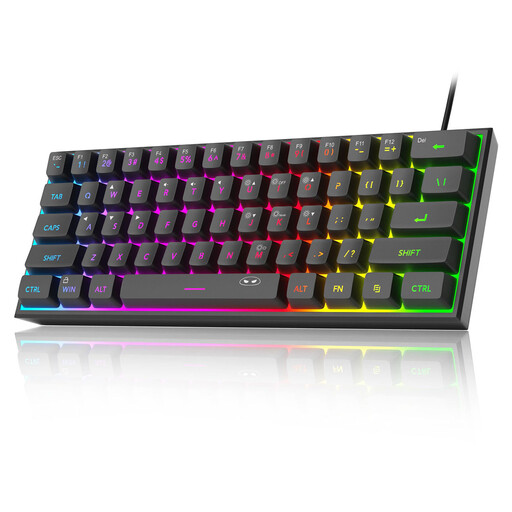
Why this fits the profile: This wired model has a compact 60% form factor, RGB lighting and a plug‑and‑play connection for PC and the listed consoles. Note: the product description states it uses membrane technology with a mechanical feel.
The product information explicitly states the membrane construction. That lets you factor in the difference versus true mechanical switches when making your decision.
61 keys, RGB modes, adjustable brightness and an IPX4‑rated PCB according to the product data. The USB connector itself is not waterproof.
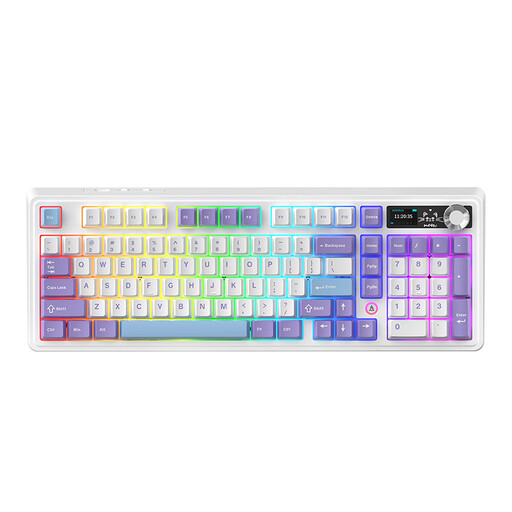
Why this fits the profile: This 98% model combines wireless and wired connections with a volume knob, TFT display, RGB lighting and hot‑swap capability. It suits users who game and work at the same desk.
The compact 98% size retains a large number of keys, avoiding part of the function‑loss pitfall of 60% models.
97 keys, gasket construction, hot‑swappable PCB, tri‑mode connectivity and a metal knob according to the product information.
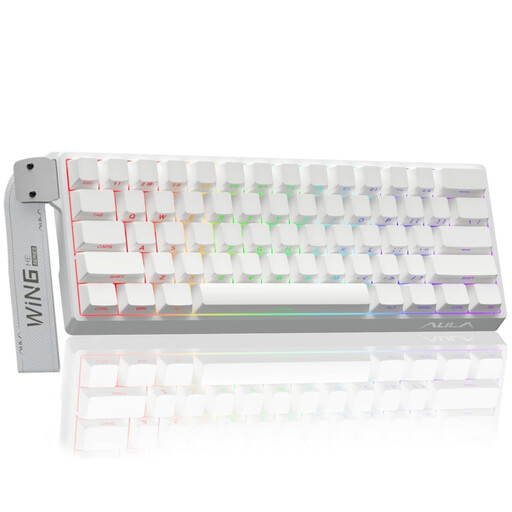
Why this fits the profile: This wired 60% model targets players who want features such as Hall Effect switches, Rapid Trigger and adjustable actuation.
The product title specifies the Hall Effect system and adjustable actuation. Do check in advance whether the software and features suit your game and operating system.
Quoted polling rate of 8K, RGB lighting, 60% size and an adjustable actuation distance of 0.01 mm according to the product data.
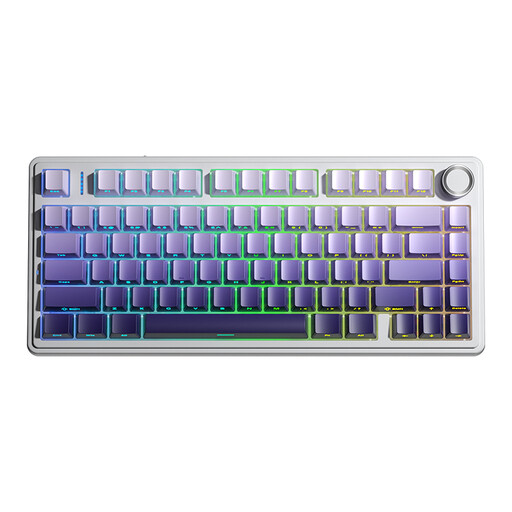
Why this fits the profile: A 75% layout keeps the arrow keys available and offers tri‑mode connections for PC, laptop, tablet and the listed consoles.
The choice between USB, Bluetooth and 2.4 GHz reduces reliance on a single connection method. The 4000 mAh battery does require regular charging, depending on usage.
Hot‑swap support for 3‑ and 5‑pin switches, RGB with multiple effects, macro functions and a multifunction knob according to the product description.
We’ve compiled a complete, up‑to‑date list of products that fully meet these strict selection criteria and the applicable European safety regulations.
Yes, as long as you consider noise levels, layout and size. Linear or quiet switches can be more practical in a shared workspace than clicky switches. A model with a volume knob, programmable keys and a 75% or 96% layout can also be suitable for both typing and gaming.
Lifespan depends on the quality of switches, stabilisers, keycaps, cable and battery. A hot‑swappable keyboard can remain usable for longer when you replace worn switches. For wireless models, the battery is a separate wear component. Keep the keyboard dry, don’t pull on the cable and clean it with a soft, dry cloth.
RGB lighting increases the power consumption of a wireless keyboard. Actual runtime varies by brightness, effect, connection and battery. If you want to save the battery, dim the lighting or switch it off. With a wired RGB gaming keyboard, battery life obviously isn’t a factor, but the USB connection is still required for both power and data.
