
Vandaag of morgen in huis

Kwaliteit gegarandeerd

Welkomstaanbiedingen ontgrendelen: GRATIS bezorging | Tot 80% korting | Gratis 30 dagen JoyPlus-proefperiode
Download de app
A mechanical gaming keyboard can offer a better experience for gaming, typing and programming, but the product page doesn't always tell the full story. Terms like RGB, rapid trigger and “mechanical feel” might sound appealing, but the practical differences lie in the layout, switch technology, connectivity and build quality.
When buying a new keyboard, you might run into three common pitfalls:
The dimensions of a keyboard determine how much space you have left for your mouse and how easily you can access everyday functions.
Besides the percentage, look at the actual dimensions. A model measuring 327 × 136 × 40 mm might seem compact on paper, but a high-profile case could still require a different wrist posture.
With mechanical switches, each keypress is registered by an individual switch. Linear switches typically move smoothly without a tactile bump. They are often chosen by gamers who prefer a consistent keystroke. Clicky switches, on the other hand, provide a distinct tactile bump and an audible click.
A hot-swappable keyboard allows you to replace compatible 3- or 5-pin switches without soldering. However, always check which switches and PCB connections are supported beforehand. Hot-swappable doesn't mean that any switch will automatically fit.
A Hall Effect keyboard uses magnetic sensors instead of traditional contact points. For the Redragon M68 and AULA WIN60HE, features like adjustable actuation and Rapid Trigger are mentioned. These are technical features for users who want to customise their keystrokes. The practical benefit depends on the game, software and personal preference. Claims about response times or input lag are made by the manufacturer and shouldn't be seen as a guaranteed advantage for every user.
A wired gaming keyboard with USB-C or USB offers a simple connection and never needs charging. A wireless mechanical keyboard gives you more freedom on your desk but requires you to think about battery life, charging cables, Bluetooth profiles and a potential 2.4GHz receiver.
Also, be sure to check:
RGB lighting is primarily an adjustable visual feature. It doesn't automatically make a keyboard more comfortable or durable.
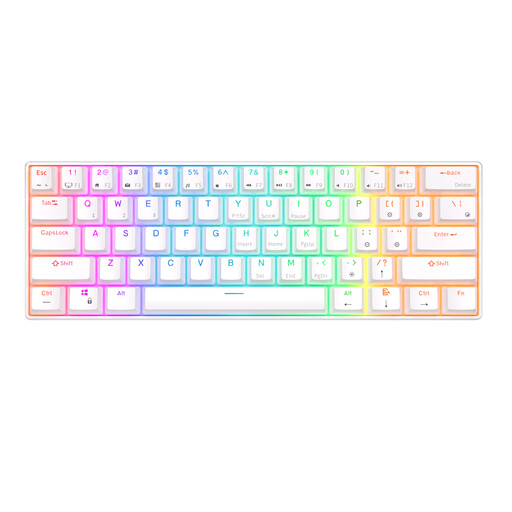
Why it's a good match: The 61-key layout is ideal for small desks and for users who want to try a compact model. The keyboard supports Bluetooth and has a detachable USB cable.
The product information clearly states it has 61 keys and Bluetooth support. This tells you that the arrow and function keys are accessed via key combinations.
60% form factor, RGB lighting, hot-swappable design, and can connect to up to three Bluetooth devices, according to the product description.
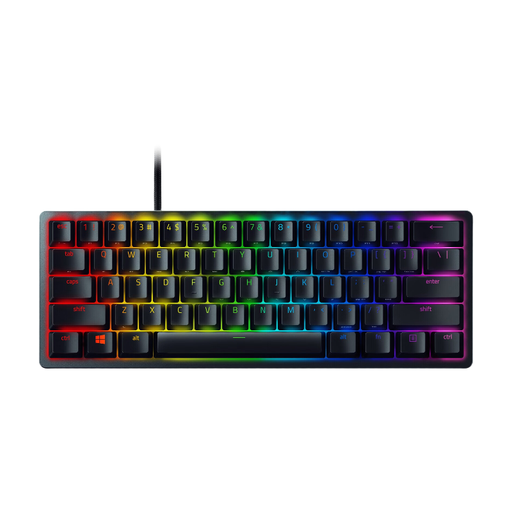
Why it's a good match: This 60% model combines an aluminium frame, PBT keycaps, USB-C connectivity and individual RGB lighting, making it perfect for a compact, fixed PC setup.
The specifications list the size, the US International layout, and the 61-key count. This prevents any confusion about missing physical keys.
Optical switches, onboard memory for up to five profiles, and anti-ghosting with N-key rollover, according to Razer's product information.
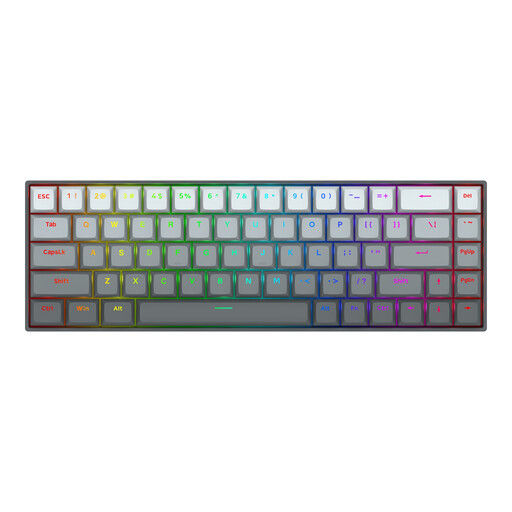
Why it's a good match: For esports enthusiasts specifically looking for Hall Effect technology, a 65% layout, and adjustable actuation.
The product information explicitly mentions magnetic Hall Effect switches and an adjustable range of 0.2 to 4.0 mm. Just be sure to check that the software features are compatible with your operating system.
68 keys, aluminium top plate, detachable Type-C cable, and RGB lighting. The manufacturer also states an 8000 Hz polling rate.

Why it's a good match: The 75% form factor offers a practical balance between desk space and access to arrow and function keys.
The product listing specifies a QWERTY US layout, a wired Type-C connection, linear switches, and a gasket-mounted design. This means all the key details can be checked before you buy.
PBT keycaps, support for hot-swapping 3- and 5-pin switches, a CNC-machined volume knob, and multiple layers of sound-dampening foam, according to the product specifications.
We've put together a complete, up-to-date list of products that meet these strict selection criteria and comply with all applicable European safety regulations.
Yes, but pay attention to the noise level and your choice of switch. Linear switches are often quieter than clicky switches, although the sound can vary depending on the case and keycaps. For a shared workspace, a membrane keyboard or a model with sound dampening might be more practical.
The lifespan depends on the switch type, usage, maintenance and whether parts can be replaced. Manufacturers sometimes state a keystroke rating, such as 50 million or 100 million. This is a technical specification from the brand and not a guarantee for every user. A hot-swappable keyboard can be easier to maintain because individual switches can be replaced.
A wireless model has no extra running costs beyond charging, but you do need to consider the battery, charging cable and a potential receiver. A wired gaming keyboard draws power via USB and doesn't need a battery. For a fixed gaming PC setup, wired is often simpler; for use with multiple devices, Bluetooth can be more practical.
Not necessarily. You should choose the layout you're used to typing on. A QWERTY US keyboard will work perfectly fine with UK language settings in Windows, but the symbols printed on some keys might not match the characters that appear on screen. It's always best to check the layout before you order.
