
Vandaag of morgen in huis

Kwaliteit gegarandeerd

Welkomstaanbiedingen ontgrendelen: GRATIS bezorging | Tot 80% korting | Gratis 30 dagen JoyPlus-proefperiode
Download de app
A mechanical gaming keyboard can help declutter your desk and provide a more distinct key feel. However, a high polling rate, bright lighting or a well-known switch brand doesn't automatically mean a keyboard is the right fit for your setup. The layout, connectivity and software are what will ultimately determine how enjoyable it is to use for gaming every day.
The three most common pitfalls:
The size, or form factor, determines how much space you have left for your mouse and how many keys are directly accessible.
A compact gaming keyboard is a great match for a small desk or a mobile setup. If you often use spreadsheets, keyboard shortcuts or numeric entry, a larger model may be more practical.
Mechanical switches come in linear, tactile and clicky variants, among others. Linear switches move smoothly and have no distinct click. Clicky switches produce an audible click, which can be distracting in a shared space. The specified operating force and actuation distance give a more objective picture than terms like "ultra-fast".
A hot-swap keyboard allows you to replace compatible switches without soldering. However, you should check whether the board supports 3-pin, 5-pin or a specific switch system. A hot-swap base doesn't mean that every switch will automatically fit.
On a Hall Effect keyboard, magnetic sensors measure the position of a key. Some models offer an adjustable actuation point and Rapid Trigger, which allows a key to re-actuate as soon as it's slightly released. According to the product specifications for the Redragon M68, the actuation can be adjusted via software between 0.2 and 4.0 mm, and the model supports Rapid Trigger. Think of this as a customisation feature, not a guarantee of better gaming performance.
A wired mechanical keyboard typically uses a USB-C to USB-A connection. This eliminates the need for charging and is convenient for fixed PC setups. A wireless gaming keyboard offers more flexibility via Bluetooth, 2.4 GHz, or both. Be sure to check:
Also, pay close attention to the language layout. Several of the models below have a QWERTY US or US International layout, while some TKL models have a Belgian AZERTY layout. This difference remains important, even if the keys otherwise look the same.
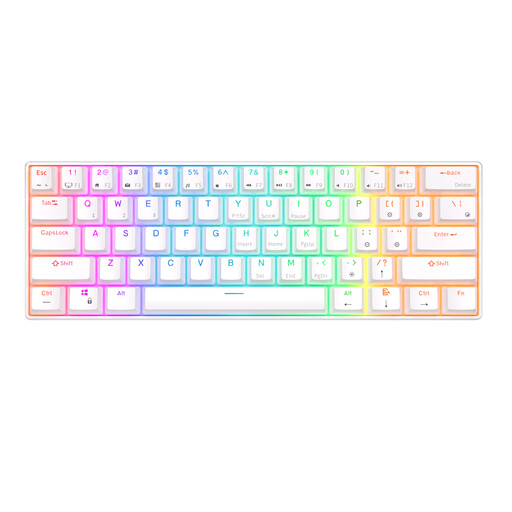
Why it's a good fit: This 60% model keeps your setup compact and offers Bluetooth, a detachable cable and support for Windows, iOS and Android. This makes it ideal for anyone who uses one keyboard for multiple devices.
The product specifications clearly state that it has 61 keys and multiple connection options. Just make sure the lack of dedicated arrow keys won't be a problem for you.
Tri-device Bluetooth, RGB lighting and a stated 1450 mAh battery.
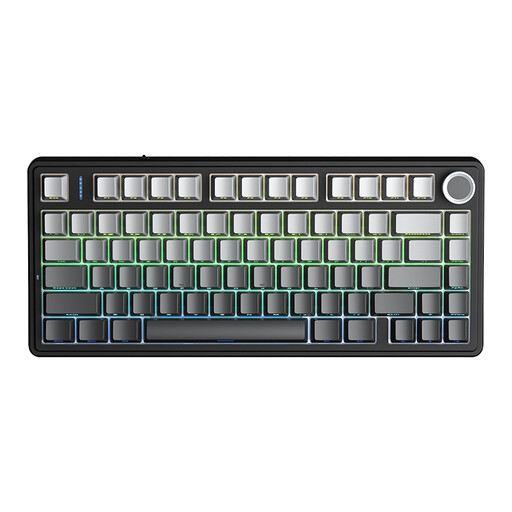
Why it's a good fit: The 75% layout combines arrow keys with a compact footprint. The tri-mode connectivity, 4000mAh battery, rotary knob and hot-swap base are practical for a versatile work and gaming space.
The choice between wired, Bluetooth and 2.4 GHz means you're not completely dependent on a single connection method. Check the software support for your system.
3-pin/5-pin hot-swap according to the product description, RGB with 16.8 million colours and a multi-function knob.
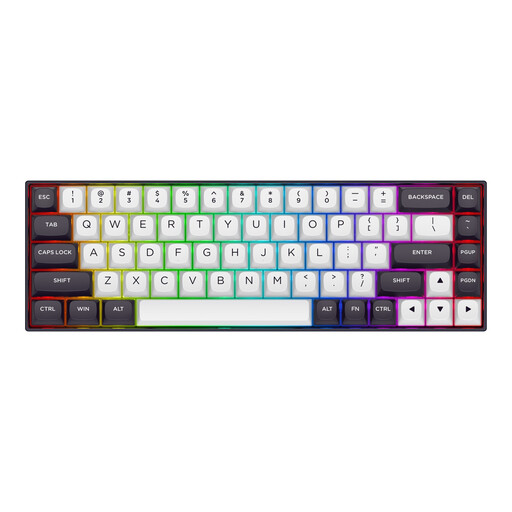
Why it's a good fit: The 65% layout with 68 keys is aimed at gamers who want plenty of mouse space. The model uses Hall Effect switches and is designed for adjustable actuation and Rapid Trigger, according to the product specifications.
The product specifications list specific values for actuation and polling rate. Compare those settings with your game and check that the software works on your PC.
Adjustable actuation from 0.2 to 4.0 mm according to the listing, 8000Hz polling rate and a detachable USB-C cable.
We've put together a full, up-to-date list of products that meet these strict selection criteria and comply with current European safety regulations.
It can be, if you're happy using Fn key combinations. For gaming, the most important movement keys are usually present, but arrow keys, F-keys and navigation keys are on a secondary layer. If you work with documents or use keyboard shortcuts a lot, you might find a 65%, 75% or TKL keyboard more convenient.
The lifespan varies depending on the switch, keycaps, case and usage. Some product listings mention a rating of 50 million or 100 million keystrokes, for example. This is a specified technical value and not a guarantee that every component will last that long. Keep the keyboard dry, don't pull hard on the cable, and clean it according to the manual.
With a wired model, you're unlikely to notice this on your energy bill, as the power consumption is generally low. On a wireless gaming keyboard, however, RGB can shorten the battery life per charge. You can lower the brightness or turn the lighting off when battery life is more important than aesthetics.
