
Vandaag of morgen in huis

Kwaliteit gegarandeerd

Welkomstaanbiedingen ontgrendelen: GRATIS bezorging | Tot 80% korting | Gratis 30 dagen JoyPlus-proefperiode
Download de app
A mechanical gaming keyboard can significantly transform your gaming and work setup. However, an expensive model is not automatically the right choice. Focusing solely on RGB lighting, an extensive feature set or an impressive battery capacity can lead to practical issues after purchase: an unsuitable layout, an inconvenient wireless connection or switches that do not match your use case.
This guide helps you compare keyboards based on verifiable specifications. It highlights key considerations for gamers, programmers, remote workers and enthusiasts who may want to customise their keyboard later.
A 60% gaming keyboard such as the RK61 saves a considerable amount of space, but it does not have dedicated arrow keys, a function row or a navigation cluster. These functions are usually accessed through an Fn combination. That is convenient for a compact gaming setup, but less intuitive for spreadsheets, programming or everyday office work.
A 75% mechanical keyboard generally retains the arrow keys and function row in a more compact design. A full-size keyboard with 104 or 108 keys also includes a numeric keypad. Check the layout as well: a US QWERTY layout differs from the Dutch QWERTY or Belgian AZERTY layout. The legends on the keycaps should match your typing habits.
A wireless mechanical keyboard may connect via Bluetooth, 2.4G or USB-C. Bluetooth is practical for a laptop, tablet or smartphone. For competitive gaming, many users prefer 2.4G or a wired connection, as these options make you less dependent on wireless settings and battery status.
A tri-mode keyboard typically combines Bluetooth, 2.4G and wired USB-C connectivity. Do not look only for the word “wireless”; check how many devices you can pair, how you switch between devices and whether the 2.4G receiver is included.
Battery claims also vary depending on usage. According to the AJAZZ AK820 MAX product description, the stated battery life is up to 120 hours without lighting and up to 55 hours with RGB enabled. Actual battery life depends on brightness, connection type and frequency of use.
A RGB gaming keyboard with numerous lighting effects may look appealing, but RGB does not determine the typing feel, stability or build quality. Terms such as “creamy sound” and “thocky” are not fixed measurement standards either. Treat them as descriptions from the product presentation, not as a guarantee of a specific acoustic experience in your room.
Instead, focus on concrete features such as:
Linear switches move smoothly without a distinct tactile bump. They are often chosen for rapid repeated keystrokes and a consistent typing feel. Tactile switches provide noticeable feedback during the keystroke. Clicky switches add an audible click. In a shared workspace or student accommodation, that noise may be less practical.
The right choice depends on your preferences and environment. A quiet tactile or linear switch may be better suited to remote work, while gamers who appreciate clear feedback may prefer tactile switches.
A hot-swappable keyboard allows you to replace compatible switches without soldering. Check whether the PCB supports 3-pin or 5-pin switches and whether the case provides enough clearance for your preferred keycaps.
This is particularly useful if you want to change the typing feel later. Turn off the keyboard and disconnect the cable before replacing switches. Use a suitable puller and pull the switch straight upwards. Product information for several Ticktype models warns that lateral force may damage the sockets or flexible plate.
A gasket mount keyboard uses dampening elements between parts of the construction. Manufacturers often describe this as providing a softer or more responsive typing feel. However, the experience is also influenced by the plate, foam layers, switches, keycaps and desk surface.
The AJAZZ AK820 models list, among other features, Poron and IXPE dampening, a flex-cut PC plate and a gasket construction. The product description also mentions PBT keycaps and a CNC-machined volume knob. These are verifiable characteristics; the final sound remains dependent on the room and your typing style.
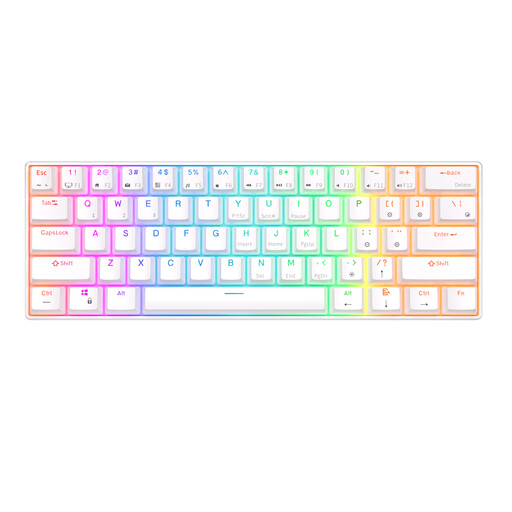
Why it fits: A compact choice for gamers and students with limited desk space. The 61-key layout works well if you are comfortable using Fn combinations.
The product information lists Bluetooth, a detachable USB cable, RGB and hot-swappable switches. Make sure beforehand that a 60% layout suits the way you work.
61 keys, RGB lighting and support for three Bluetooth devices according to the product description.
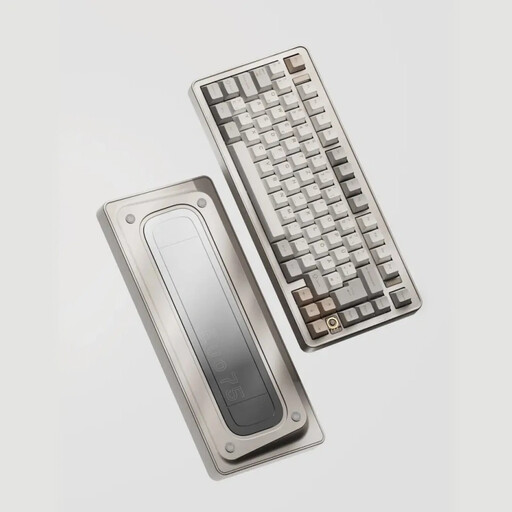
Why it fits: For users looking for a 75% layout, wireless flexibility and room for custom modifications.
The specifications list 3-pin and 5-pin hot-swap support alongside three connection types. This means the model is not restricted to a single fixed switch configuration.
80 keys, an aluminium case, an 8,000mAh battery, plus 2.4G, Bluetooth and USB-C according to the product specifications.
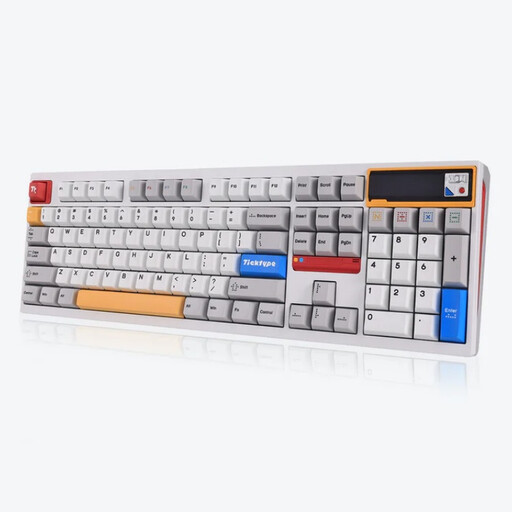
Why it fits: For anyone who needs a numeric keypad for figures, administration, programming or intensive daily typing.
A full-size layout means you will not need Fn combinations for many tasks. Do check that the US layout matches your keyboard settings.
108 keys, a hot-swappable 3- and 5-pin layout, a leaf-spring mount and a stated 8,000mAh battery.
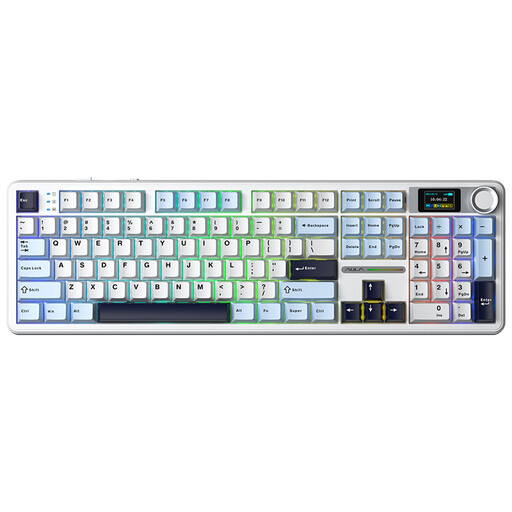
Why it fits: For users who want a full-size keyboard with a volume knob, display and multiple connection options for gaming and media.
The combination of Bluetooth, 2.4G and USB-C offers more connection options than Bluetooth alone. The product description also lists hot-swap support.
108 keys, gasket mount, a multifunction knob and a smart LCD screen according to the product information.
Browse a current selection of customisable keyboards and compare layouts, connectivity, switches and additional features based on the product specifications.
Yes, but choose the switch type and layout carefully. Linear or tactile switches can be suitable for typing, while clicky switches may sound loud in a shared space. For extensive numeric input, a full-size mechanical keyboard is practical. For a smaller desk, a 75% model offers a balance between compactness and direct access to the arrow and function keys.
With a programmable mechanical keyboard, you can customise keys, macros, lighting or profiles through software. Check whether the software is available only for Windows or also works with macOS. Also check whether settings are stored on the keyboard itself. This is useful when switching between a desktop, laptop and other devices.
Lifespan depends on the switches, stabilisers, cable, battery and conditions of use. Some product descriptions, for example, state an estimated lifespan of 50 million keystrokes for certain switches. This is a manufacturer product specification, not a guarantee for the lifespan of the keyboard as a whole.
Keep the keyboard free of dust, keep liquids away and disconnect the USB cable before cleaning. For models with a lithium battery, follow the safety instructions and avoid charging with unsuitable high-power adapters.
