
Vandaag of morgen in huis

Kwaliteit gegarandeerd

Welkomstaanbiedingen ontgrendelen: GRATIS bezorging | Tot 80% korting | Gratis 30 dagen JoyPlus-proefperiode
Download de app
A mechanical gaming keyboard can help keep your desk tidy and feel comfortable when gaming or typing. However, eye-catching RGB lighting does not guarantee that a model will suit the way you use it. The layout, switches and connection in particular determine whether your purchase remains practical day after day.
A 60% gaming keyboard usually has 61 keys. This leaves more room for your mouse, but the arrow keys, function row and numeric keypad are often missing as separate keys. That can be less practical for chatting, spreadsheets or working quickly with keyboard shortcuts.
So check beforehand whether you can genuinely work with a compact gaming keyboard layout. A full-size mechanical keyboard generally has a numeric keypad and a complete function row, but takes up more desk space.
Switches determine the sound and key feel. Quiet red switches are often chosen for their linear movement and relatively quiet operation. A tactile or clicky switch, on the other hand, provides more noticeable or audible feedback.
Also pay attention to the difference between mechanical and optical switches. The Razer Purple switches in the Huntsman Mini are described in the product information as clicky optical switches. So if you are looking for a quiet workspace, do not confuse these with a quiet linear switch.
An RGB gaming keyboard may offer various lighting effects, but you should also look at the software, profile storage and macro functions. Some models only offer lighting control through key combinations. Others are a programmable keyboard with software for profiles, macro keys and customised functions.
According to Razer’s product information, the BlackWidow and Huntsman models can be customised using Razer Synapse. This is a product feature, not a guarantee that every setting will be available on every operating system. Check compatibility with your PC before ordering.
Choose based on your daily tasks:
A US QWERTY keyboard can work perfectly well with a Dutch computer, but the physical characters on the keycaps will not always correspond to the Dutch keyboard setting in Windows.
Pay attention to these practical properties:
Specifications such as actuation force, actuation point and total travel provide more information than the colour of a switch alone. A lower actuation force may feel lighter, but personal preference remains important.
A wired keyboard does not have a battery and works directly via USB. With a wireless mechanical keyboard, you should check which connection types are supported. A Bluetooth keyboard is convenient for a laptop, tablet or phone, while a tri-mode keyboard generally combines several connection options. Check the exact modes in the product listing.
Hot-swap means that switches can be replaced without soldering them to the keyboard. This is useful if you want to try a different key feel later. However, check which switch standard is supported; not every hot-swappable keyboard accepts every switch.
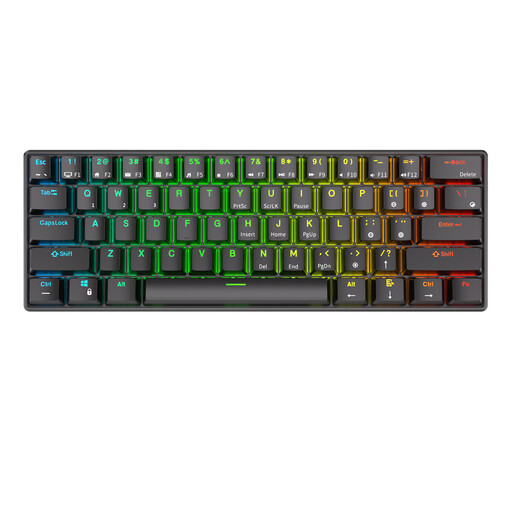
Why it suits this profile: The 61-key layout takes up very little space and offers Bluetooth, a detachable USB cable and, according to the product information, connectivity with up to three Bluetooth devices.
The product listing mentions quiet red switches and hot-swap functionality. This means you can adjust the key feel later, although you should check the compatibility of replacement switches.
61 keys, RGB lighting, Bluetooth and a built-in 1450 mAh battery according to the product description.
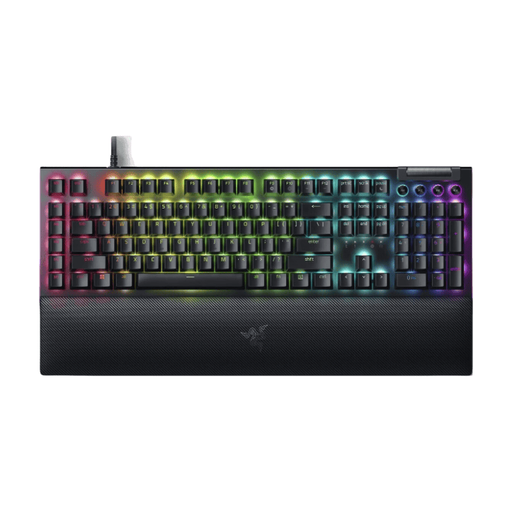
Why it suits this profile: This full-size model is aimed at gamers who want direct access to a numeric keypad, multimedia functions and six programmable macro keys.
The specifications explicitly list Razer Yellow switches, USB connectivity, US QWERTY and a wrist rest. You can therefore check the layout and connection type in advance.
Full-size ANSI layout, Razer Yellow linear switches, Chroma RGB, six macro keys and a magnetic wrist rest according to the product information.
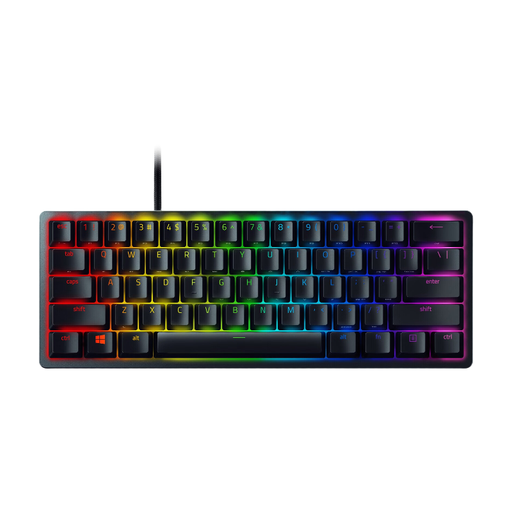
Why it suits this profile: The 60% form factor is suitable for esports enthusiasts, streamers and users with limited desk space who want a detachable USB-C cable and stored profiles.
The product specifications clearly state 61 keys, a US International layout, a wired USB connection and optical clicky switches. This avoids confusion about the size and sound.
Per-key Razer Chroma RGB, built-in memory for up to five profiles, aluminium construction and detachable USB-C cable according to the product description.
We have put together a complete, up-to-date list of products that fully meet these strict selection criteria and the applicable European safety regulations.
Check these points before completing your purchase:
Clean the keyboard regularly with a dry, soft cloth and keep liquids away from it. Use a suitable posture during long sessions and take breaks. This helps reduce unnecessary strain and keeps the device in better condition.
Yes, but choosing the right switch and layout is crucial. Linear switches can feel comfortable for fast typing, while tactile switches provide more feedback. A full-size model is useful if you often work with numbers; a 60% model requires more use of Fn combinations.
Its lifespan depends on the switch type, usage, cleaning and build quality. Brands may specify a particular number of keystrokes. According to the product information, Razer states a lifespan of up to 100 million keystrokes for the Huntsman Mini. This is a manufacturer’s claim and is not a guarantee for every user or every component.
A Bluetooth keyboard uses a built-in battery that needs to be recharged periodically. RGB lighting can increase power consumption. For the RK61, the product description states that it has a 1450 mAh battery. Actual battery life depends on the lighting, connection mode and intensity of use.
