
Vandaag of morgen in huis

Kwaliteit gegarandeerd

Welkomstaanbiedingen ontgrendelen: GRATIS bezorging | Tot 80% korting | Gratis 30 dagen JoyPlus-proefperiode
Download de app
A mechanical gaming keyboard can make your desk feel more organised and offers a different typing experience from a standard membrane keyboard. However, a high polling rate, colourful RGB lighting or a well-known switch name does not automatically make it the right choice. The layout, software, connection and language layout are just as important in determining whether a keyboard works well for gaming and everyday use.
A 60% gaming keyboard usually has no dedicated arrow keys, function row or navigation keys. These functions are accessed using an Fn combination instead. This saves space, but can be inconvenient when working from home, programming or playing games in which you regularly use the F keys.
A TKL gaming keyboard leaves out the numeric keypad, but generally retains the arrow keys and function row. A 75% mechanical keyboard often provides the same important functions in an even more compact format. However, always check the exact number of keys and the physical layout.
For users in the Netherlands, QWERTY and AZERTY are not interchangeable. An AZERTY gaming keyboard may be suitable for anyone using a Belgian layout, but it feels different from a Dutch or US QWERTY model. Do not just look at the product title: also check the ISO or ANSI layout, the language and the markings on the keycaps.
An 8,000 Hz polling rate sounds impressive, but its practical value depends on your computer, game, settings and usage. Hall Effect switches and Rapid Trigger functions also often require software configuration. For many players, a standard mechanical switch with 1,000 Hz may be perfectly adequate.
Also pay attention to the type of switch. A keyboard with red switches usually has linear switches without a tactile click. This can feel comfortable for rapid, repeated movements, but the noise level and key feel vary from one model to another.
Measure the space between your monitor, mouse and the edge of your desk. A TKL model is around 36 cm wide, while a 60% model is often approximately 29 cm wide. Fewer keys do not necessarily mean fewer settings: many functions are available through Fn combinations or programmable profiles.
Extra mouse space can be important for FPS gaming. For spreadsheets and working with numbers, a numeric keypad is particularly practical. A full-size model, such as the AJAZZ AK35I V3, therefore remains relevant for users who combine work and gaming.
Mechanical switches are broadly categorised as linear, tactile or clicky. Linear switches move smoothly and consistently. Tactile switches provide a noticeable bump. Clicky switches generally produce a distinct clicking sound. According to the product description, the Corsair K70 CORE TKL uses Corsair MLX Red v2 linear switches with pre-applied lubricant.
A hot-swappable keyboard allows you to replace compatible 3- or 5-pin switches without soldering. Check beforehand that the sockets and switches are genuinely compatible. Hot-swap does not mean that every switch will automatically fit.
A Hall Effect gaming keyboard uses magnetic detection instead of conventional mechanical contact measurement. Features such as adjustable actuation and Rapid Trigger may be appealing for competitive FPS games. According to the product descriptions from AULA and Redragon, actuation points can be adjusted via software on certain models. Treat such performance claims as the brand’s product specifications; your actual experience may depend on your settings and system configuration.
A wireless mechanical keyboard offers greater flexibility, but pay attention to the connection modes used: Bluetooth, 2.4 GHz and USB-C do not work in exactly the same way. For use with a console, you should also check whether the specific model works with your PlayStation or Xbox.
A RGB gaming keyboard is primarily a lighting and customisation feature. Check whether the lighting can be configured per key, whether profiles are stored in the keyboard’s internal memory and which operating systems the software supports. According to the specifications, the Corsair K70 CORE TKL has five profiles available in its internal memory. The USB-C cable is detachable and the reported polling rate is up to 1,000 Hz.
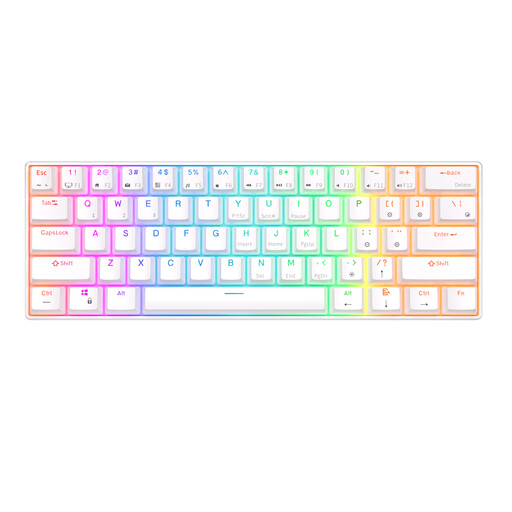
Why it suits this profile: This 60% model is compact and supports Bluetooth as well as a detachable USB cable. That makes it suitable for a compact workspace or use with multiple devices.
The product information explicitly states the 61-key layout and Bluetooth support. However, check whether the lack of dedicated arrow keys suits the way you use it.
61 keys, RGB lighting, Bluetooth and a 1,450 mAh battery according to the product specifications.
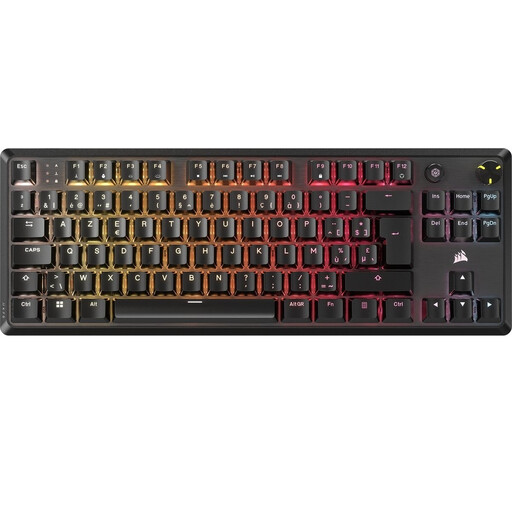
Why it suits this profile: The BE AZERTY TKL layout is suitable for users who need a Belgian layout while still wanting plenty of room for broad mouse movements.
The layout, switch type and connection are clearly specified. This means you do not have to rely solely on images or general terms such as ‘compact’.
TKL, BE ISO AZERTY, MLX Red v2 linear switches, per-key RGB, volume control and five profiles according to Corsair.
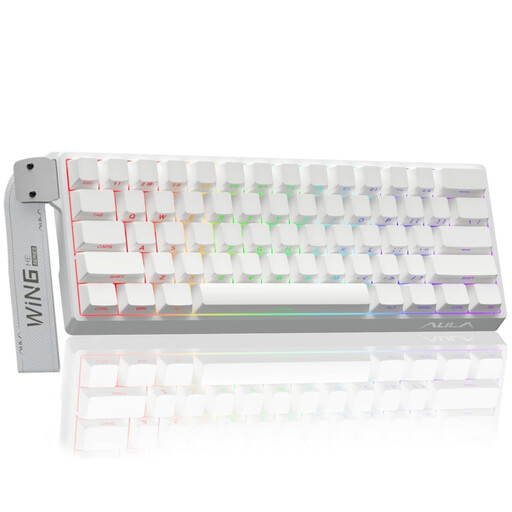
Why it suits this profile: This wired model is aimed at players looking for Hall Effect switches, adjustable actuation and Rapid Trigger for competitive games.
The features are tied to a specific 60% layout and wired connection. You therefore know in advance that saving space may mean sacrificing dedicated keys.
Hall Effect magnetic switches, Rapid Trigger, RGB and a stated polling rate of 8,000 Hz.
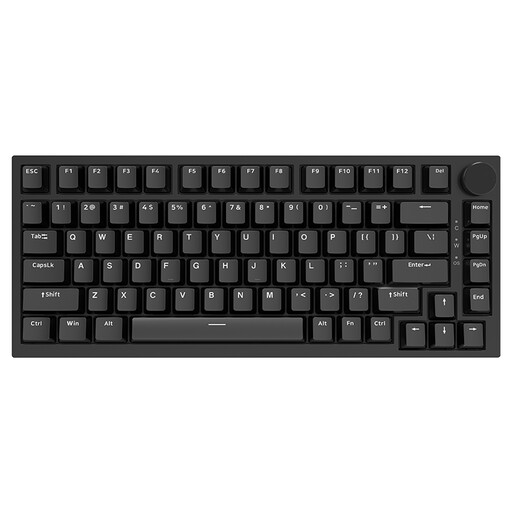
Why it suits this profile: The 75% layout retains the arrow keys and function keys, while the volume control and hot-swap function are useful for work, writing and gaming.
The product specifications mention 3- and 5-pin hot-swap support and a wired USB-C connection. Even so, check switch compatibility before replacing any switches.
75% layout, PBT keycaps, gasket construction, volume control, RGB and linear switches according to the product information.
We have put together a complete, up-to-date list of products that fully meet these strict selection criteria and the applicable European safety regulations.
Yes, provided the layout and noise level suit your working environment. Linear switches often provide a smooth, consistent feel, while clicky switches are more clearly audible. A 75% or TKL model retains more practical keys than a 60% model.
Its lifespan depends on the switches, keycaps, electronics and conditions of use. Brands sometimes state a number of keystrokes, but this is a product specification rather than a guarantee for every user. Dust, liquid and incorrectly changing switches can shorten its lifespan.
Power consumption generally increases when RGB lighting is active. Battery life varies by model, connection and brightness. Therefore, check the stated capacity and battery life separately for Bluetooth, 2.4 GHz and lighting.
