
Vandaag of morgen in huis

Kwaliteit gegarandeerd

Welkomstaanbiedingen ontgrendelen: GRATIS bezorging | Tot 80% korting | Gratis 30 dagen JoyPlus-proefperiode
Download de app
A mechanical gaming keyboard can noticeably transform your gaming and typing experience, but a high polling rate, colourful RGB lighting or a well-known brand name does not tell you everything. The right choice mainly depends on the size, layout, switches, connectivity and software.
Many buyers run into the same problems: a keyboard with too few functions for everyday work, a US layout that types differently from expected, or switches that feel too loud or too light in practice. Use the points below to compare models based on verifiable specifications rather than marketing terms.
A 60% gaming keyboard saves a lot of space, but usually has no dedicated arrow keys, function row or navigation cluster. These functions are often accessed using the Fn key. That works well for a minimalist gaming desk, but can be less practical for spreadsheets, programming or office work.
A 75% mechanical keyboard generally offers arrow keys and a compact function row. A TKL gaming keyboard leaves out the numeric keypad, but usually retains the function and navigation keys. So do not just check the percentage: also check the actual number of keys.
Linear switches move without an audible click or tactile bump. They are popular for gaming, but are not automatically suitable for everyone. If you type lightly, you may press keys accidentally more often. A heavier switch can feel more tiring during long sessions.
Pay attention to the actuation force, actuation point and total key travel. On a Hall Effect keyboard, these values can often be adjusted through software. According to the product information for certain models, Rapid Trigger can dynamically adjust how quickly a key resets. This may be interesting for competitive gaming, but has less value if you mainly work, chat or play casual games.
A QWERTY US layout uses a different key arrangement from a Dutch ISO layout. The physical shape of the Enter and Shift keys, as well as the positioning of special characters, may differ. Windows can be set to use a different input language, but the symbols on the keycaps remain the same.
For Dutch users, this is particularly important for punctuation, symbols and the key combinations you use every day. Also check whether the product specifies AZERTY, QWERTZ, ANSI or ISO. A keyboard with a Belgian AZERTY layout is not the same as a QWERTY US layout.
Use this guide:
A compact gaming keyboard is useful for small desks and esports setups, but check in advance how you access the missing functions.
On a traditional mechanical keyboard, switches are usually linear, tactile or clicky. Linear switches are often smooth and relatively predictable. Clicky switches produce an audible click and are not always suitable for a shared workspace or streaming room.
A hot-swappable keyboard allows compatible 3- or 5-pin switches to be replaced without soldering. Do check that the PCB and the selected switches work together. A gasket mount, foam layers and lubricated stabilisers can affect the sound and key feel, but the final experience also depends on the keycaps, surface and type of switch.
On a Hall Effect keyboard, magnetic sensors detect the position of each key. According to their product descriptions, some models offer an adjustable actuation point and Rapid Trigger. Pay attention to software support and compatibility, and consider whether you will actually use these features.
A wired mechanical keyboard works via USB and does not require a battery or wireless receiver. This makes it a straightforward choice for a fixed PC setup. A wireless mechanical keyboard offers greater flexibility, especially if you switch between a PC, laptop and tablet. Check whether the model supports Bluetooth, 2.4G and USB, and how charging is handled.
An RGB keyboard may offer per-key adjustable lighting. This is practical in a dark room, but on wireless models it uses more power when the lighting is left on continuously. A volume dial or media keys are particularly useful when you want to adjust audio quickly while gaming or streaming.

Why it suits this profile: This 75% model combines a compact layout with arrow keys, a QWERTY US layout and a wired USB-C connection. That makes it easy to use for anyone looking for their first mechanical gaming keyboard.
The product information states support for 3- and 5-pin hot-swappable switches, so you can replace the switches later without soldering. The volume dial means media controls do not have to be accessed solely through shortcut keys.
75% layout, PBT keycaps, gasket mount, linear switches and RGB lighting. The stated dimensions are 327 × 136 × 40 mm.
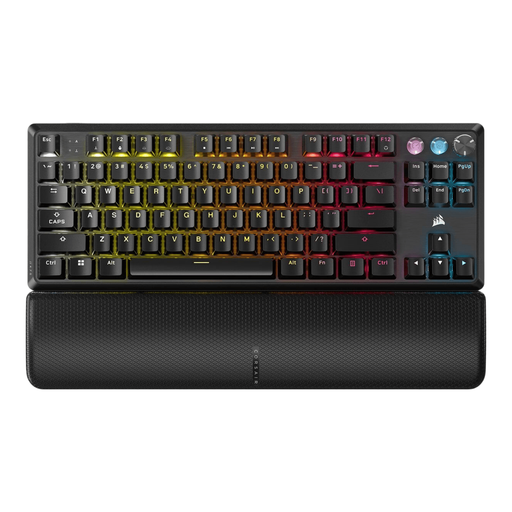
Why it suits this profile: For players who want to combine adjustable magnetic switches and extensive software with a TKL size in a fixed PC setup.
The product page states an adjustable actuation range of 0.1 to 4.0 mm, Rapid Trigger and software-based profiles. This allows you to fine-tune the response instead of relying solely on a general speed claim.
Hall Effect switches, up to 8000 Hz polling according to the product specification, per-key RGB, rotary dial and detachable wrist rest.
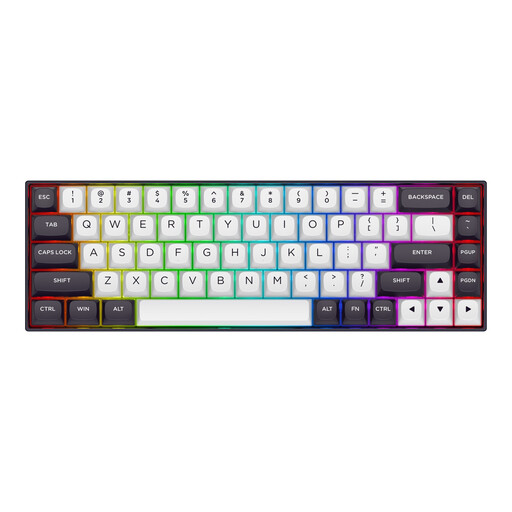
Why it suits this profile: Designed for players who use a very compact keyboard for shooters and want to retain plenty of desk space for mouse movement.
The product description mentions adjustable actuation from 0.2 to 4.0 mm and Rapid Trigger. Before buying, check that the associated software and features are compatible with your games and operating system.
68 keys, Hall Effect linear switches, US layout, metal top plate, RGB and a stated polling rate of 8000 Hz.
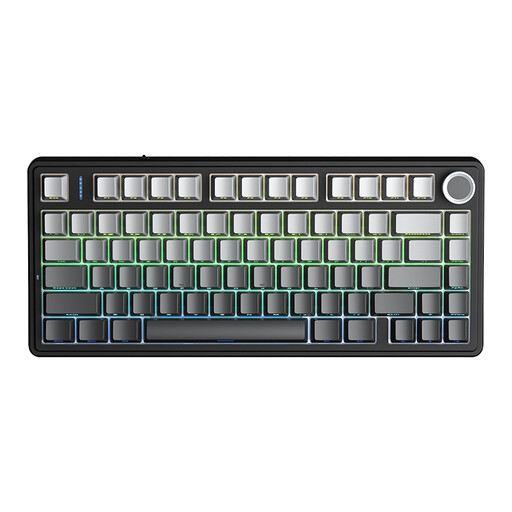
Why it suits this profile: A practical option for anyone who switches between a PC, laptop and other devices, while still wanting arrow keys, a volume dial and a compact layout.
The tri-mode connection offers Bluetooth, 2.4G and wired use. The hot-swappable design means you will not immediately need a new keyboard when changing switches.
75% layout, 3 connection modes, 4000mAh battery according to the product information, RGB, hot-swap and a multifunctional knob.
We have put together a complete, up-to-date list of products that fully meet these strict selection criteria and the applicable European safety regulations.
Wired use means you do not have to worry about battery life or wireless interference. USB is therefore a practical choice for a fixed gaming PC. Wireless models are more convenient if you use multiple devices. In that case, compare the available modes, battery capacity and whether RGB lighting affects the operating time.
Lifespan varies depending on the switches, PCB, keycaps and usage. Manufacturers sometimes state a number of keystrokes, but this is a product specification rather than a guarantee for every user. A hot-swappable model can remain usable for longer because worn switches can be replaced individually.
Not every mechanical keyboard sounds the same. Linear switches are often quieter than clicky switches, while gasket mounts, foam layers and lubricated stabilisers can affect the sound further. For a shared space, it is wise to assess the switch type and sound dampening together, rather than focusing only on the word “mechanical”.
