
Vandaag of morgen in huis

Kwaliteit gegarandeerd

Welkomstaanbiedingen ontgrendelen: GRATIS bezorging | Tot 80% korting | Gratis 30 dagen JoyPlus-proefperiode
Download de app
A mechanical gaming keyboard can be comfortable for gaming, programming and long typing sessions, but the differences between models are not limited to RGB lighting or appearance. The wrong layout, unclear software or limited switch compatibility can mean your purchase is not the best fit for your desk or the way you use it.
This buying guide from the Joybuy Product Recommendation Officer takes you through the key specifications. You’ll discover which pitfalls are often overlooked and which models suit different users in the Netherlands.
A 75% or 80% model saves space and gives your mouse more room to move. However, it may not include a numeric keypad, separate Home and End keys or certain function keys. This is not always an issue for competitive gaming, but a full-size mechanical keyboard may be more practical for accounting, spreadsheets or frequent number entry.
Also check the key layout. Many models use a QWERTY US layout. It works technically with a Dutch computer, but the position of Enter, Shift and special characters, among others, may differ from an ISO-NL keyboard.
A wireless mechanical keyboard may connect via Bluetooth, a 2.4GHz receiver or both. Bluetooth is useful for laptops and tablets, while 2.4GHz is generally intended for a direct wireless connection to a PC. For gaming, it is also worth checking whether a wired USB-C mode is available.
With models that have a battery, pay attention to the capacity, charging method and safety information. Use a suitable cable and power source as instructed in the manual. A larger battery capacity does not necessarily indicate exactly how long the keyboard will last; lighting, connection mode and usage time all affect power consumption.
An RGB keyboard with lots of lighting effects may look appealing, but check how the lighting is adjusted. Can this be done using key combinations, software or an online driver? With a programmable keyboard, it is also important to check whether macros, profiles and key remapping are actually supported.
The same applies to a hot-swappable keyboard. Hot-swap means you can replace switches without soldering, but the connection may vary. Check whether the board supports 3-pin switches, 5-pin switches or both.
Do not choose based on the percentage alone. Look at the actual key layout and check whether you need a numeric keypad, media keys or a function row.
Linear switches move without a clear tactile interruption. They are often chosen by gamers who want a smooth, consistent keystroke. Tactile switches provide a noticeable bump when pressed. This can be comfortable for typing, as you receive feedback without having to press the key all the way down.
Hall Effect keyboards use magnetic sensors. According to the Royalaxe E75 product description, the TTC Magnetic HE switches support Rapid Trigger. This is a product specification, not a guarantee of better gaming performance for every user. Check that the software settings and compatibility match your games and operating system.
PBT keycaps have a matt, hard-wearing finish according to the product descriptions of several models. In practice, the material, profile and printing method may vary from one product to another. Double-injection keycaps are designed to keep legends visible for longer, but always check the specific product specification.
A gasket-mount keyboard uses a flexible layer between the plate and the case. According to the manufacturer’s description, this can provide a softer keystroke and reduce resonance. The actual sound also depends on the switches, keycaps, plate material and the damping underneath.
A keyboard with a volume knob is useful for music, video and games. Check whether the knob controls volume only or can perform other functions as well.
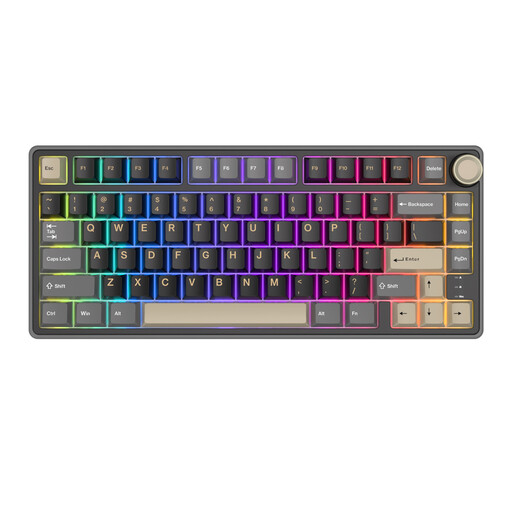
Why it suits this profile: This wired 75% model keeps the purchase straightforward and saves space on a compact desk. According to the product description, it has a volume knob, RGB lighting, PBT keycaps and support for QMK and VIA.
The specifications clearly state an 81-key layout and USB connection. This means you do not have to pay for wireless features you will not use.
Compact 75% layout; hot-swappable switches; programmable functions via QMK and VIA according to the product description.
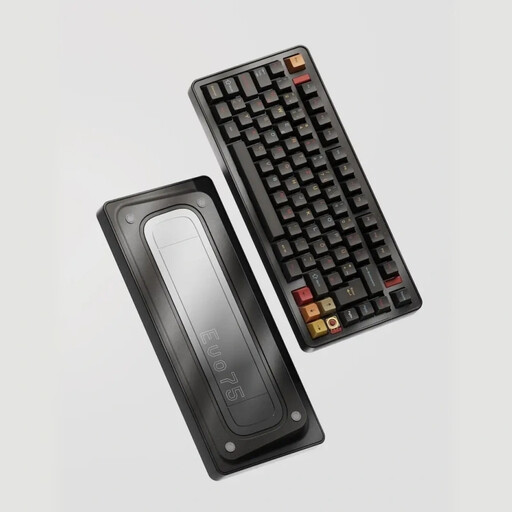
Why it suits this profile: According to the product specification, the EVO75 combines an aluminium case with a 75% layout, tri-mode connectivity and an 8000mAh battery. VIA compatibility and hot-swap capability appeal to users who want to customise their keyboard.
The three connection options are clearly listed: 2.4GHz, Bluetooth and USB-C. The product information also highlights 3- and 5-pin switches and the replacement procedure.
Tri-mode connectivity; aluminium case; hot-swap and VIA according to the product information.
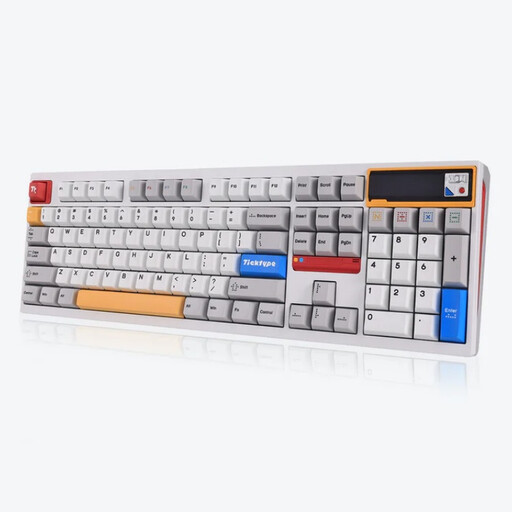
Why it suits this profile: The full-size layout with 108 keys is suitable for users who frequently enter numbers or want a traditional workstation setup. According to the specifications, this model has tri-mode connectivity, hot-swap capability, RGB and an 8000mAh battery.
The layout and connections are clearly specified. The keyboard must be switched off before hot-swapping, and a suitable switch puller is required.
108 keys with numeric keypad; 2.4GHz, Bluetooth and USB-C; support for 3- and 5-pin switches according to the product information.
We have put together a complete, up-to-date list of products that fully meet these strict selection criteria and the applicable European safety regulations.
For a keyboard with a battery, check whether the product page lists safety information, manufacturer details and an EU responsible person. A CE mark should not automatically be treated as a guarantee of quality; check that the necessary information and documentation are available.
Also bear the following points in mind:
Yes, it can be. Choose a layout with the keys you use every day and consider the switch type. Tactile switches provide noticeable feedback, while linear switches offer a smooth, consistent keystroke. Programmable layers and customised shortcuts can sometimes be useful for programming.
Its lifespan depends on usage, dust, moisture, switch quality and maintenance. According to product descriptions, PBT keycaps are designed for durable use, while hot-swap sockets make replacing switches easier. This does not mean that every component will have the same lifespan.
Power consumption is usually limited, but a model with RGB lighting and a built-in battery needs to be charged regularly. Wired use avoids the need to recharge. If you mainly use a fixed PC, you may therefore also want to consider a wired model.
