
Vandaag of morgen in huis

Kwaliteit gegarandeerd

Welkomstaanbiedingen ontgrendelen: GRATIS bezorging | Tot 80% korting | Gratis 30 dagen JoyPlus-proefperiode
Download de app
A mechanical gaming keyboard can make your desk more compact, offer extra features and give you more room for your mouse. However, comparing the options can be difficult. Terms such as RGB, hot-swap and gasket mount sound appealing, but they only mean something if you know what you are actually getting.
Pay particular attention to these three common pitfalls:
“Mechanical feel” is not the same as mechanical switches
Some affordable keyboards use a membrane construction with a mechanical feel. This can be perfectly suitable for light use, but you usually cannot replace the switches, and the typing experience is different from that of a genuinely mechanical model.
A compact layout can hide certain functions
A 60% keyboard often has no separate arrow keys, function row or navigation cluster. These functions are then accessed using an Fn combination. This saves space, but can be less practical for programming, spreadsheets or everyday office work.
RGB lighting cannot replace good build quality
Lots of colours and lighting effects are visually appealing, but also check the connection, keycap material, stabilisers and whether the switches can be replaced. An RGB gaming keyboard without suitable software or clear controls may be limited in practice.
The right layout depends on how you intend to use it:
Also check the language layout. A US QWERTY keyboard has a different Enter key, Shift layout and punctuation marks from a Dutch QWERTY layout. US QWERTY can be particularly convenient for programmers, but check the symbols printed on the keycaps beforehand.
Mechanical switches determine the typing feel, sound and amount of pressure required. Broadly speaking, there are:
A hot-swappable keyboard allows compatible 3- or 5-pin switches to be replaced without soldering. However, check whether the included PCB supports the type you want. “Hot-swap” does not automatically mean that every switch will fit.
A model with PBT keycaps has keycaps made from a type of plastic that, according to the product information, generally develops a shiny surface less quickly than ABS. Lifespan also depends on usage, cleaning and the quality of the switches underneath.
A wired keyboard generally uses USB-C or a fixed USB connection. This eliminates the need for charging and is straightforward for a permanent PC setup. A wireless mechanical keyboard can work via Bluetooth, 2.4 GHz or both.
A tri-mode keyboard usually combines:
For wireless models, check the battery capacity, charging method and the number of devices you can pair. According to the product description, the AULA F75 Pro, for example, has a 4000 mAh battery and supports Bluetooth, 2.4 GHz and USB. Actual battery life may depend on the lighting, connection and settings.
A gasket mount keyboard uses flexible elements between the plate and the case. According to the product description, this can provide a softer typing feel and reduce resonance. The experience still depends on the plate, switches, keycaps and internal dampening. Also browse our gasket mount keyboard range if you are specifically looking for this construction.
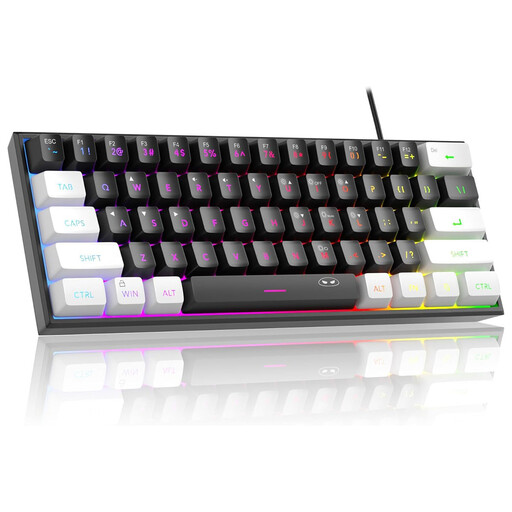
Why it suits this profile: This wired 60% model is aimed at people who need minimal desk space and mainly want to game on a PC, Mac or console. According to the product description, it uses a membrane construction with a mechanical feel, so do not expect replaceable mechanical switches.
The product information clearly states the 60% layout and membrane construction. This means you know in advance that it is not a hot-swappable mechanical keyboard.
61 keys, wired connection, RGB lighting and a compact size of approximately 29.2 × 10.1 cm.
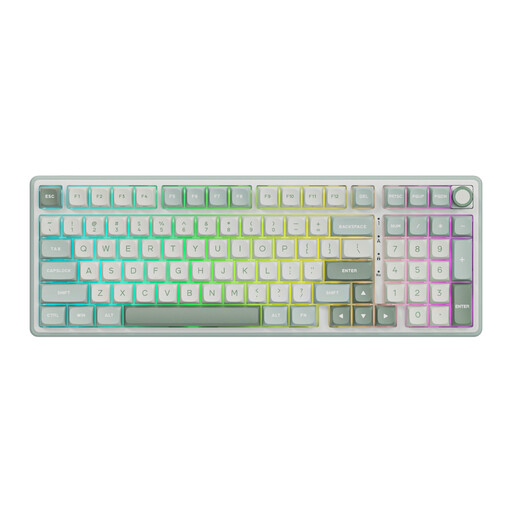
Why it suits this profile: The 98% layout retains a numeric keypad while combining it with features for enthusiasts who like customisable keyboards.
The listed gasket mount, PBT keycaps and hot-swap function are each mentioned separately in the product description. Before buying, check the exact switch variant.
Numeric keypad, volume knob, RGB lighting, MDA profile and programmable online driver according to the product information.
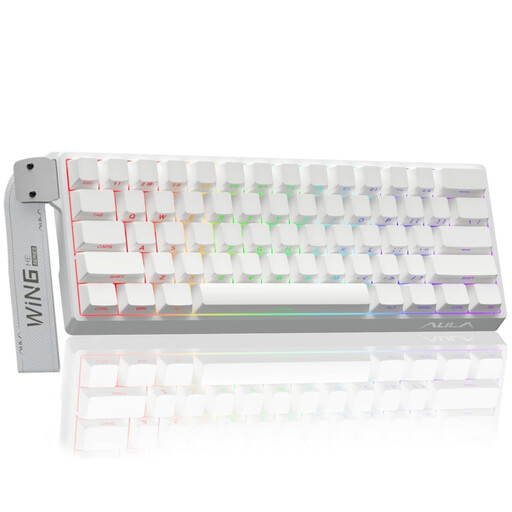
Why it suits this profile: This model is designed for players looking for specific adjustment options. According to the product name and product information, it features Hall Effect magnetic switches, Rapid Trigger and adjustable actuation.
The specifications state specific values, including an 8K polling rate and 0.01 mm adjustable actuation. Check software support and compatibility with your PC before ordering.
Compact 60% layout, Hall Effect technology, Rapid Trigger and RGB lighting according to the stated product specifications.
We have put together a complete, up-to-date list of products that fully meet these strict selection criteria and the applicable European safety regulations.
Use this quick checklist:
For a gaming keyboard for PC and Mac, the Fn layer is also important. Mac compatibility does not always mean that all media keys, software functions or shortcuts work in the same way as they do in Windows.
It can be, especially if you have limited desk space and are used to Fn combinations. For programming, word processing and spreadsheets, a 75% or 80% layout is often more practical because the arrow and navigation keys remain directly accessible.
Lifespan depends on the switches, stabilisers, keycaps, usage and maintenance. Manufacturers may specify a particular number of keystrokes, but this is a product specification rather than a guarantee for every user. Keep the keyboard dry, remove dust regularly and do not use excessive force when replacing keycaps or switches.
With a wired keyboard, this is generally only noticeable to a limited extent through the power consumption of the USB connection. With a wireless model, RGB lighting does use battery capacity. If longer battery life is important to you, lower the brightness or switch the lighting off.
