
Vandaag of morgen in huis

Kwaliteit gegarandeerd

Welkomstaanbiedingen ontgrendelen: GRATIS bezorging | Tot 80% korting | Gratis 30 dagen JoyPlus-proefperiode
Download de app
A mechanical gaming keyboard can be a clear upgrade for gaming, programming and everyday typing. However, you may sometimes be paying mainly for RGB lighting or high polling rates, while important factors such as the layout, connection and switch replaceability receive less attention.
For Dutch users, these pitfalls are particularly relevant:
The size determines how much desk space you have left and which functions are available directly.
A 60% model is not automatically inconvenient, but check the key combinations in advance. If you regularly use spreadsheets or need quick access to navigation keys, 75% or TKL is often the more logical choice.
Linear switches move without a noticeable click or clear resistance halfway through the press. They are often chosen for gaming because the keystroke feels consistent. Red switches are a common variant.
Clicky switches, by contrast, produce an audible click. This can be pleasant for typists, but is less suitable in a shared office. Tactile switches have a noticeable bump during the keystroke without the same click as clicky switches.
Also pay attention to the difference between regular mechanical switches and Hall Effect magnetic switches. Models such as the Redragon M68 use magnetic switches with adjustable actuation and Rapid Trigger via software, according to the product specifications. This can be interesting for competitive gaming, but usually requires more configuration and compatibility checks than a traditional mechanical keyboard.
A wired mechanical keyboard connected via USB-C has no battery and is ready to use as soon as it is connected. This avoids charging and potential connection problems. A detachable cable is also useful for transport.
Check the following before buying:
PBT keycaps are generally more resistant to wear and developing a shiny surface than ABS keycaps, according to the product information. That does not mean every PBT set is the same quality: also consider the profile, legends and available layout.
A gasket mount keyboard uses flexible materials between parts of the construction. According to the descriptions of various models, the aim is to provide a softer typing feel and reduce resonance. However, the experience also depends on the plate, switches, keycaps and internal foam layers.
Multiple layers of Poron, IXPE or other dampening materials can affect the sound. This does not make a keyboard silent: mechanical keys still produce keystroke noise. If you work in a shared space, it is worth assessing the switch type and noise level together.
A keyboard with a volume knob is particularly practical during gaming, video calls and media use. However, check whether the knob only controls volume or can also be assigned other functions through software.

Why it suits this profile: This wired model combines a 75% layout with a volume knob, RGB lighting and a hot-swappable PCB. This gives you plenty of features without immediately moving to a larger keyboard.
The specifications list a QWERTY US layout, linear switches, PBT keycaps and support for 3-pin and 5-pin switches. So check the layout before placing your order.
75% size, wired USB-C connection, gasket mount, PBT keycaps and a CNC volume knob.
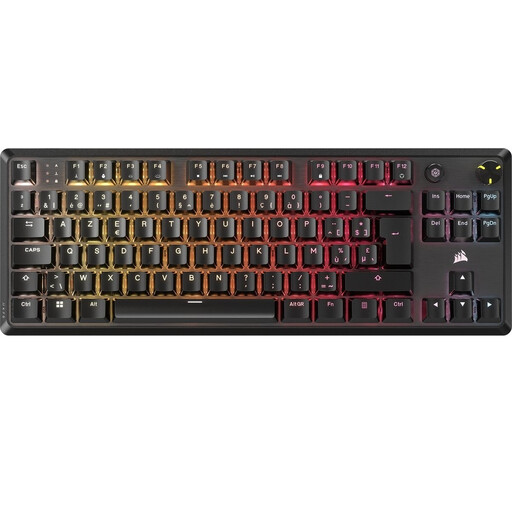
Why it suits this profile: The TKL design leaves room for your mouse, while an aluminium top plate, detachable USB-C cable and programmable lighting provide a more comprehensive package.
The product details mention two layers of sound-dampening foam, pre-lubricated stabilisers and linear MLX Red v2 switches. Please note: this is a BE AZERTY model, not QWERTY US.
TKL layout, per-key RGB, rotary dial, NKRO and five profiles stored in the onboard memory.
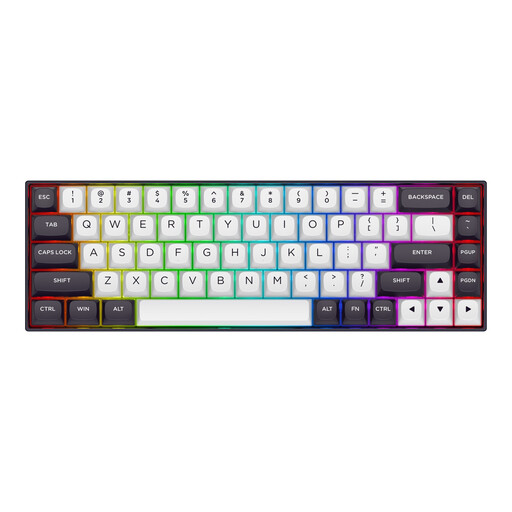
Why it suits this profile: The 68-key layout is aimed at players who want plenty of room for their mouse. The product specifications list Hall Effect switches, adjustable actuation and a polling rate of up to 8000 Hz.
According to the listing, actuation can be adjusted through software from 0.2 to 4.0 mm. Check in advance whether you actually want to use these functions and whether the US layout suits you.
65%-style size with 68 keys, aluminium top plate, RGB and detachable USB-C cable.
We have compiled a complete, up-to-date list of products that fully meet these strict selection criteria and the applicable European safety regulations.
Wired connectivity means you do not have to charge a battery and gives you a direct USB connection. For most players, a reliable connection is more important than an extremely high polling rate. Choose wireless only when freedom of movement or a tidy desk matters more to you.
Its lifespan depends on switch quality, use, dust and liquid damage. Some product listings, for example, quote 50 million or 100 million keystrokes, but these are manufacturer specifications and not a guarantee of the keyboard’s overall lifespan. A hot-swappable model can be easier to maintain, as individual switches can be replaced.
No. RGB can be useful for visibility, atmosphere or profiles, but it has no direct effect on the keystroke. Above all, check whether the lighting can be dimmed and whether your preferences can be saved without permanently installing software.
