
Vandaag of morgen in huis

Kwaliteit gegarandeerd

Welkomstaanbiedingen ontgrendelen: GRATIS bezorging | Tot 80% korting | Gratis 30 dagen JoyPlus-proefperiode
Download de app
A mechanical gaming keyboard can help keep your desk tidy and offers plenty of possibilities for gaming, programming and working from home. However, it is easy to pay too much for features you will never use. With compact models in particular, the layout, switch type and connection are more important than eye-catching design or a long list of marketing terms.
A 60% keyboard usually has 61 keys and omits the arrow keys and function row. This saves space, but you will often need to use the Fn key for functions that are immediately available on a larger keyboard. The extra space for your mouse can be useful for FPS games, while programmers and people working from home may miss the arrow keys, function keys or navigation keys.
A 65% keyboard generally adds arrow keys. A 75% keyboard often also includes a function row while retaining a compact format. Check whether you need a QWERTY US keyboard, QWERTZ or AZERTY layout. The wrong layout can take some getting used to, particularly for special characters and keyboard shortcuts.
An RGB keyboard may look attractive, but lighting does not automatically determine how quickly or accurately input is registered. Instead, look at features such as N-key rollover, anti-ghosting, the connection and the switch type. RGB is particularly useful when you play in a dark room or want to make a specific key layout easier to see.
Also check whether the effects can be adjusted directly using the keys or whether software is required. Not every system supports the same configurations.
A wireless mechanical keyboard is practical for a tidy desk or use with multiple devices. However, you will need to consider charging, Bluetooth profiles and the supplied receiver. Some users prefer a wired connection for competitive gaming.
A tri-mode model usually combines USB, Bluetooth and 2.4 GHz. Always check which modes are actually supported and whether the stated battery life is measured with the lighting on or off. A claim such as ‘up to 120 hours’ often applies under specific conditions according to the product description.
Use this layout as a practical guide:
A keyboard with a volume knob can be practical while gaming or making video calls. Check whether the knob only controls the volume or also supports lighting, media functions or custom actions.
Mechanical switches determine the key feel and sound:
With a Hall Effect keyboard, do not focus on the term alone. Check whether actuation distance, rapid trigger and polling rate are actually listed as features.
A hot-swappable keyboard allows you to replace compatible switches without soldering. Check whether the PCB supports 3-pin or 5-pin switches and whether replacement switches are readily available.
A gasket mount keyboard uses a flexible layer between parts of the construction. The overall experience also depends on the plate, stabilisers and dampening layers. Manufacturers may use terms such as ‘soft’ or ‘quiet’; treat these as product claims and check the specific components, such as Poron, IXPE or other foam layers. A mechanical keyboard with PBT keycaps may also feel more hard-wearing than a model with ABS keycaps, but overall build quality remains the deciding factor.

Why it suits this profile: This wired 75% model combines arrow keys and function keys with a compact format. That makes it suitable for gaming, everyday typing and programming without the need to manage a battery.
The specifications state that it has a QWERTY US layout, hot-swapping for 3-pin and 5-pin switches, and a USB-C cable. You therefore do not need to maintain a wireless battery and can replace the switches later.
75% layout, CNC volume knob, PBT keycaps, gasket construction and, according to the product description, multiple dampening layers.

Why it suits this profile: Suitable for users looking for a mechanical keyboard for several devices. The 80% layout keeps many keys available, while the tri-mode connection works well with a PC, laptop or tablet.
The product information states that it supports both wireless and wired use. The switches are also hot-swappable, so you are not completely tied to the supplied key feel.
QWERTY US layout, gasket mount, PBT keycaps, programmable knob and a stated battery capacity of 4000 mAh.
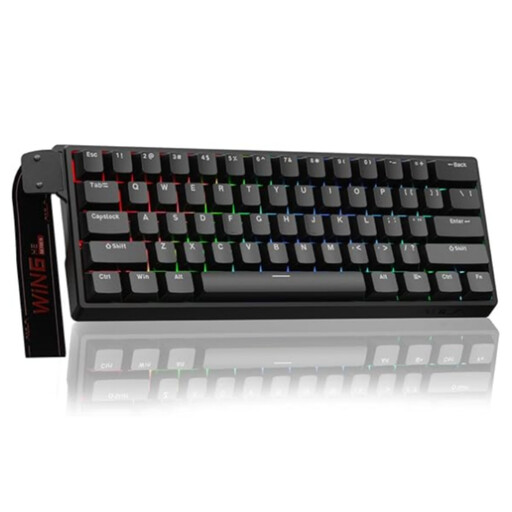
Why it suits this profile: This model is aimed at players looking for a compact gaming keyboard with Hall Effect technology and rapid trigger, particularly for fast-paced FPS games.
The product name and specifications mention adjustable actuation, Hall Effect magnetic switches, rapid trigger and an 8K polling rate. Before buying, check the software support and the settings you want.
60% format, RGB lighting, wired USB connection and, according to the product information, 0.01 mm adjustable actuation.
We have put together a complete, up-to-date list of products that fully meet these strict selection criteria and the applicable European safety regulations.
It can be, but you will need to get used to using Fn combinations for the arrow keys, function keys and navigation. For everyday work and programming, a 65% or 75% keyboard is often more practical if you want to stay compact without sacrificing too many functions.
Its lifespan depends on the switches, the quality of the sockets, stabilisers and keycaps, as well as how it is used. Manufacturers sometimes state a number of keystrokes, but this is a product specification measured under certain test conditions and is not a guarantee of the lifespan of the entire keyboard. Keep the board dry, clean it regularly and do not force the switches when replacing them.
For everyday gaming, wireless use can be practical. Some players choose a wired connection for competitive FPS games because it is predictable and does not require battery management. A tri-mode keyboard offers greater flexibility, but check the battery life, the 2.4 GHz receiver and whether you can continue using it in wired mode while it is charging.
