
Vandaag of morgen in huis

Kwaliteit gegarandeerd

Welkomstaanbiedingen ontgrendelen: GRATIS bezorging | Tot 80% korting | Gratis 30 dagen JoyPlus-proefperiode
Download de app
A mechanical gaming keyboard can be a joy for gaming, typing and working from home, but the product page doesn’t always tell the whole story. Terms like RGB, Rapid Trigger and hot-swappable sound appealing, while important details such as layout, connectivity and switch type are sometimes less clearly stated.
For Dutch users, these three pitfalls are especially relevant:
Choose the size based on your daily use:
Also look out for the US QWERTY layout. The position of Enter, Shift and special characters differs from a Dutch ISO layout. Check in advance whether you’re comfortable working with US QWERTY.
Linear switches press down smoothly with little tactile interruption. Clicky switches make a distinct click, and tactile switches give a noticeable bump during the key press. The choice is personal, but noise level matters in a shared workspace.
A hot-swappable keyboard lets you replace compatible 3- or 5-pin switches without soldering. Do check whether the included switches and your intended replacements are genuinely compatible.
On a Hall Effect keyboard, the key position is measured magnetically. Some models therefore offer an adjustable actuation point and Rapid Trigger. According to the manufacturer’s product description, these features are designed to let you fine-tune actuation and reset behaviour for faster response. They’re most relevant for competitive PC games, and not automatically essential for every user.
A wired mechanical keyboard typically uses USB-C and doesn’t need a battery or wireless receiver. That limits cable-free freedom but keeps connection simple and predictable. A wireless mechanical keyboard can work over Bluetooth, 2.4 GHz or both. Check:
A keyboard for PC and Mac can physically work with both systems, but software, media keys and key layouts may differ per operating system. A volume knob is handy while gaming or working, while an RGB keyboard mainly adds lighting and personal customisation. RGB is not an indicator of key feel quality.

Why this fits the profile: The 75% layout gives you arrow keys and a function row without the footprint of a full-size model. That makes this mechanical gaming keyboard suitable for beginners who also want to type and work from home.
The product description lists linear, hot-swappable switches and a wired USB-C connection. You don’t have to rely solely on ‘mechanical feel’.
PBT keycaps, gasket-mount construction, a volume knob and compatibility with Windows and Mac. According to the product data, the model also supports NKRO.
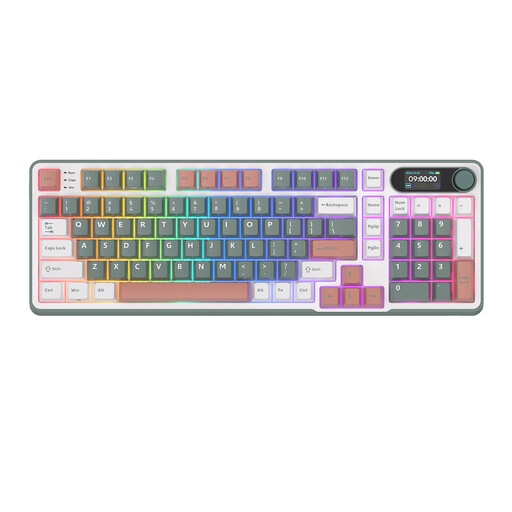
Why this fits the profile: This model combines an almost full layout with wireless flexibility. It suits users who game, type a lot and want multiple connectivity options.
The 96% layout limits the compromise of a compact keyboard. According to the product description, Bluetooth, 2.4 GHz and USB-C are available.
Hot-swap, RGB, PBT keycaps, a metal knob and a display. The product information also mentions a 10,000 mAh battery.
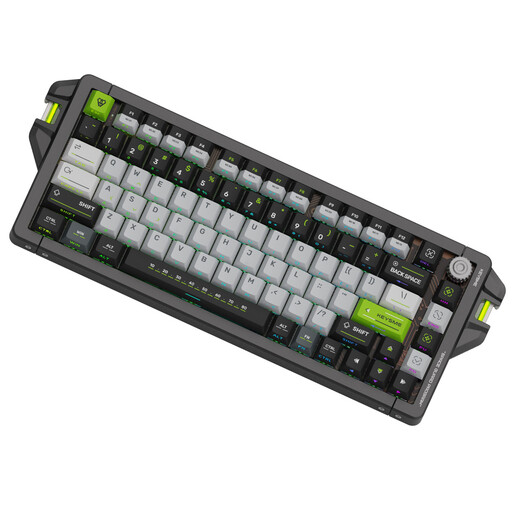
Why this fits the profile: According to the product description, this 75% model targets players who want adjustable actuation, Rapid Trigger and a high polling rate for competitive PC games.
The technical features are clearly specified: 0.1–4.0 mm adjustment range, Rapid Trigger and a wired 8,000 Hz polling rate. Do check whether your game and software support these features.
CNC aluminium housing, PBT keycaps, hot-swappable switches and SOCD support, according to the product data.
We’ve assembled a complete, up-to-date list of products that fully meet these strict selection criteria and comply with current European safety regulations.
Yes, as long as the noise level and layout suit your work. Linear switches are often less loud than clicky switches. A 75% model usually offers a good balance between desk footprint and available keys. For heavy number entry, a 96% or full-size keyboard remains more practical.
Lifespan depends on switches, keycaps, usage and maintenance. Manufacturers sometimes quote a high number of keystrokes; treat this as a product specification rather than a guarantee for every user. A hot-swappable keyboard can remain usable longer because switches and keycaps are replaceable.
Power use varies by battery, connection and lighting. RGB lighting can shorten runtime. Over Bluetooth or 2.4 GHz, a wireless model works without a cable, but charging is part of the experience. If you don’t want to manage a battery, choose a wired mechanical keyboard with USB-C.
