
Vandaag of morgen in huis

Kwaliteit gegarandeerd

Welkomstaanbiedingen ontgrendelen: GRATIS bezorging | Tot 80% korting | Gratis 30 dagen JoyPlus-proefperiode
Download de app
A mechanical gaming keyboard can be comfortable for gaming, programming, studying and working from home. However, a compact case with RGB lighting is not automatically the right choice. QWERTY US models in particular can lead to disappointment if they have missing keys, limited software or unclear switch specifications.
Joybuy Product Recommendation Officer therefore filters the most important product specifications and common marketing claims. This helps you compare products effectively, without focusing solely on appearance or lighting.
Some compact keyboards use membrane technology with a mechanical feel. This can work perfectly well for basic use, but it is not the same as a keyboard with individual mechanical switches. Check whether the product page explicitly mentions mechanical switches, specifies the switch type and states whether replacement is possible.
For example, the MageGee TS91 is described as a keyboard with “mechanical feeling”. The product information does not mention individual mechanical switches. Consider this model a straightforward compact option rather than a fully hot-swappable mechanical keyboard.
A 60% keyboard usually has no separate arrow keys, function row or navigation cluster. These functions are often accessed using the Fn key. This saves space, but can be less practical for programming, spreadsheets or everyday office work.
A 75% keyboard generally retains the arrow keys and some navigation keys. For many Dutch users, this offers a practical compromise between desk space and functionality. Also check the number of keys, as the layout can vary between brands.
An RGB gaming keyboard can offer attractive lighting effects, but lighting says little about the stabilisers, keycaps, connectivity or repairability. Look for verifiable details such as PBT keycaps, hot-swap support, mounting style, dimensions and whether a volume knob is included.
Claims about sound dampening or comfort often come from the brand itself. According to AJAZZ’s own product information, layers including Poron and IXPE are intended to affect the sound and keystroke feel. Treat this as a design feature, not as a guaranteed sound measurement.
With a QWERTY US keyboard, check that you are comfortable with the American Enter, Shift and punctuation layout. A Dutch ISO keyboard has a different layout. Mac compatibility also does not always mean that all key combinations work in the same way as on an Apple keyboard.
Linear switches move smoothly without a distinct click. They are often chosen for gaming, but their suitability depends on personal preference and noise level. Also consider:
A wired mechanical keyboard usually uses USB-C and does not need to be charged. This is practical for a fixed PC setup and avoids battery management. A wireless mechanical keyboard offers greater flexibility, but check the battery capacity, charging method and available connections.
A tri-mode keyboard generally combines USB, Bluetooth and 2.4 GHz wireless connectivity. Check whether the required receiver is included and whether your PC, Mac, tablet or console is supported. A converter may be required for PS4, PS5 or Xbox; the product information for some models states that this is not included.

Why it suits this profile: This wired mechanical keyboard combines a compact 75% layout with a QWERTY US layout, linear switches and a volume knob. The USB-C connection means there is no battery to manage.
The specifications clearly mention mechanical linear switches, hot-swap support and 3-/5-pin PCB support. This makes the technology clearer than with models that only mention “mechanical feeling”.
75% layout, CNC volume knob, PBT keycaps, gasket construction and a stated lifespan of 50 million keystrokes.
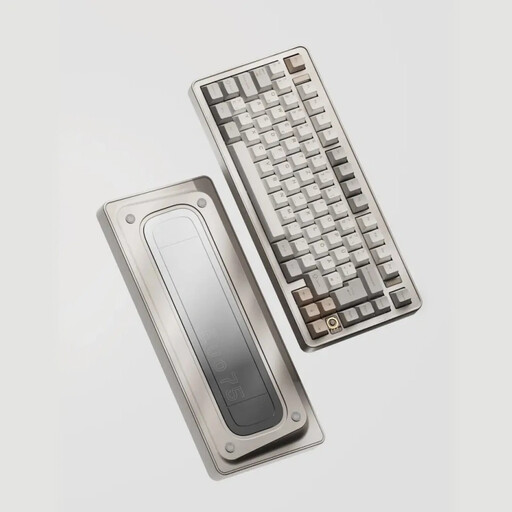
Why it suits this profile: The EVO75 is aimed at users who value materials, customisation and multiple connection options. The case is made from anodised aluminium and, according to the product information, the model supports VIA.
The key components are specified clearly: 75% ANSI US layout, hot-swap support for 3- and 5-pin switches, plus USB-C, Bluetooth and 2.4 GHz connectivity.
Aluminium case, 8000mAh battery, RGB lighting and VIA compatibility according to the stated specifications.
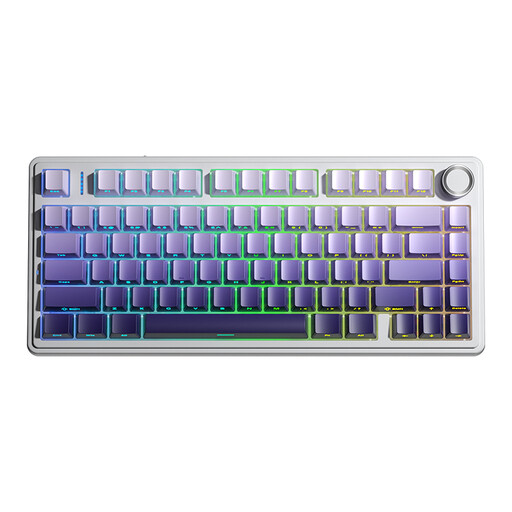
Why it suits this profile: This model is intended for users who switch between a PC, laptop and other devices. Its tri-mode connection combines Bluetooth, 2.4 GHz and wired USB use.
The product description mentions both switch replacement and the available connection options. However, check compatibility with your specific console before buying.
75% layout with arrow keys, hot-swap support for 3- and 5-pin switches, 4000mAh battery and programmable knob.
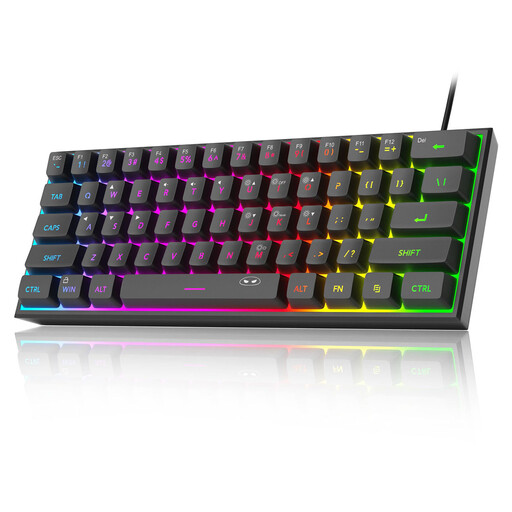
Why it suits this profile: The TS91 is suitable for anyone mainly looking for a very small wired keyboard for gaming or a limited workspace. Bear in mind that it has a QWERTY US layout and lacks many separate keys.
The product information clearly specifies a 60% layout and a wired connection. At the same time, the model is described as offering “mechanical feeling”, so do not expect hot-swappable mechanical switches.
61 keys, RGB lighting, USB plug-and-play and a stated IPX4-certified PCB. The USB connection itself is not waterproof.
We have compiled a complete, up-to-date list of products that fully meet these strict selection criteria and the applicable European safety regulations.
Yes, but pay attention to the switch type and noise level. Linear switches can be suitable for both typing and gaming. A gasket mount construction or sound-dampening layers can affect the keystroke feel, but according to the brand’s own product information, this is not a fixed noise standard. If you work in a shared space, consider quieter switches.
Its lifespan depends on the switches, keycaps, stabilisers, cable and how it is used. Brands sometimes state a number of keystrokes, such as the 50 million quoted by AJAZZ. This is a product specification provided by the brand, not a guarantee of the lifespan of the complete keyboard. Hot-swap functionality makes it easier to replace compatible switches.
A wireless model uses a rechargeable battery. The main costs are the electricity required for charging and possible replacement in the longer term. A wired keyboard has no battery, while a tri-mode model offers more connection options. With a wireless model, always check the battery capacity, charging cable and included receiver before placing your order.
