
Vandaag of morgen in huis

Kwaliteit gegarandeerd

Welkomstaanbiedingen ontgrendelen: GRATIS bezorging | Tot 80% korting | Gratis 30 dagen JoyPlus-proefperiode
Download de app
A mechanical gaming keyboard can give you greater control, customisation and a distinctive typing feel. However, eye-catching RGB lighting or the word “gaming” does not automatically say anything about build quality. Dutch buyers in particular face three practical issues: choosing the wrong layout, confusing mechanical and membrane keyboards, and discovering that certain features are less flexible than expected.
Use this buying guide to compare layouts, switches, connectivity and extra features. That way, you can find a model suited to gaming, programming, studying or working from home.
Many compact models are a QWERTY US keyboard. On these models, the Enter and Shift keys, as well as characters such as @, " and €, may be positioned differently from those on a Dutch ISO layout. The keyboard layout is also determined by both the physical keycaps and the language settings in Windows or macOS.
Before buying, check:
The MageGee TS91 is described in the product information as a membrane keyboard with a mechanical feel. That is different from a keyboard with individual mechanical switches. If you want to replace switches, adjust the sound or find a specific typing feel, you need a genuinely mechanical model.
Look out for terms such as mechanical switches, hot-swappable and the type of switch. If the listing only says “mechanical feeling” or “imitation mechanical”, do not expect the same upgrade options.
An RGB gaming keyboard may have several lighting modes, but that says little about the software, macro functions or power consumption. Wireless RGB lighting generally uses more energy than lighting that is switched off. With a wireless mechanical keyboard, charging time, connection modes and the option to use it wired are therefore more important than the number of lighting effects alone.
Gasket mount is not a guarantee of a particular sound or typing feel either. The experience depends on the plate, foam, stabilisers, switches and keycaps. Treat this term as one part of the construction, not as a standalone promise of quality.
The layout determines how much space you save and which keys are immediately available.
A compact mechanical keyboard gives you more room for your mouse, but check whether you can access the missing keys through keyboard shortcuts. For programmers and students, a 75% model can be a practical middle ground.
Mechanical switches determine the typing feel, noise level and actuation force. Linear switches generally feel smooth and consistent; tactile switches provide a noticeable bump during the keypress. Clicky switches usually produce a distinct clicking sound. Names and characteristics vary by manufacturer, so check the included switch and any replacement options.
A hot-swappable keyboard allows you to replace compatible 3-pin or 5-pin switches without soldering. However, check that the PCB, stabilisers and switch puller are suitable. Pull switches straight upwards and follow the instructions to avoid damaging the sockets.
A wired keyboard works without a battery and is easy to connect via USB-C or USB. A wireless model offers greater flexibility on a desk with several devices. Tri-mode usually means support for USB, Bluetooth and 2.4 GHz via a receiver. Check:
A programmable keyboard can let you customise keys, macros, lighting and profiles. Check whether this requires software, an online driver or, for example, VIA/QMK. Not every software feature works on every operating system.
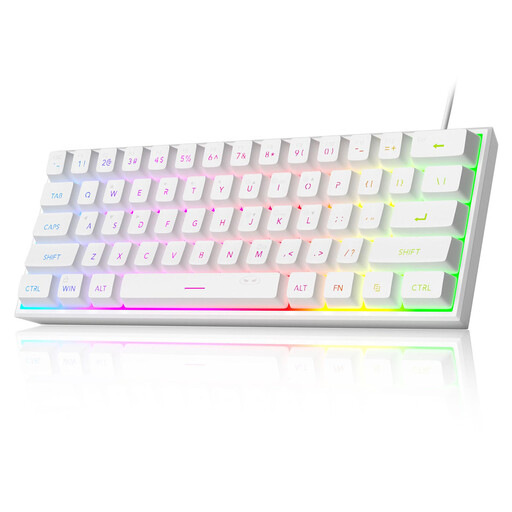
Why it suits this profile: The 60% layout takes up little space and connects via USB. According to the product description, this model is suitable for Windows and Mac, but it uses membrane technology with a mechanical feel.
The product information clearly states that it offers a “mechanical feeling”. This allows you to adjust your expectations about genuine mechanical switches before buying.
61 keys, RGB lighting and a compact size of approximately 29.2 × 10.1 cm; wired and battery-free.
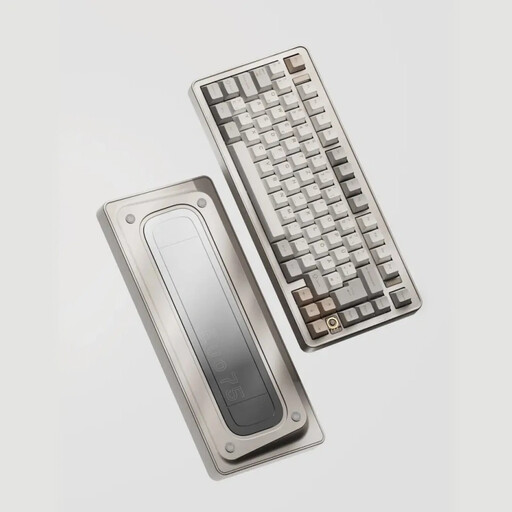
Why it suits this profile: This 75% model combines an aluminium case, tri-mode connectivity, VIA compatibility and a hot-swappable design for users who want to customise their keyboard further.
The key customisation features are clearly specified: 3- and 5-pin hot-swap, VIA, and USB-C, Bluetooth and 2.4 GHz connectivity.
80 keys, aluminium case, 8000mAh battery and support for 3-pin and 5-pin switches.
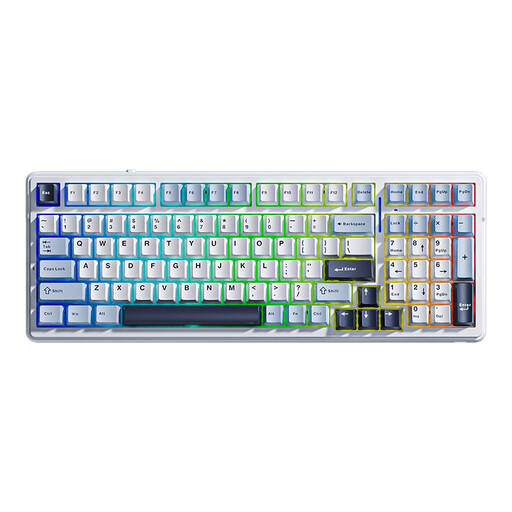
Why it suits this profile: According to the product description, the 96% layout retains the arrow and number keys, while the model offers tri-mode connectivity and macro support for work and gaming.
You will not need to reach for a separate numpad when working with figures every day. However, check the US layout and charging requirements before ordering.
99 keys, hot-swap, RGB, Bluetooth, 2.4 GHz and USB-C; the stated battery capacity is 8000mAh.
We have compiled a complete, up-to-date list of products that fully meet these strict selection criteria and the applicable European safety regulations.
Use this quick checklist:
A mechanical keyboard with a volume knob can be useful during games and meetings, but check whether the knob also controls other functions and whether software is required for this. With wireless models, also keep an eye on the charge level and use a suitable USB-C charger according to the manual.
Yes, provided that the layout and noise level suit your workspace. A 75% or 80% model generally offers arrow keys without taking up as much room as a full-size keyboard. For working with lots of figures, a 96% or 104-key model may be more practical.
Its lifespan depends on the switches, stabilisers, keycaps, cable, battery and conditions of use. A hot-swappable keyboard can be easier to maintain because compatible switches can be replaced. Manufacturer claims about a particular number of keystrokes are product specifications from the brand and are not a guarantee for every user.
On wireless models, RGB lighting affects battery life, particularly at high brightness and with dynamic effects. Turn the lighting down or switch it off when battery life is more important. A wired RGB gaming keyboard does not have this charging issue, but it does still draw power through the USB connection.
