
Vandaag of morgen in huis

Kwaliteit gegarandeerd

Welkomstaanbiedingen ontgrendelen: GRATIS bezorging | Tot 80% korting | Gratis 30 dagen JoyPlus-proefperiode
Download de app
A mechanical gaming keyboard can feel faster, sturdier and more customisable than a standard office keyboard. However, eye-catching RGB lighting or a high polling rate does not tell the whole story. You may only notice the wrong layout, missing software or a switch that does not suit your playing style after making your purchase.
That is why you should pay particular attention to these three common pitfalls:
The layout determines how much desk space you save and which functions are immediately available.
Also check the language layout. A QWERTY US keyboard has a different Enter, Shift and punctuation layout from many Dutch ISO keyboards. The MageGee and AJAZZ models below use a QWERTY US layout. This is not a problem if you are used to it, but check the keys and the language setting in Windows or macOS beforehand.
Linear switches generally move smoothly without a tactile click. They are often chosen for gaming, but the noise level also depends on the keycaps, case and dampening. Clicky and tactile switches provide more feedback, but may sound more prominent in a shared study or office.
A hot-swappable keyboard allows you to replace suitable 3- or 5-pin switches without soldering. The AJAZZ AK820 specifies a hot-swappable PCB and support for both mounting types. According to the product description, it also uses a gasket construction and multiple foam layers. These can affect the typing feel and sound, but the precise experience remains a matter of personal preference.
Be aware of the difference between:
The polling rate indicates how often the keyboard reports input to the computer. A wired gaming keyboard with 1000Hz is sufficient for many players. Some models specify 8000Hz, which according to the relevant product description means a higher reporting frequency. The difference is not noticeable in every game or on every computer.
A Rapid Trigger keyboard registers a key being pressed again or released based on its movement, rather than relying solely on a fixed reset point. This can be particularly interesting for competitive FPS games. According to the product information, the Redragon M68 combines Hall Effect switches, adjustable actuation from 0,2 to 4,0 mm and Rapid Trigger. However, check that the software works with your operating system and that settings can be saved for each game.
RGB lighting is primarily a matter of preference. An RGB gaming keyboard can offer brightness levels and effects, but lighting does not automatically make the keystrokes faster or more comfortable.
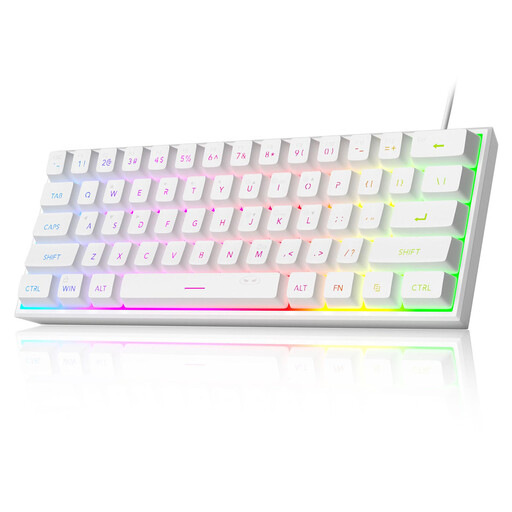
Why it suits this profile: This compact model is designed for those with limited desk space who want RGB lighting and a USB connection without immediately opting for advanced magnetic features.
The product information explicitly states that this model uses membrane keys with a mechanical feel. So do not expect genuine mechanical switches or hot-swappable functionality.
61 keys, RGB effects, a wired USB connection and an IPX4 rating for the circuit board according to the product description. The connection itself is not waterproof.

Why it suits this profile: The 75% layout retains the F row and arrow keys, while the CNC volume knob and gasket construction are appealing for gaming, typing and working from home.
The product information mentions genuine linear switches, a hot-swappable 3/5-pin PCB and a wired Type-C connection. This makes the technology more clearly specified than on models offering only a “mechanical feel”.
PBT keycaps, a volume knob, gasket construction, RGB lighting and compatibility with Windows and macOS according to the product details.
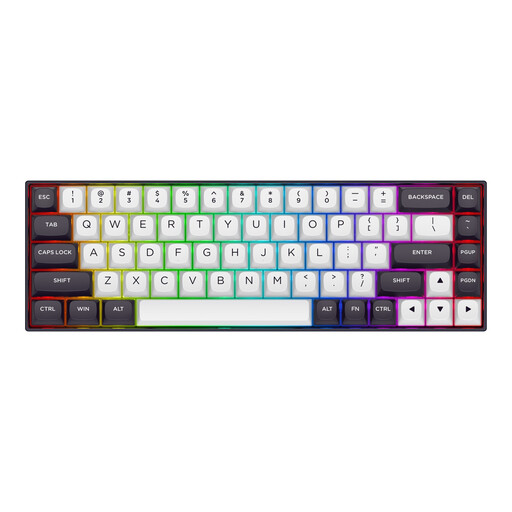
Why it suits this profile: FPS players and esports users who want to adjust actuation, Rapid Trigger and polling rate get features specifically designed for fast input.
The product description specifies Hall Effect switches, Rapid Trigger and an adjustable actuation point. However, check the software support and whether you genuinely need these features before purchasing.
65% size with 68 keys, a metal top plate, detachable Type-C cable, RGB and a polling rate of 8000Hz, as specified in the product information.
We have put together a complete, up-to-date list of products that fully meet these strict selection criteria and the applicable European safety regulations.
It can be, but you need to be comfortable using Fn combinations for the arrow keys, F keys and navigation functions. For extensive text editing or office work, a 65% or 75% mechanical keyboard may be more practical.
Its lifespan depends on the switch type, usage, dust and liquid damage. According to the product description, the AJAZZ AK820 has a lifespan of 50 million keystrokes. This is a brand or product specification, not a guarantee of a specific number of years of use. Clean the keyboard according to the instructions and disconnect it before carrying out maintenance.
A wired gaming keyboard draws its power via USB. RGB lighting increases consumption compared with having the lighting switched off, but on a wired model it does not affect battery life. If you prefer less light, you can usually reduce the brightness or effects. For software-controlled functions, check whether the lighting continues to work without the programme running.
