
Vandaag of morgen in huis

Kwaliteit gegarandeerd

Welkomstaanbiedingen ontgrendelen: GRATIS bezorging | Tot 80% korting | Gratis 30 dagen JoyPlus-proefperiode
Download de app
A mechanical gaming keyboard can help keep your desk tidy and provide clear feedback while gaming. However, not every compact model is genuinely mechanical. Some keyboards use membrane technology with only a mechanical feel. Terms such as RGB, 8K polling and rapid trigger only mean something if you understand how they benefit you.
For gamers in the Netherlands, there are three particular pitfalls to watch out for:
The layout determines how much space the keyboard takes up and which keys are immediately available.
Also check that you are deliberately choosing a mechanical keyboard with a US QWERTY layout. Windows can change the language setting, but this does not change the physical key labels.
With a traditional mechanical keyboard, each key is registered by an individual switch. Linear switches generally move smoothly without a noticeable click. Tactile switches provide a noticeable point during key travel. Your choice affects the sound, feedback and the way you press the keys.
Pay attention to the difference between:
The MageGee TS91 is explicitly described as a membrane keyboard with “mechanical feeling”. This does not make it equivalent to a fully mechanical keyboard. This distinction can help you avoid making the wrong purchase.
A wired gaming keyboard connected via USB-C does not need a battery and prevents you from having to recharge during a gaming session. Wireless models are more flexible, but you should check the connection, battery and any potential delay.
A high polling rate means that the keyboard sends information to the PC more frequently each second. Redragon states that the M68 has an 8000 Hz polling rate and a quoted response time of 0.125 ms. According to the brand’s product information, this model also supports rapid trigger, which allows a key to register again more quickly as soon as you release it slightly. These features can be useful in competitive games, but they do not replace properly configuring your game, PC and keyboard software.
RGB lighting is primarily a visual feature. Check whether you can adjust the brightness, effects and software. A gaming keyboard with a volume knob is practical if you want to change the volume quickly during a game without opening a menu.
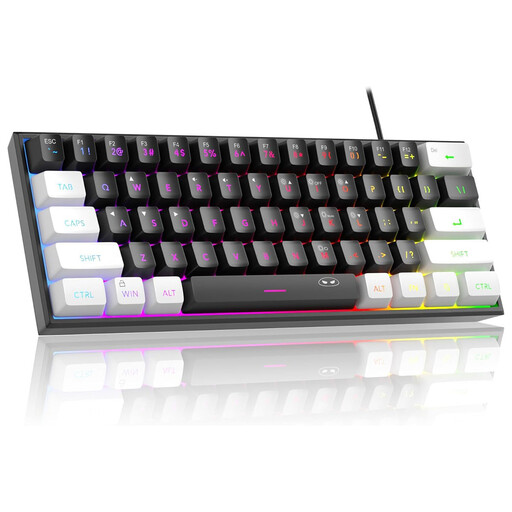
Why it suits this profile: According to the product information, this compact model has 61 keys, RGB lighting and a wired connection. It is suitable for a small home office or gaming desk, as long as you are not expecting fully mechanical switches.
The product description clearly states “mechanical feeling” and a membrane construction. You can therefore make an informed choice instead of mistaking a membrane model for a fully mechanical one.
60% format, RGB modes, USB connection and a PCB rated IPX4 according to the description. The connection itself is not waterproof.

Why it suits this profile: The 75% format retains more everyday keys than a 60% model. The combination of linear switches, PBT keycaps, hot-swap functionality and a volume knob suits both gaming and typing.
The US QWERTY layout, connection and switch type are listed in the product specifications. This allows you to check in advance whether it suits your keyboard settings and preference for a linear feel.
Hot-swap support for 3- and 5-pin switches, PBT keycaps, USB-C, gasket construction, NKRO, RGB lighting and a CNC volume knob.
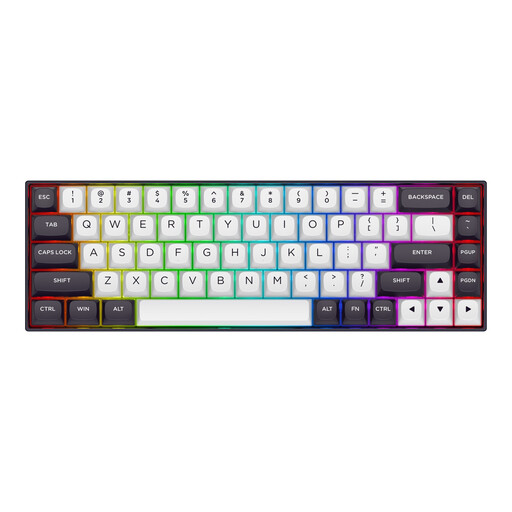
Why it suits this profile: This 65% model is aimed at players looking for a compact gaming keyboard with Hall-effect technology, adjustable actuation and rapid trigger.
The product information explicitly mentions Hall-effect magnetic switches, an adjustable range of 0.2 to 4.0 mm and rapid trigger. The features are therefore more specific than a general claim about speed.
68 keys, US layout, detachable USB-C cable, RGB lighting, aluminium top plate and, according to Redragon, an 8000 Hz polling rate.
We have put together a complete, up-to-date list of products that fully meet these strict selection criteria and the applicable European safety regulations.
It can be, but you will use Fn combinations more often for arrow, function and navigation keys. If you write a lot of documents or enter figures quickly, a 65%, 75% or full-size model will often be more suitable.
Lifespan varies depending on the switches, case and usage. Check the stated lifespan of the switches, but treat this as a manufacturer’s product specification rather than a guarantee for every user. With a hot-swappable keyboard, you can replace worn switches later, provided suitable replacement parts are available.
With a wired gaming keyboard, RGB lighting has no noticeable effect on your energy bill beyond normal USB power consumption. On wireless models, continuous lighting can drain the battery more quickly. Therefore, check whether the brightness and lighting can be switched off separately.
