
Vandaag of morgen in huis

Kwaliteit gegarandeerd

Welkomstaanbiedingen ontgrendelen: GRATIS bezorging | Tot 80% korting | Gratis 30 dagen JoyPlus-proefperiode
Download de app
A mechanical gaming keyboard can be suitable for gaming, programming, working from home and studying. However, an RGB effect or promising product name tells you little about day-to-day use. The size, connection, switches and layout have a much greater impact on whether a keyboard is right for you.
A 60% keyboard saves space, but often has no separate arrow keys, function row or navigation keys. These functions then work via combinations with the Fn key. That can be convenient during gaming, but less practical for spreadsheets, programming or quickly editing text.
A 75% mechanical keyboard usually retains the arrow keys and a function row, while omitting the numeric keypad. A 96% or 99% layout offers almost all the important keys in a narrower case. Also check whether the layout is QWERTY US or QWERTZ. The physical key legends may differ from the settings on your computer in the Netherlands.
An RGB gaming keyboard can illuminate your desk and make certain keys easier to see. However, the lighting says nothing about switch stability, input latency or keycap quality. So check whether the RGB settings can be adjusted using key combinations or software, and whether the lighting can also be switched off completely.
Also pay attention to claims made by a brand. According to a brand’s own research or measurements, battery life, noise level or response time, for example, may differ from what you experience in practice. Treat such figures as the manufacturer’s product specifications and compare them with the actual connection options and battery capacity.
Red, brown and linear switches offer a different feel from clicky switches, but the final sound is also affected by the case, keycaps, stabilisers and dampening layers. A gasket mount keyboard uses a flexible mounting structure. According to the product description, this construction can reduce vibrations and harsh bottom-out noise, but the experience varies from one user and switch to another.
For a shared office, a quiet or dampened switch is usually a better choice than a clicky version. If you mainly want to adjust the sound and feel, it is better to look for a hot-swappable keyboard.
Use this practical guide:
A compact gaming keyboard gives your mouse more room to move, but check that the case is not too tall and that the cable or receiver can be positioned properly.
Mechanical switches determine the key feel:
With a hot-swap model, you can usually replace switches without soldering. Check whether the PCB is compatible with 3-pin, 5-pin or both. When replacing switches, use a switch and keycap puller, switch off the keyboard and do not apply excessive force. A damaged socket is not automatically covered as normal wear and tear.
A tri-mode keyboard generally supports Bluetooth, 2.4 GHz wireless and wired USB-C. For competitive gaming, a wired connection or 2.4 GHz with a receiver is often more straightforward than Bluetooth. Bluetooth is particularly convenient for a laptop, tablet or phone.
Pay attention to the following points:
PBT keycaps are generally more resistant to wear than many ABS keycaps and may retain their surface and legends for longer. This does not mean that every PBT set has the same thickness, legends or fit.
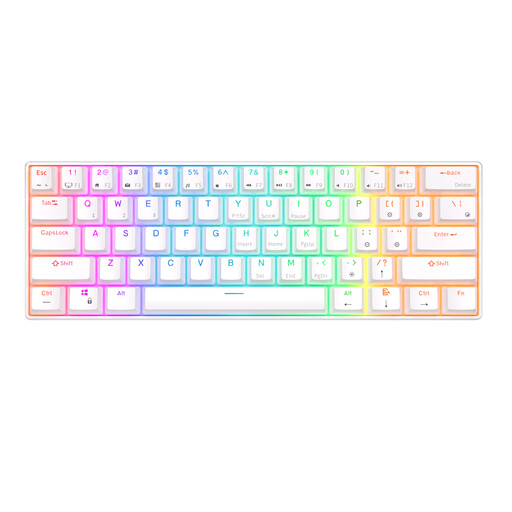
Why it suits this profile: The 61-key layout takes up very little space and offers Bluetooth, a detachable USB cable and connectivity with multiple devices.
The product description mentions hot-swap switches and several connection options. However, check whether you can work without a function row and separate arrow keys.
61 keys, RGB lighting, Bluetooth and a stated battery capacity of 1450 mAh.
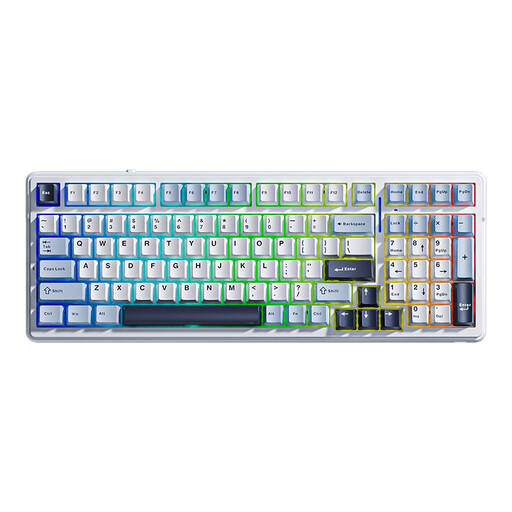
Why it suits this profile: The 99-key layout retains the numeric keypad, while tri-mode connectivity, RGB and customisable switches provide flexibility for different work and gaming situations.
The model combines hot-swap compatibility for 3- and 5-pin switches with five stated dampening layers. The sound experience still depends on the switch and the surface it is used on.
Bluetooth, 2.4 GHz and USB-C; 8000mAh battery according to the product information; PBT keycaps and programmable macros.
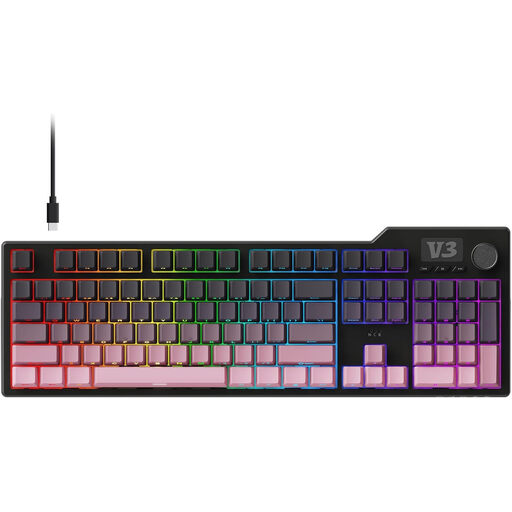
Why it suits this profile: The 104-key layout with a volume knob and media keys is ideal for users who game, work with numbers and want to control audio quickly.
The product description mentions five-layer sound insulation, hot-swap compatibility for 3- and 5-pin switches and a wired connection. This makes the model less suitable for a wireless setup.
Full-size layout, metal volume knob, PBT keycaps, anti-ghosting and detachable cable.
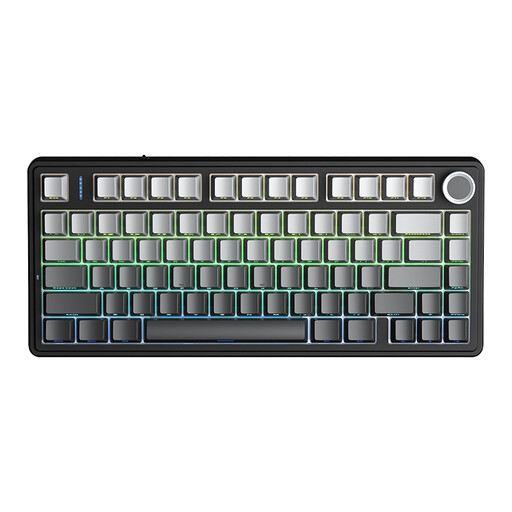
Why it suits this profile: This 75% layout combines tri-mode connectivity, hot-swap compatibility, gasket mount, RGB and a multifunctional knob for gaming and everyday work.
The five stated dampening layers and replaceable 3- or 5-pin switches make it possible to adjust the key feel and sound later on.
4000mAh battery according to the product information, RGB, macro support, arrow keys and a knob for lighting or volume.
We have put together a complete, up-to-date list of products that fully meet these strict selection criteria and the applicable European safety regulations.
It can be, particularly with a 2.4GHz connection using a receiver. Bluetooth is convenient for laptops and tablets, but may have different latency or connection characteristics. Choose a model with USB-C if you also want to play or work in wired mode.
Its lifespan depends on the switch type, usage, dust, liquids and socket quality. A hot-swappable keyboard may remain usable for longer when individual switches can be replaced. Protect the keyboard from moisture, clean it regularly and do not use aggressive cleaning products.
RGB increases power consumption compared with having the lighting switched off, particularly on wireless models. Actual usage time depends on brightness, effects, connection mode and battery capacity. If battery life is important to you, dim or switch off the lighting and use the keyboard via USB-C.
