
Vandaag of morgen in huis

Kwaliteit gegarandeerd

Welkomstaanbiedingen ontgrendelen: GRATIS bezorging | Tot 80% korting | Gratis 30 dagen JoyPlus-proefperiode
Download de app
A mechanical gaming keyboard can help keep your desk tidy and offer a different typing feel from a membrane keyboard. However, it’s not always wise to buy in a hurry. Product pages often focus on RGB lighting, extremely high polling rates or terms such as ‘rapid trigger’, even though the practical differences may be smaller than you expect.
For gamers in the Netherlands, three things matter most: whether the layout suits your keys and operating system, whether the size fits your desk, and whether you’re happy with the sound and feel of the switches. Use the following points to compare models more effectively.
A 60% gaming keyboard saves space, but usually doesn’t have dedicated arrow keys, a function row or navigation keys. These functions are often available through an Fn combination. That works well for a minimalist setup, but can be awkward when editing text or working with spreadsheets.
A TKL gaming keyboard leaves out the number pad while keeping the arrow and function keys. A 75% model usually saves a similar amount of space, with a more compact layout and often a rotary knob. Always check the number of keys and the physical dimensions.
A high polling rate or short actuation distance may sound appealing. Your actual experience also depends on your computer, game, USB connection, software settings and how quickly you get used to the keyboard. A Hall effect keyboard uses magnetic sensing to measure key position. According to product information from some brands, actuation can be adjusted in software and rapid trigger may be supported. That doesn’t automatically mean every player will perform better as a result.
So don’t just look at a number: consider adjustability, compatibility and the software you’ll need too.
An RGB gaming keyboard can add atmosphere and offer profile settings, but lighting won’t make up for the wrong layout. Dutch users should pay particular attention to QWERTY or AZERTY, the language layout and whether the keyboard uses the ISO or ANSI format. If you’re looking for an AZERTY gaming keyboard, check that the physical key legends and software settings match the Belgian or French layout.
Measure the space between your monitor, mouse mat and desk edge. A TKL model is often about 36 cm wide, while a full-size keyboard with a number pad can be around 43 to 45 cm wide. A narrower keyboard can be useful if you make broad mouse movements, but if you work with numbers a lot, you may miss the number pad.
A 75% mechanical keyboard is a middle ground: compact, but usually with arrow keys and a function layer. A 65% model often has arrow keys, but fewer navigation keys.
Mechanical switches include linear, tactile and clicky types:
Bear in mind that sound dampening, stabilisers and keycaps all affect the final result. A keyboard with foam layers can reduce resonance, but that doesn’t automatically make it quiet. Also check whether the keycaps are made from ABS or PBT, and whether they can be replaced.
A wired model usually connects via USB and doesn’t need a battery. A wireless mechanical keyboard keeps your desk tidy, but you’ll need to consider battery life, charging and the connection options available. Tri-mode models often combine USB, Bluetooth and 2.4 GHz.
A hot-swappable keyboard lets you replace compatible switches without soldering. Check whether the PCB supports 3-pin or 5-pin switches. Also look for key rollover, anti-ghosting, programmable profiles and software for macOS or Windows.
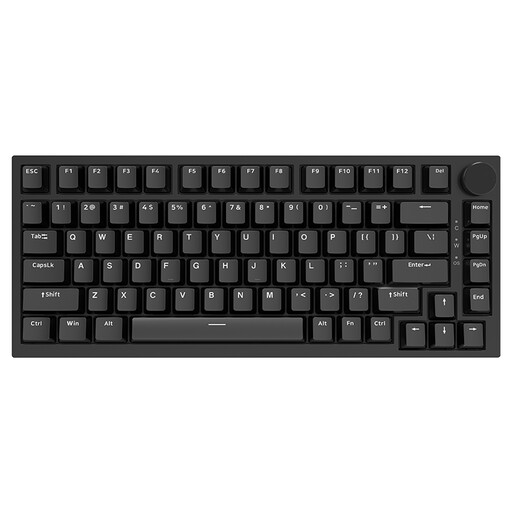
Why it suits this profile: The 75% layout keeps the arrow keys and a compact function layer close to hand, without a number pad. The wired USB-C connection makes it a straightforward first mechanical keyboard.
The product information states that it supports hot-swapping, so you can replace the switches later. Be sure to check the layout you want first, as this model has a US QWERTY layout.
75% size, rotary knob, PBT keycaps, gasket construction and RGB lighting, according to the product specifications.
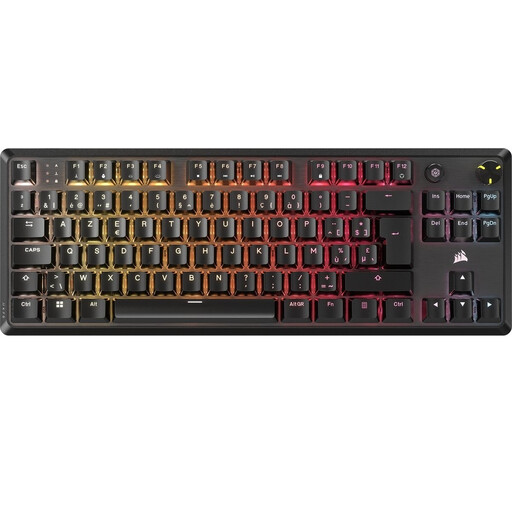
Why it suits this profile: This wired TKL model is aimed at users looking for a Belgian AZERTY layout, media controls and a sturdier desk setup.
The specifications explicitly state BE ISO AZERTY, making it easier to check the physical layout. The cable is detachable; the keyboard is not wireless.
MLX Red v2 linear switches, per-key RGB, aluminium top plate, rotary knob and five profiles stored in onboard memory.
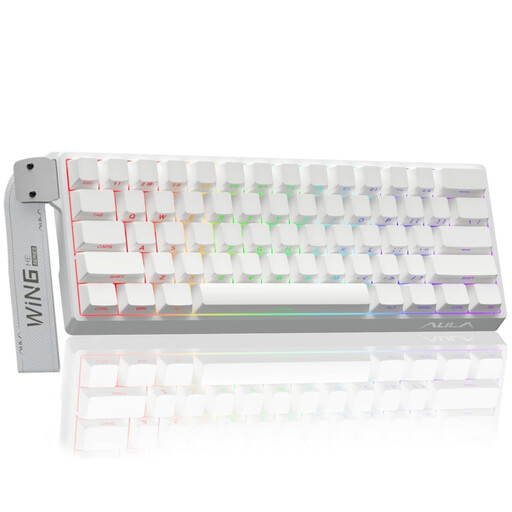
Why it suits this profile: The 60% form is designed for players who want to leave plenty of desk space for their mouse and are happy to use key combinations to access certain functions.
The product title mentions Hall effect magnetic switches, rapid trigger, 8K polling and adjustable actuation. Before buying, check that the accompanying software and US layout suit the way you’ll use it.
Compact 60% size, RGB lighting and magnetic switches with a stated adjustable actuation distance.
We’ve put together a complete, up-to-date list of products that meet these strict selection criteria and comply with current European safety regulations.
Yes, but choosing the right switch type is key. Linear switches feel smooth, while tactile or clicky switches offer more feedback. If you work in a shared space, it’s worth considering the noise level and any sound dampening.
Lifespan varies depending on the switches, keycaps, stabilisers and how you use the keyboard. Manufacturers sometimes state a number of keystrokes, but this is a product specification, not a guarantee for every user. Regularly removing dust, keeping liquids away and cleaning the keyboard carefully can help reduce wear.
Power consumption mainly depends on the battery, connection method and RGB lighting. Bluetooth generally uses different settings from 2.4 GHz. On a model with lighting, switching RGB off or dimming it can affect how long the keyboard lasts between charges. So check the charging port, battery details and whether you can continue using it in wired mode.
