
Vandaag of morgen in huis

Kwaliteit gegarandeerd

Welkomstaanbiedingen ontgrendelen: GRATIS bezorging | Tot 80% korting | Gratis 30 dagen JoyPlus-proefperiode
Download de app
A mechanical gaming keyboard can be a significant upgrade for gaming, programming and everyday typing. However, a product boasting multiple RGB modes, a high polling rate or phrases such as “pro gaming” won’t automatically give you a better experience. The right choice depends mainly on the layout, switches, connection and features you’ll actually use.
Many gaming models use a US layout or ANSI layout. These may lack features such as the characteristic ISO-shaped Enter key and, in some cases, the Dutch characters you’re used to. Before buying, check:
A US-layout keyboard can work perfectly well, but it often takes some getting used to. For regular typing, programming or administrative work, the layout matters just as much as the lighting.
A high polling rate sounds appealing, but it isn’t essential for everyone. For everyday gaming, office work and typing, a stable USB connection and reliable firmware are often more important than the highest figure on the box.
Rapid Trigger and an adjustable actuation point are also mainly useful for competitive games where quickly pressing and releasing keys matters. You may notice less difference in strategy, simulation or story-driven games.
A gaming keyboard with RGB lighting can add a personal touch to your desk. However, RGB doesn’t automatically improve the feel of the keys, response time or lifespan. Check whether the lighting:
Mechanical switches determine the sound, resistance and point at which a key registers.
Also consider the actuation force, total key travel and available software. A short actuation distance isn’t comfortable for everyone: accidental key presses can happen more easily when typing.
The size determines how much room you have for your mouse and which keys are physically available.
A compact mechanical keyboard gives you more room to move your mouse, while a full-size model may be more practical for work. Don’t just look at the percentage: check the number of keys and whether it has a volume control.
A wired mechanical keyboard doesn’t need charging, making it a straightforward choice for a fixed PC setup. A wireless mechanical keyboard offers more flexibility, but check the following:
Macro keys, media controls and onboard memory are useful if you use these features regularly. Make sure the software is compatible with your computer.
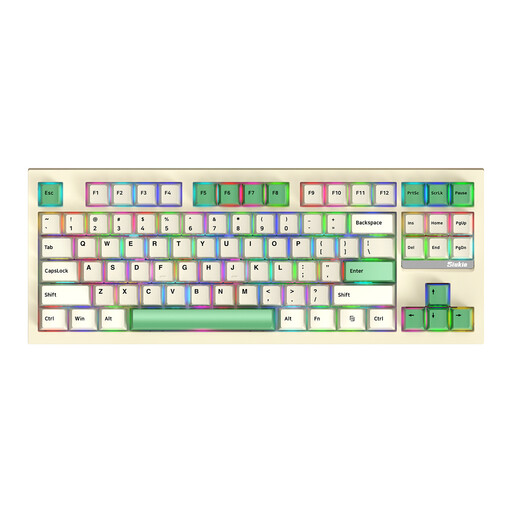
Why it suits this profile: The 87-key layout gives you a compact design without going straight to a 60% model. The product title lists three connection modes, RGB and replaceable switches.
You don’t have to choose immediately between a large full-size board and a very small 60% model. Just check the exact switch and layout variant before buying.
87 keys, three connection modes according to the product listing, RGB and a detachable-switch design.
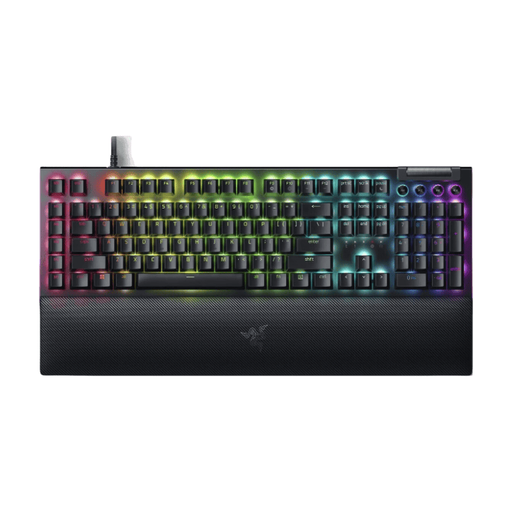
Why it suits this profile: This wired, full-size mechanical gaming keyboard pairs Razer Yellow linear switches with Chroma RGB, six macro keys, media controls and a wrist rest.
The product information clearly states the switch type, 1.2 mm actuation distance and US QWERTY layout. This makes it easier to check in advance whether the feel and layout are right for you.
Linear Yellow switches, six programmable macro keys, USB connection and a full-size layout.
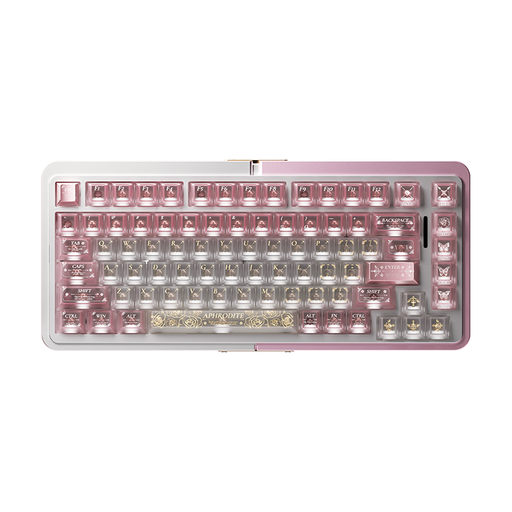
Why it suits this profile: This model is aimed at users looking for a 75% layout, magnetic TTC HE switches, hot-swap functionality and Rapid Trigger in one wired keyboard.
The product name explicitly lists the relevant technologies. Before buying, check whether your games and setup would genuinely benefit from Hall Effect and Rapid Trigger.
75% layout, aluminium case, magnetic HE switches, hot-swappable design and Rapid Trigger according to the product listing.
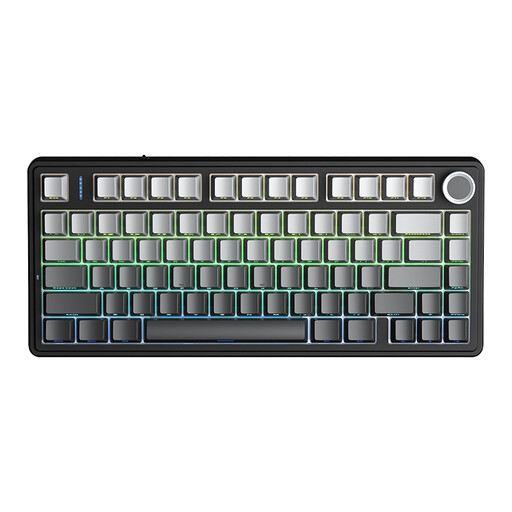
Why it suits this profile: This 75% model supports Bluetooth, 2.4 GHz and USB-C, making it a good choice if you switch between a PC, laptop and other compatible devices.
The three connection options mean you’re not tied to a single connection method. Still, check the battery status, compatibility and preferred layout.
Tri-mode connectivity, 75% size, hot-swap support for 3- and 5-pin switches, and RGB lighting according to the product description.
We’ve put together a complete, up-to-date list of products that meet these strict selection criteria and the applicable European safety regulations.
Yes, but the right switch type makes a difference. Linear switches feel smooth, while clicky switches are noisier and provide more feedback. If you work in a shared space, consider a quieter switch or a model with sound-dampening construction.
Lifespan depends on the switches, keycaps, electronics and how you use it. A replaceable-switch design can make maintenance and customisation easier. Keep the keyboard dry, remove dust regularly and avoid harsh cleaning products. Always check the official product specifications rather than relying on a general lifespan claim.
Not necessarily. Rapid Trigger may be useful for competitive games where quickly switching between pressing and releasing keys matters. For general gaming, typing and office work, size, comfort, layout and switch feel are usually more important.
