
Vandaag of morgen in huis

Kwaliteit gegarandeerd

Welkomstaanbiedingen ontgrendelen: GRATIS bezorging | Tot 80% korting | Gratis 30 dagen JoyPlus-proefperiode
Download de app
A mechanical gaming keyboard can help keep your desk tidy and often offers more options for gaming, typing and everyday use. However, many models look similar even though there can be significant differences between them. A compact keyboard, for example, may not have arrow keys, RGB lighting may be mostly decorative, and a product described as having a “mechanical feel” may not be a genuinely mechanical keyboard.
Use this buying guide to compare the key specifications: size, switch technology, connectivity, compatibility and customisation.
Check that the product information specifically mentions mechanical switches. The MageGee TS91 is described in its product listing as a membrane keyboard with a mechanical feel. That’s different from a keyboard with replaceable or individual mechanical switches. If you’re specifically looking for the feel and customisation of a mechanical keyboard, this distinction matters.
A 60% keyboard typically has around 61 keys and omits the function row, arrow keys and number pad, among other keys. This leaves more room for your mouse, but means you’ll use Fn key combinations more often. A 75% keyboard usually keeps the arrow and function keys in a more compact design. If you work with spreadsheets or numbers, a 96% or full-size keyboard may be more practical.
An RGB gaming keyboard may have plenty of lighting modes, but that doesn’t automatically tell you anything about its switch quality, software or build. Check whether you can adjust the lighting using key combinations or software, change its brightness and switch it off. Be wary of brand claims, too. A brand’s own research may make the number of colours or lighting effects sound impressive, but focus on what’s actually stated in the product details.
Choose a size that suits your everyday needs:
Check the layout, too. Many models in this range have a US QWERTY keyboard. The Enter, Shift and punctuation keys, among others, are in different positions from those on a UK QWERTY layout. Make sure you’re comfortable using the US layout.
On a traditional mechanical keyboard, the switch determines how the keys feel and sound. Linear switches have a smooth, consistent feel; tactile switches give you a noticeable bump as you press them; and clicky switches are generally louder.
A hot-swappable keyboard lets you replace compatible switches without soldering. Check whether the model supports 3-pin or 5-pin switches, or a specific switch size. The AULA F75 Pro lists support for 3-pin and 5-pin switches.
A keyboard with Hall Effect or magnetic switches works differently from a conventional mechanical model. The AULA WIN60HE lists features including adjustable actuation down to 0.01 mm, Rapid Trigger and an 8K polling rate. These features are most relevant to players who want precise control over key actuation. Check that the accompanying software works with your system, too.
A wired model usually connects easily via USB and doesn’t need a battery. A wireless mechanical keyboard gives you more flexibility, but check which connection modes it offers and its battery capacity.
A tri-mode keyboard usually supports:
According to their product information, the Ajazz AK820 Pro and AULA F75 Pro support all three connection types. This is useful if you switch between a gaming PC, laptop and tablet. Also check whether the model is explicitly compatible with Windows and macOS. A keyboard may connect to a Mac, but certain keyboard shortcuts or software features may work differently.
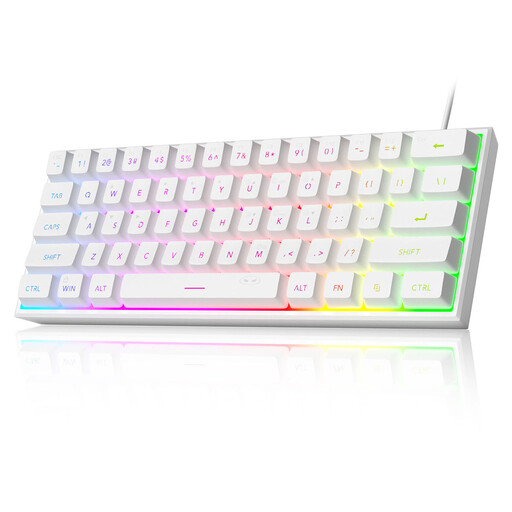
Why it suits this type of user: This wired model is compact, weighs 400 grams according to the product information and works straight out of the box with a USB cable. It’s a good fit for a small desk and for anyone who doesn’t need a wireless connection.
The specifications clearly state that it has a 60% layout and a membrane construction with a mechanical feel. So you know it isn’t a fully mechanical hot-swappable model.
61 keys, RGB lighting with adjustable brightness and an IPX4-rated circuit board according to the product information. The USB connection itself isn’t waterproof.
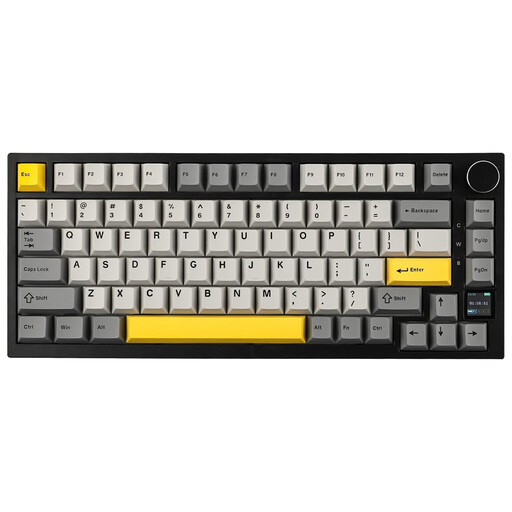
Why it suits this type of user: This model combines a 75% layout with mechanical switches, wireless connectivity, a TFT display and hot-swap capability. It’s a good match for anyone who games, works from home and uses multiple devices.
You still get arrow and function keys, while the keyboard takes up less space than a full-size model. And you’re not limited to Bluetooth connectivity.
Wired USB, Bluetooth 5.1 and 2.4GHz connectivity, a 4000mAh battery according to the product information, hot-swappable switches and compatibility with Windows and macOS.

Why it suits this type of user: The 75% layout, programmable features and three connection modes make it a good fit for gamers, streamers and anyone who switches between a PC, laptop and other devices.
The product information specifies the connections, support for 3-pin and 5-pin hot-swappable switches, and a dedicated volume control. This makes it easy to check the key features.
Bluetooth 5.0, 2.4GHz and USB connectivity, a 4000mAh battery, RGB lighting and a rotary knob for media or lighting controls, according to the listed specifications.
We’ve put together a complete, up-to-date list of products that meet these strict selection criteria and the applicable European safety regulations.
That depends on its compatibility and layout. Some models, such as the Ajazz AK820 Pro, list support for Windows and macOS. Also check whether you’re comfortable using a US QWERTY keyboard and whether the configuration software is available for macOS.
Its lifespan depends on the switches, how you use it, how well you maintain it and the quality of the casing. Look for replaceable switches, keycap materials such as PBT, and the availability of spare parts. Keep the keyboard free of dust and don’t use liquid to clean it. A model with spill-resistant parts isn’t necessarily fully waterproof.
A wireless mechanical keyboard runs on a built-in battery. Battery life varies depending on RGB brightness, connection mode and how often you use it. Switch off the lighting to save battery and check the stated battery capacity. For long gaming sessions without a break to recharge, a USB connection remains a practical option.
