Who is this choice relevant to?

Market stallholder who needs larger text

You want to enlarge names and stall details without losing too much of the overall picture as you enter information. Microsoft Support explains how to adjust text size in Windows; also check whether your chosen register app displays the information properly when magnified.

Market organiser

You want to take the register with you and may need to update it without an internet connection. So consider portability, power and what you need to do to prepare files for offline use. Google Docs Help explains how to make files available offline in advance.

User with existing register software

Above all, you need a laptop that can run your chosen programme and work with your files. Check the operating system and how you manage your files first; a screen specification alone tells you nothing about compatibility.

What should you look for?

Windows laptop with a spacious screen

A good fit if: your register software requires Windows, or you want to combine text magnification with a clear view of the register. Test your preferred settings in the app itself.

The trade-off: a 16-inch model gives you more screen space than a smaller one, but it usually takes up more room when you’re on the move. Specifications and included accessories vary between configurations.

Chromebook with a web-based register

A good fit if: your register is in a compatible browser app or Google Sheets. ChromeOS includes features for enlarging pages or the screen.

The trade-off: check in advance that your chosen software works on ChromeOS; web access alone doesn’t confirm this. To work offline, you’ll need to make the right file available beforehand.

MacBook

A good fit if: your chosen register software works on macOS and you want to use macOS accessibility settings.

The trade-off: check which version of macOS your software requires and whether your peripherals will work with the available ports.

What to consider What should you check? Who should pay particular attention?
Readability and overview Test the register app with larger text, display scaling and, if needed, Magnifier. Check how many fields remain visible at once. If I need larger text, I still want to see enough register details while entering information. Around 40% of consumers say readability and overview are their top priority.
Software compatibility Check that your existing programme and files work on Windows, macOS or ChromeOS. Test the app with your preferred magnification. If you already use a particular register programme, you don’t want to find out later that it won’t work with your laptop. Around 23% of consumers put compatibility first.
Working offline and on the move In Google Sheets, make the right file available offline in advance and check it. Also compare screen space and portability. If I want to update the register on site, I need to consider carrying it around and possibly working without an internet connection. Around 23% of consumers make this their top priority.
Typing and ports Try the keyboard and check the ports on the exact configuration if you want to connect peripherals. When entering lots of information, I want a keyboard that feels comfortable to use and, if needed, suitable ports for accessories. Around 14% of consumers start with ease of use and connectivity.

Pitfalls to avoid

  • Assuming a large screen means the register will be easy to read

    Enlarging text isn’t the same as enlarging the whole interface. With larger text, other fields or sections may move off screen.

    Try a sample register with your preferred text size and check how much information remains visible at once.

  • Assuming a cloud file will work offline automatically

    To use Google Sheets offline, you need to set up access in advance and make the file you need available offline.

    Set this up before you leave and check that the file is available without an internet connection.

  • Assuming every configuration in a range is the same

    Memory, ports and included accessories can vary between configurations. So compare the full model or part number, keyboard layout and box contents. HP says that the charger for the HP OmniBook 5 16-bm0631ndx mentioned here is sold separately.

    Check which ports and accessories are included with the exact configuration, and whether you’ll need an adapter.

Brands to compare

Acer

The Aspire Lite range includes Windows laptops in various screen sizes. According to Acer, the AL15-33P-3097 is a configuration with a 15.6-inch screen.

  • Acer lists a 1920 × 1080 anti-glare IPS screen and 8 GB of memory for the AL15-33P-3097.
  • For this configuration, Acer lists a maximum supported system memory of 8 GB; don’t assume this applies to other models in the range.

HP

The OmniBook 5 range includes Windows models with 16-inch screens. The 16-bm0631ndx is a specific configuration worth comparing.

  • HP lists a resolution of 1920 × 1200, 16 GB of RAM, a 512 GB SSD, USB-C, USB-A and HDMI for the 16-bm0631ndx.
  • HP says the charger for this configuration is sold separately; check what’s included with the exact offer.

ASUS

The Vivobook 16 X1607 series offers 16-inch Windows configurations to compare if you want to view register fields side by side.

  • For the X1607 configurations shown, ASUS lists features including a 1920 × 1200 screen and USB-A, USB-C and HDMI.
  • Processor and memory vary by configuration, so check the full order number.

Apple

The 15-inch MacBook Air is a macOS option if your chosen register software works on macOS.

  • Apple specifies a 15.3-inch screen and two Thunderbolt 4 ports for the MacBook Air (15-inch, M5). macOS has settings to make text and other screen elements easier to see.
  • Check that your register software works on macOS and that your peripherals will fit the available ports.

Laptop picks on Joybuy

This selection includes laptops with 16-inch screens for creating and updating a market stall register. For each model, check that your register software works and that your preferred text magnification still gives you a clear overview.

ASUS V16 FX3607VP-RP061W laptop

ASUS V16 FX3607VP-RP061W

Check whether the 16-inch screen gives you a clear enough view at your preferred text magnification.

16-inch WUXGA screen with 144 Hz; Windows 11 Home; Dutch QWERTY keyboard.

View on Joybuy

ASUS Vivobook S16 S3607QA-SH109W laptop

ASUS Vivobook S16 S3607QA-SH109W

See whether the 16-inch screen shows enough register fields at once with your preferred magnification.

16-inch WUXGA OLED screen, 16:10; Snapdragon X processor; 16 GB LPDDR5X; 512 GB SSD; Windows 11 Home.

View on Joybuy

HP OmniBook Ultra Next Gen AI 16-bk0001nd laptop

HP OmniBook Ultra Next Gen AI 16-bk0001nd

Use your own register to check whether the screen shows the right amount of information at your preferred magnification.

16-inch 3K OLED touchscreen, 120 Hz; 32 GB RAM; 1 TB SSD; Windows 11 Pro; QWERTY keyboard.

View on Joybuy

MSI Venture 16 AI A2HMG-068NL laptop

MSI Venture 16 AI A2HMG-068NL

A numeric keypad may come in handy if you enter lots of information; check that the layout suits the way you work.

16-inch screen, 1920 × 1200 and 144 Hz; 32 GB DDR5 RAM; 512 GB SSD; Windows 11 Pro. According to the product description, this configuration is supplied without a power adapter.

View on Joybuy
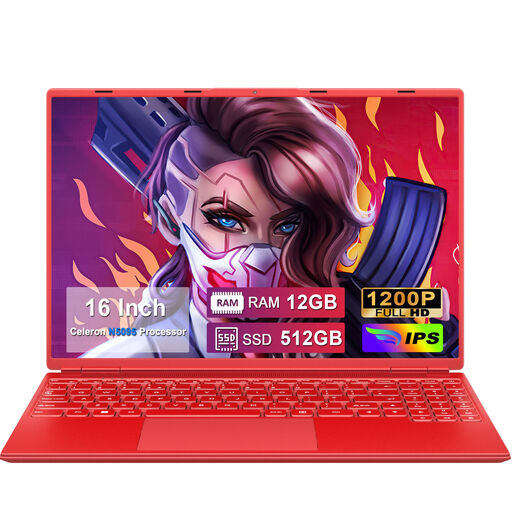
NOTODD 16-inch laptop with numeric keypad

NOTODD 16-inch laptop, Celeron N5095

Test the screen with your register and preferred text size before choosing based on screen size alone.

1920 × 1200 resolution; numeric keypad; Celeron N5095; 12+512 GB; supports expansion up to 1 TB.

View on Joybuy

Frequently asked questions

How can you make register text larger without relying on screen size alone?

Windows has separate settings for text size, display scaling and Magnifier; ChromeOS includes page zoom and screen magnification, while macOS has settings for larger text. Test your preferred view in the register itself: a system feature doesn’t guarantee that every app will continue to show all its fields properly.

Can you update a Google spreadsheet without an internet connection?

Yes. Google explains how to use Sheets offline on a computer, but you need to set up offline access in advance and make the file you need available offline. Before you leave, check that the file is ready to use without an internet connection.

Should you automatically buy an extended warranty for a laptop?

Not automatically. According to the Dutch government, consumer purchases come with a legal guarantee, and the retailer is your point of contact if a product is faulty. Compare a paid package with the rights or services it actually adds; different considerations may apply to business purchases.

Is there a cooling-off period for a laptop bought online?

For many eligible consumer purchases made at a distance, there is a 14-day cooling-off period, according to the Dutch government. Check the retailer and type of purchase, as not every online purchase is covered by the same rules.

Can you simply add stallholders’ names and phone numbers to the register?

Names and phone numbers that identify a person are personal data. If you process them as a business, you must comply with the GDPR and consider what data you process, why you process it and whether you’re allowed to use it. Information that relates solely to a legal entity does not automatically fall under the same definition.
