
Mario Kart World players
If you want to play this particular game on TV, first check which console you need. Nintendo states that Mario Kart World is exclusive to Switch 2.


Choose your console based on the kart racing game and how many players need to race together on one screen. Mario Kart World requires a Switch 2, while Mario Kart 8 Deluxe can also be played on a Switch OLED on TV. Up to eight players can play on one Switch 2 with Mario Kart 8 Deluxe after the update, provided you have enough compatible controllers. For other kart racers, you could also consider a PlayStation or Xbox. The Switch Lite does not support TV mode.
If you want to play this particular game on TV, first check which console you need. Nintendo states that Mario Kart World is exclusive to Switch 2.
If you want to play with more than four people on one screen, check the game version, any required update and the number of compatible controllers. Nintendo states that the updated Mario Kart 8 Deluxe can be played with up to eight players on one screen on Switch 2.
If you want to stick with your current platform or use games you already own, weigh up the available kart racers against switching to another console. Nintendo warns that some Switch games may not be fully compatible, or may not work at all, with Switch 2.
Start with the game you want and the number of local players. Then check compatibility, controllers and any requirements for online play.
A good choice if: you want to play Mario Kart World or play Mario Kart 8 Deluxe with a larger group on one Switch 2 screen.
Consider: Mario Kart World supports up to four players on the same system. The eight-player limit applies to Mario Kart 8 Deluxe after the update, with enough controllers.
A good choice if: you’ve chosen Mario Kart 8 Deluxe and up to four players on TV is enough.
Consider: Mario Kart World is not available on these systems. For TV play, the included dock is important.
A good choice if: you want to stick with PlayStation and play Sonic Racing: CrossWorlds locally with up to four players.
Consider: this option does not give you access to Mario Kart. According to the Dutch PlayStation game page, PlayStation Plus is required to play Sonic Racing: CrossWorlds online.
A good choice if: you want an all-digital Xbox for Sonic Racing: CrossWorlds, with two to four players on one screen.
Consider: the console does not play game discs, and Xbox requires a separate subscription for online multiplayer in this game.
| What to consider | What should you check? | Who will find this important? |
|---|---|---|
| Kart racing game you want | Check that the game works on the console and can be played locally on TV. | If I want to play one specific game, I first need to know which console supports it. Around 36% of consumers prioritise their preferred kart racing game. |
| Players on one screen | Check the limit for the specific game, console and local play mode, as well as the number of compatible controllers. | If I’m planning a big group race, I need to know how many people can play on one TV at the same time. Around 29% of consumers prioritise the size of their local group. |
| Existing games and platform | Check compatibility for each game and controller. Don’t assume everything will be compatible when switching to Switch 2. | If I want to keep using my current platform and games, I’ll take them into account before switching. Around 21% of consumers prioritise their existing gaming platform. |
| Overall gaming set-up | Check what’s included in the bundle, which controllers you need and whether you want to play online. | If you want to race together, it’s worth knowing in advance which equipment and play requirements are involved. Around 14% of consumers prioritise the total cost of buying and playing. |
The number of racers online or across multiple systems is not the same as the number of players on one TV. The limit varies by game and console.
Check the local game mode, console version, update and required controllers together.
Larger groups may need extra compatible controllers.
Switch 2’s maximum 4K output does not mean every game will be displayed in 4K. Nintendo states that both the TV and the game must be compatible for 4K display.
Compare the picture features for the game and TV you’ve chosen, not just the console specification.
Nintendo sets out different requirements for connecting Switch 2 to a TV than for the original Switch.
Check what’s included in the box and use the connection equipment Nintendo specifies for Switch 2.
You may need to buy additional equipment if you don’t have suitable connection accessories.
The Xbox Series S and PS5 Digital Edition cannot play physical game discs.
Decide in advance whether you want to play physical or digital games.
If you own games on disc, you may need to buy a digital version if one is available.
A strong choice for Mario Kart on TV: Switch 2 for Mario Kart World and Mario Kart 8 Deluxe; Switch and Switch OLED for Mario Kart 8 Deluxe.
An option for players who want to play another kart racer, such as Sonic Racing: CrossWorlds, locally on TV with PlayStation.
Xbox Series S is an all-digital TV console for a kart racer such as Sonic Racing: CrossWorlds.
Publisher of Sonic Racing: CrossWorlds, a kart racing game that offers a console alternative to Mario Kart.
This selection focuses on Nintendo Switch consoles for playing Mario Kart on TV: a Switch 2 bundle with Mario Kart World and a Switch bundle with Mario Kart 8 Deluxe.
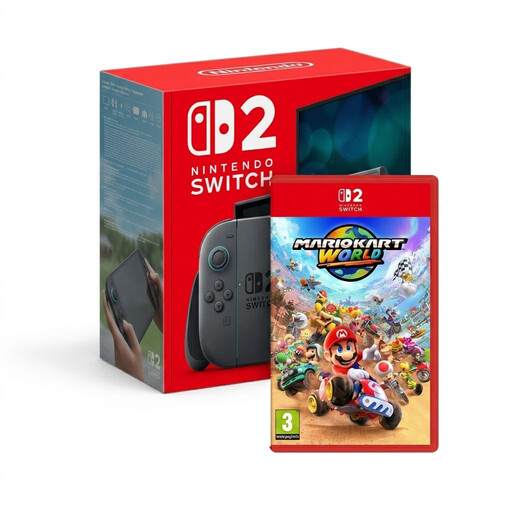 Image unavailable
The bundle combines Switch 2 with Mario Kart World and describes TV play using the dock. Nintendo states that this game supports up to four players on the same system.
 Image unavailable
The bundle includes Mario Kart 8 Deluxe and TV display via the dock. Nintendo states that this game supports up to four players in split-screen TV mode.
No. Nintendo states that Mario Kart World is exclusive to Switch 2. You can play Mario Kart 8 Deluxe on TV using a Switch OLED.
According to Nintendo, you can do this with Mario Kart 8 Deluxe on Switch 2 after the update on 2 September 2026, provided you have enough compatible controllers. Mario Kart World supports up to four players on the same system.
No. Nintendo states that Switch Lite does not support TV mode. An HDMI cable won’t make TV display possible.
Not for local split-screen play by itself; online play has different requirements. PlayStation and Xbox list subscriptions for online multiplayer in Sonic Racing: CrossWorlds, so check the requirements for the game and mode you choose.
Nintendo specifies the Switch 2 dock, a suitable Switch 2 power supply and an Ultra High Speed HDMI cable. According to its connection instructions, the original Switch power supply and HDMI cable are not suitable replacements for TV mode on Switch 2.