
Designer of 2D mapping projects
You create maps using layers and a print layout, and want to decide which software and workstation setup will suit you. QGIS Tutorials and Tips explains how to combine layers in a QGIS print layout.


Start with the software: QGIS can be used on Windows, macOS and Linux, while Esri lists Windows as a supported operating system for ArcGIS Pro. Then choose a compact or expandable desktop based on the existing monitor, the connections you need and the scale of your mapping work. If the shared computer processes personal data, arrange access permissions separately.
You create maps using layers and a print layout, and want to decide which software and workstation setup will suit you. QGIS Tutorials and Tips explains how to combine layers in a QGIS print layout.
You’re choosing a PC for colleagues to use. If it processes personal data, your organisation must also decide how access to that data will be managed. The Dutch Data Protection Authority stresses that appropriate access depends on the purpose and context of the processing.
You may be expecting point clouds, larger local files or other work alongside map layouts, and want to assess which upgrade options you’ll need. QGIS documentation describes point clouds as data that can be used to create a three-dimensional view of a landscape.
First, establish which mapping software and files you need. Then compare the PC with the existing monitor and shared workstation. Consider upgrades only in light of the GIS tasks you actually expect to carry out.
| What to consider | What should you check? | Who is this important for? |
|---|---|---|
| Software and configuration | Check which operating system, memory and storage configuration will suit the agreed software and files. Esri lists Windows as a supported operating system for ArcGIS Pro; QGIS is available for Windows, macOS and Linux. | If I mainly create 2D maps and print layouts, I first want to know which application the organisation uses. Around 33% of consumers put suitable mapping software and mapping work first. |
| Access for shared use | Match accounts, file locations and access permissions to the way the PC will be used. The Dutch Data Protection Authority says that the access required depends on the purpose and context of the processing. | When colleagues use the same PC, I want to know who can access the project files, especially if they contain personal data. Around 27% of consumers give shared access top priority. |
| Space and monitor | Compare the connections on the exact PC with the existing monitor and check which components are included with that configuration. | If the PC is going on a shared desk with an existing monitor, I want to know whether the case and connection will fit. Around 20% of consumers put workstation size and the monitor first. |
| GIS upgrades | Check the upgrade options for the exact configuration and decide whether the data or visualisations you use make them necessary. | If I expect to work with larger data files or point clouds as well as map layouts, I want to know what upgrades the chosen configuration actually supports. Around 20% of consumers prioritise future GIS upgrades. |
QGIS and ArcGIS Pro do not support the same operating systems. A PC that doesn’t match the agreed application may not fit your workflow.
First, find out which software is required, then check the system requirements for the version you’ll be using.
For the Lenovo M70q configurations reviewed, the monitor is sold separately. A Gen 6 configuration also has no keyboard or mouse selected. The exact package contents vary by configuration.
Compare what’s included in the offer with the monitor, input devices and connections already available at the office.
A PC used by colleagues doesn’t automatically control who can open project files. If personal data is being processed, your organisation must prevent unauthorised access.
Ask your organisation to establish which accounts and access permissions are appropriate for the files and how they’ll be used.
Dell offers both integrated graphics and separately selectable graphics cards for the Pro Max Micro. A configurable option doesn’t mean it’s included as standard in every configuration.
Check the components in the final configuration and first establish whether your specific mapping workflow requires a separate graphics card.
ThinkCentre Tiny is a compact business PC range worth considering when desk space and your existing monitor are the main priorities.
The Pro Mini 400 G9 offers a compact case, while the Pro Tower 400 G9 is an alternative with a different case design.
The PRO DP10 13M range is worth comparing if you’re looking for a compact PC with a choice of connections and storage options.
The Dell Pro Max Micro FCM2250 is a configurable compact workstation option to consider if a specific workflow calls for more demanding configuration choices.
These compact desktop picks are intended for mapping workstations where space matters. For each model, check that the full configuration, connections and mapping software you use are suitable for a shared office workstation.
 No image available
The mini PC form factor may suit a desk with limited space. Before buying, check that the configuration meets the requirements of the mapping software you use.
The product title lists 128 GB LPDDR5x memory and a 1 TB SSD.
 No image available
The compact ThinkCentre may suit a shared workstation with limited desk space. Compare the configuration with the requirements of your chosen mapping software.
The product title lists Windows 11 Pro, 16 GB DDR5-SDRAM and a 512 GB SSD.
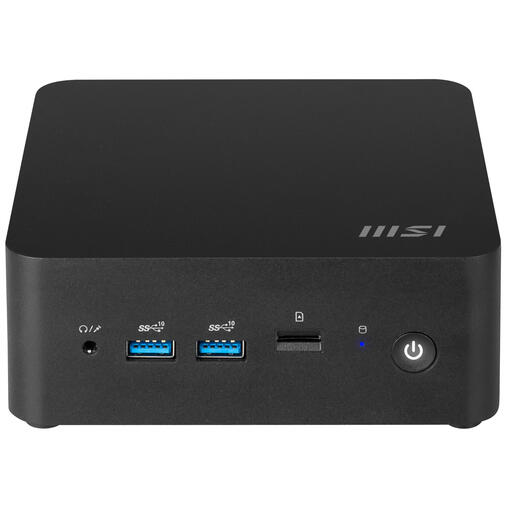 No image available
This compact barebone may suit a space-conscious setup, but first establish which components you’ll need to turn it into a complete workstation.
The product title lists a 0.84-litre case and Intel SoC 150U. This is a barebone configuration, not a fully specified desktop setup.
Not if you’ve chosen QGIS: QGIS lists support for Windows, macOS and Linux. If your organisation requires ArcGIS Pro, check which Windows versions Esri supports and the system requirements for the version you’ll use.
First, check that the chosen software can access the layers and project files you need. If your organisation processes personal data, it must prevent unauthorised access and set appropriate access permissions. The Dutch Data Protection Authority links this assessment to the purpose and context of the processing.
Don’t assume they are. For an M70q Gen 6 configuration reviewed, Lenovo states that no keyboard or mouse has been selected and that the monitor is sold separately. Check the package contents for the exact configuration.
This depends, among other things, on whether the purchase is for business or personal use. ACM ConsuWijzer says consumer protection does not automatically apply to a contract used mainly or exclusively for business; in that case, check the agreed warranty and service terms. The statutory guarantee applies to purchases covered by consumer law.
No. Access measures depend on what your organisation processes and the context in which it does so. If personal data is processed, your organisation must protect it appropriately and prevent unauthorised access. Ask it to decide which accounts and permissions are needed.