
Vandaag of morgen in huis

Kwaliteit gegarandeerd

Welkomstaanbiedingen ontgrendelen: GRATIS bezorging | Tot 80% korting | Gratis 30 dagen JoyPlus-proefperiode
Download de app
A magnetic portable SSD 1TB might seem straightforward to choose on paper: enough storage, a USB-C connection and high transfer speeds. Yet the most important differences are often in the details. A high speed on the packaging means little if your laptop, iPhone or cable doesn't support that speed.
For content creators, videographers, photographers, gamers and professionals, three pitfalls are particularly relevant:
The DigiEra LPS2000M-2 and LPS2000M-3 state a read speed of up to 2000 MB/s and a write speed of up to 1800 MB/s via USB 3.2 Gen 2x2 Type-C. These are manufacturer-stated product specifications. The actual speed also depends on the port used, the cable, source files, temperature and the connected device.
A USB-C connection doesn't automatically mean USB 3.2 Gen 2x2 either. Some USB-C laptops, tablets and phones use a lower USB standard. So check:
For large video files and photo libraries, a portable SSD USB-C can be considerably more practical than a traditional hard drive. An SSD has no moving parts, making it compact and quiet to operate. That makes it suitable as external storage for iPhone, laptop, camera or games console.
According to the product description, the DigiEra SSDs are intended for devices with USB-C and are specifically mentioned for the iPhone 15 and 16 series. The manufacturer states that direct 4K ProRes video recording to external storage is supported on compatible Pro and Pro Max models.
That doesn't mean every iPhone with USB-C automatically supports all features. Check before purchase:
Please note: according to the product specification, these models are not compatible with iPhone 14 or older iPhones. For other smartphones, tablets, cameras and laptops, USB-C compatibility depends on the port and the operating system.
According to the product information, the DigiEra LPS2000M models have an aluminium casing, dimensions of approximately 2.28 × 0.46 inches and a weight of 1.62 oz, roughly 46 grams. That's handy for a camera bag, jacket pocket or laptop bag.
The manufacturer also states shock resistance up to 1500G / 0.5 ms and vibration resistance of 10–2000 Hz. These are technical values from the product description, not a guarantee that data will be preserved under all circumstances. Always make a second copy for important projects.
For everyday use, these points are also important:

Why this fits the profile: A compact choice for anyone using an external SSD 1TB for the first time with a USB-C laptop, tablet or compatible iPhone.
The product description clearly states the USB 3.2 Gen 2x2 interface and the limitation to iPhone 15 and newer. This allows you to check the connection in advance.
1TB storage, magnetic attachment, USB-C and a stated read speed of up to 2000 MB/s.
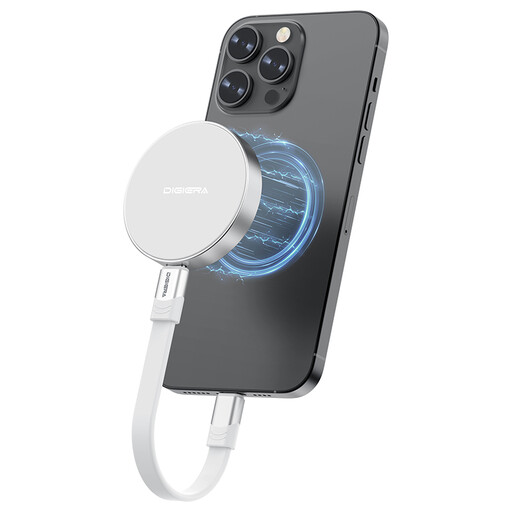
Why this fits the profile: Suitable for users looking for a lightweight SSD for video editing, photography and mobile working with various USB-C devices.
According to the specification, the casing is made of aluminium alloy and the manufacturer states shock and vibration resistance. This makes the stated properties more verifiable than just a general term like "rugged".
3D NAND TLC, 1TB capacity, up to 1800 MB/s stated write speed and a compact size.
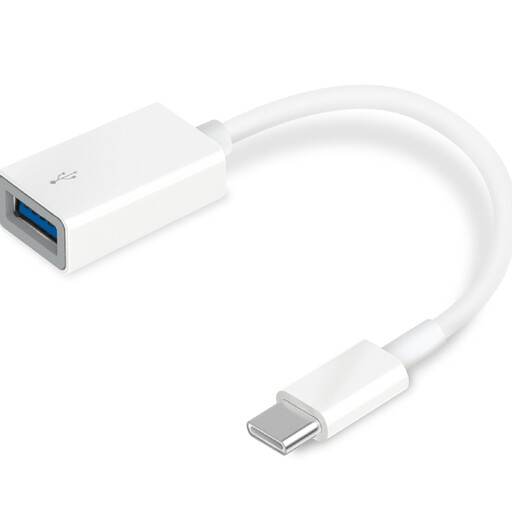
Why this fits the profile: Handy if you want to connect a magnetic SSD USB-C to an older device with USB-A, such as a laptop or card reader.
The adapter states USB 3.0 SuperSpeed and OTG support. Don't expect the full USB 3.2 Gen 2x2 speed of the SSD here; the adapter can limit the transfer.
Compact USB-A to USB-C solution, plug-and-play and compatible with Windows, macOS, Chrome OS, Linux and Android according to the product information.
We've put together a full, up-to-date list of products that fully meet these strict selection criteria and current European safety regulations.
According to the DigiEra product description, the LPS2000M-2 and LPS2000M-3 support direct recording to external storage on compatible iPhone Pro and Pro Max models. Always check the exact iPhone model, the available ProRes options and the USB-C cable used. The 1TB storage capacity is suitable for large files, but 4K video can fill this space quickly.
Not necessarily. USB-C describes the shape of the connection, not automatically the speed. A laptop can use USB 2.0, USB 3.x, USB4 or Thunderbolt via USB-C. The SSD may well work, but the transfer speed is determined by the slowest link: device, cable or SSD.
The lifespan depends on the amount of data you write, heat generation, usage conditions and storage quality. A shock-resistant SSD is not maintenance-free. Store important files in at least two locations and safely eject the SSD. For daily video work, it's wise to regularly check that backups have been made correctly.
