
Vandaag of morgen in huis

Kwaliteit gegarandeerd

Welkomstaanbiedingen ontgrendelen: GRATIS bezorging | Tot 80% korting | Gratis 30 dagen JoyPlus-proefperiode
Download de app
Do you regularly work with customer data, financial information or internal documents on the train, in the office or in a coffee shop? A magnetic laptop privacy screen can stop people sitting next to you from easily reading your screen. But choosing the right one involves more than looking for the words “privacy filter”. Screen size, aspect ratio, webcam position and how the filter attaches all affect how comfortable it is to use every day.
A 14-inch screen isn’t automatically compatible with every 14-inch privacy filter. Check the aspect ratio too, such as 16:10, as well as the screen bezels. A filter designed for a widescreen 16:9 display may not line up correctly on a 16:10 laptop, or could cover part of the display.
For a 13.5-inch Surface Laptop privacy screen, you’ll need a model designed specifically for this screen size and its magnetic bezel. If you’re unsure, measure the visible screen’s width and height, then compare them with the product specifications.
A privacy filter restricts visibility from the sides, but it won’t make your screen invisible to everyone outside your viewing direction. Kensington MagPro models specify a limited viewing angle of +/- 30 degrees. This helps prevent people from looking over your shoulder on the train or at a shared desk, but someone standing directly behind you may still be able to see parts of the screen.
As well as checking the viewing angle, think about where you sit, your screen brightness and where you display sensitive information.
A thick or poorly positioned filter can make touch controls less comfortable to use, increase reflections or partly cover the webcam. On laptops with narrow bezels, a magnetic screen filter is often more practical than one with adhesive strips. Check that the magnets are designed for your type of bezel and whether the filter can stay in place when you close the laptop.
Check at least the following:
According to the product information, the Kensington MagPro Magnetic Privacy Screen for 14-inch laptops is designed for a 16:10 screen. Its stated dimensions are 38.5 × 26 cm. Always compare these measurements with your own laptop, as the casing may be larger than the visible display.
Magnetic attachment is handy if you want to remove the filter often. You can avoid adhesive residue and store the screen filter away when you’re working from home. Before fitting it, check that the magnetic bezel is clean. The safety information warns that metal particles or magnetic dust between the filter and screen could cause scratches.
A filter that stays attached when you close your laptop is practical, but never close the laptop with dirt, heavy objects or protruding accessories between the screen and keyboard. This could cause pressure marks on the LCD panel.
An anti-glare privacy screen can reduce distracting reflections. Some models have two sides:
The Kensington MagPro Elite for the Surface Laptop has a matte and a glossy side, and supports touchscreen use and the Surface Pen. According to the product specifications, this model reduces blue light by up to 22%; the 14-inch model is stated to reduce it by up to 30%. These are product specifications provided by the brand, not a guarantee of a particular user experience or medical effect.
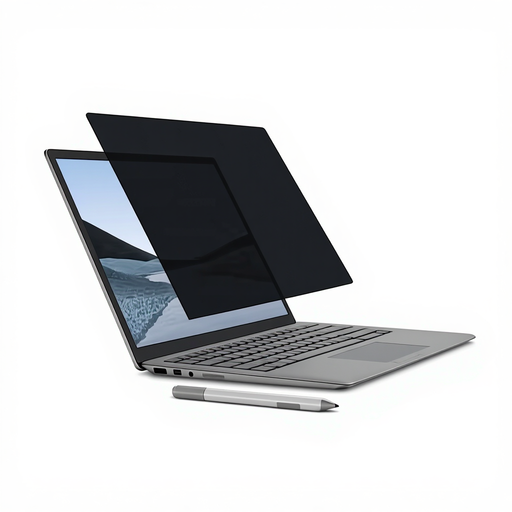
Why it suits this user: This model is designed for Surface Laptop users with a 13.5-inch screen who want an adhesive-free filter and still need to use the touchscreen.
The product specifications explicitly mention Surface Laptop 13.5-inch compatibility, magnetic attachment and support for the touchscreen and Surface Pen. Still, check your exact model and bezel.
Limited viewing angle of +/- 30 degrees, matte and glossy sides, anti-glare coating, plus a cleaning cloth and protective sleeve included.
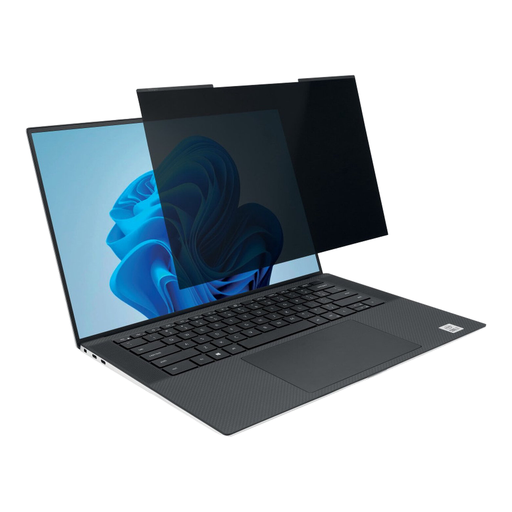
Why it suits this user: A good fit for business laptop users with a 14-inch 16:10 screen who regularly move between the office, home and public spaces.
The 16:10 aspect ratio and webcam cut-out are clearly specified, making it less likely that the filter will be misaligned or block the camera.
Magnetic strips, matte and glossy sides, anti-glare coating and, according to the product specifications, the filter can stay attached when you close your laptop.
Why it suits this user: Suitable for anyone who works with a 14-inch business laptop every day and needs a filter for train journeys, client visits and shared workspaces.
The filter can be removed without adhesive and has a limited viewing angle. Store it flat and check for dirt before fitting to help prevent wear with frequent use.
Webcam cut-out, up to 30% blue light reduction according to the product specifications, and a stated limited viewing angle of +/- 30 degrees.
We’ve put together a complete, up-to-date list of products that meet these strict selection criteria and the applicable European safety requirements.
A filter will only work properly as long as its micro-louvres and coating remain undamaged. So don’t treat it like a loose sheet that can be crushed in a full laptop bag.
It depends on the model. Look for an explicit mention of touchscreen support. The Kensington MagPro Elite for the Surface Laptop specifies support for the touchscreen and Surface Pen. Also check that touch controls continue to work accurately once the filter is fitted.
Some models allow this. The Kensington MagPro for 14-inch laptops states that you can close the laptop and put it into sleep mode with the filter attached. Before closing it, always check that there’s no dirt, cables or other objects between the screen and keyboard.
Its lifespan depends mainly on everyday use, cleaning and storage. Scratches, creases and pressure marks can reduce viewing quality. A soft cloth, flat storage and a protective sleeve can help keep the filter in good condition for longer. The statutory guarantee in the EU is at least two years; additional rights may apply under the relevant Dutch legislation.
