
Photographers with an existing camera
You’re looking for a lens that fits your current camera mount. Check the full model version, as similar lenses may be available with different mounts.


For photos of the whole basket, a close-up lens with lower magnification may be enough; choose 1:1 if you want tiny intersections or fibres to fill the frame. First check that the exact lens version is compatible with your camera, then decide on the framing and working distance you need. Depth of field is shallow when shooting close up, so a stable setup and, if needed, supported focus bracketing are worth considering.
You’re looking for a lens that fits your current camera mount. Check the full model version, as similar lenses may be available with different mounts.
You want to show the basket’s shape and material. The field of view, how far away you can shoot from and the space around the window all play a part.
You want to capture tiny intersections and fibres in close detail. Compare the maximum magnification and focusing distance of a lens that fits your camera.
First check the camera mount, then decide whether you want to photograph the whole basket or tiny details, and choose a working distance that suits the space by your window.
Choose this if: you mainly photograph the whole basket or larger sections of the weave. Canon lists a maximum magnification of 0.5× for the RF 85mm F2 MACRO IS STM on a compatible EOS R camera.
Bear in mind: 0.5× is not 1:1, so this magnification may not be enough for very small details that need to fill the frame.
Choose this if: you want to capture details on the sensor at around life size. Nikon lists 1:1 for the NIKKOR Z MC 50mm f/2.8 and Z MC 105mm f/2.8 VR S on compatible Nikon Z cameras.
Bear in mind: at its closest focusing distance, the front of the Z MC 50mm is around 5 cm from the subject, according to Nikon. This may affect how much room you have for window light.
Choose this if: fine details matter and you have enough space to move further away from the basket for a wider composition. Sony lists 1.0× for the FE 90 mm F2.8 Macro G OSS; Sigma offers the 105mm F2.8 DG DN MACRO | Art in Sony E and L-Mount versions.
Bear in mind: check the mount and whether your room gives you enough distance for the composition you want.
Choose this if: you want to capture exceptionally tiny details larger than life size with a compatible Canon RF camera. Canon specifies a maximum magnification of 1.4× for the RF 100mm F2.8L Macro IS USM.
Bear in mind: extra magnification isn’t automatically necessary for a whole basket, and focusing close up gives you a shallow depth of field.
| What to consider | What should you check? | Who is this important for? |
|---|---|---|
| Mount and version | Check the camera mount, camera model and full lens version. | If you want to use the lens on your current camera, the version must be compatible; around 28% of consumers prioritise compatibility. |
| The whole basket in the frame | Decide how large the basket should appear in the frame and whether you have enough distance in the space available. | If you mainly want to show its shape and proportions, your preferred framing matters more than maximum magnification; around 22% of consumers focus on this most. |
| Magnification for details | Compare the maximum magnification of the exact model with the size of the fibres or intersections you want to show. | If you want small details to fill the frame, maximum magnification will determine your choice; around 22% of consumers prioritise this. The Dutch Consumers' Association describes 1:1 as true macro magnification. |
| Sharpness in window light | Decide how much of the weave needs to be in focus and check whether a tripod and, if needed, focus bracketing suit your camera and way of working. | If you want to show several layers of the weave in focus, bear in mind that depth of field is shallow when focusing close up; around 17% of consumers consider this the most important factor. |
| Space around the lens and basket | Check the working distance at your chosen magnification and whether the camera will get in the way of the light coming through the window. | If you have little room to position the camera, basket and window light, the clearance in front of the lens matters; around 11% of consumers pay the most attention to this. |
Lenses with ‘Macro’ in their name can vary considerably in maximum magnification. For example, Canon lists a maximum of 0.5× for the RF 85mm F2 MACRO IS STM and 1.4× for the RF 100mm F2.8L Macro IS USM.
Compare the maximum magnification of the exact version with the framing you want, rather than relying on the product name alone.
If you want to capture very small details that fill the frame, a lens with lower magnification may ultimately not meet your needs.
Nikon lists the focusing distance of the NIKKOR Z MC 50mm f/2.8 as 0.16 m; at this setting, there is around 5 cm between the front of the lens and the subject.
Check the working distance separately and see whether the lens and camera leave the window light you want unobstructed.
A stable camera won’t increase the depth of field in a close-up. When photographing tiny details, part of the weave may fall outside the area in focus.
Consider camera movement and depth of field separately. To get several layers in focus, use a stable setup for a stationary basket and, if your camera and way of working support it, focus bracketing.
A tripod or a different way of working may require extra setup space and time.
Canon offers RF macro lenses for compatible EOS R cameras, with different maximum magnifications.
Nikon Z offers several 1:1 macro options, including lenses with different focal lengths.
The FE 90 mm F2.8 Macro G OSS is designed for compatible Sony E cameras.
The 105mm F2.8 DG DN MACRO | Art is available in separate Sony E and L-Mount versions.
The FUJINON XF80mmF2.8 R LM OIS WR Macro is an option for compatible Fujifilm X cameras.
The Sony E lenses below are options for wider compositions or close-ups with limited magnification; they aren’t a substitute for 1:1 macro if you want to capture small details at life size.
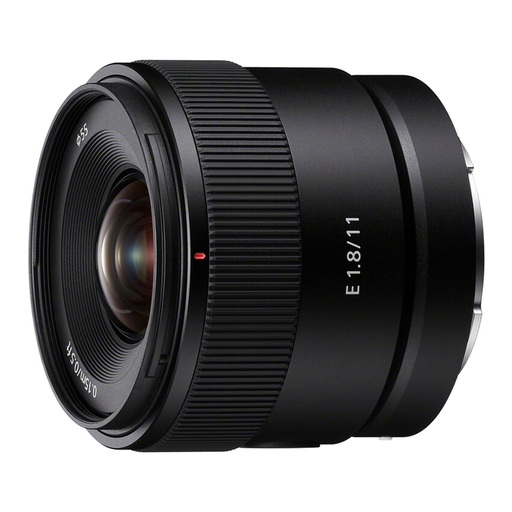 No image available
Its stated 104° angle of view suits a wide composition; the lens is also described as suitable for close-up photography.
Minimum focusing distance: 0,15 m. Maximum magnification: 0,13× in AF and 0,20× in MF; it doesn’t offer 1:1 magnification for tiny details at life size.
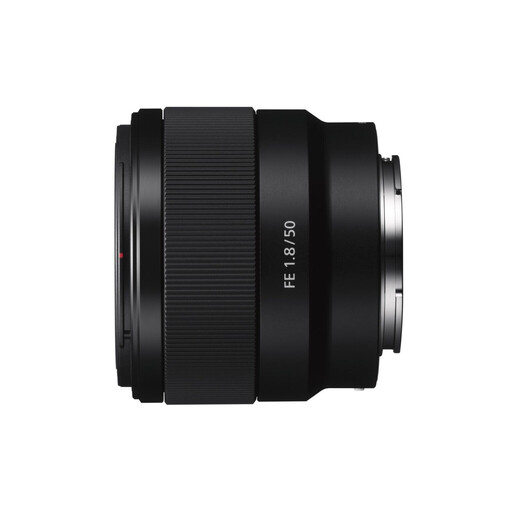 No image available
The product description mentions product and close-up photography; its stated magnification is still limited for tiny details that need to fill the frame.
Focal length: 50 mm. Aperture: f/1.8. Maximum magnification: 0,16×, not 1:1.
No, it depends on the framing you want. 1:1 matters for small details that need to fill the frame; lower magnification may be enough for the whole basket. For example, Canon specifies a maximum of 0.5× for the RF 85mm F2 MACRO IS STM.
First, check the area in focus with a test shot. Depth of field is shallow at close range; for a stationary basket, you can use a stable setup and, if your camera and way of working support it, combine shots taken at different focusing distances.
Check how the light falls before taking a series of product photos, as natural light changes. A reflector or diffuser can help you control the shadows. For repeated shots, you could use a tripod to keep the framing consistent.
When you buy online as a consumer from a business, you usually have a 14-day cooling-off period; check the applicable terms and exceptions. You’re also entitled to a product that meets legal standards. According to the Dutch government, there is no fixed statutory guarantee period in the Netherlands; if a product is faulty, the retailer is your point of contact.