
Vandaag of morgen in huis

Kwaliteit gegarandeerd

Welkomstaanbiedingen ontgrendelen: GRATIS bezorging | Tot 80% korting | Gratis 30 dagen JoyPlus-proefperiode
Download de app
The announcement of a new MacBook Pro always creates a lot of buzz, and the 2026 model with the M5 chip is no exception. If you're considering buying the new MacBook Pro 14-inch M5, you are likely a professional or a power user looking for serious performance. But in the pursuit of the latest technology, it's easy to fall into common traps that cost you unnecessary money or leave you with a laptop that isn't a perfect fit for your work.
Before you pull out your wallet, let's discuss the three biggest missteps buyers make and how you can sidestep them.
To make an informed choice, it's crucial to understand what the specifications of the MacBook Pro 14-inch 2026 mean in practice. We'll break down the key components for you.
The Apple MacBook Pro M5 chip is the heart of this machine. According to Apple's announcements, the M5 chip combines an even faster CPU and GPU with an improved Neural Engine. What does this mean for you?
The configuration is one of the most important decisions. For most creative and technical professionals, the MacBook Pro 32GB 1TB is an excellent starting point.
One of the major innovations is Apple Intelligence. According to Apple, this is a personal intelligence system deeply integrated into macOS. In practice, this can help you with tasks like:
Its true power depends on the support from the software you use. Check whether your critical applications are already optimised to fully leverage the benefits of Apple Intelligence.
Not everyone has the same needs. Below are some recommendations tailored to different professional profiles.

Why This Fits Their Persona: Ideal for the professional who works entirely within the Apple ecosystem. The seamless integration with iPhone and iPad, combined with software optimisation for Final Cut Pro and Logic Pro, creates an unparalleled workflow. The Liquid Retina XDR display is one of the best on the market for color-accurate work.
This 32GB/1TB configuration avoids the over-specification trap. It's a powerful, future-proof choice without the extreme cost of maximum upgrades, while providing the perfect foundation to leverage Apple Intelligence.
Exceptional performance-per-watt, resulting in long battery life and quiet operation. The combination of hardware and software is optimal for creative tasks.
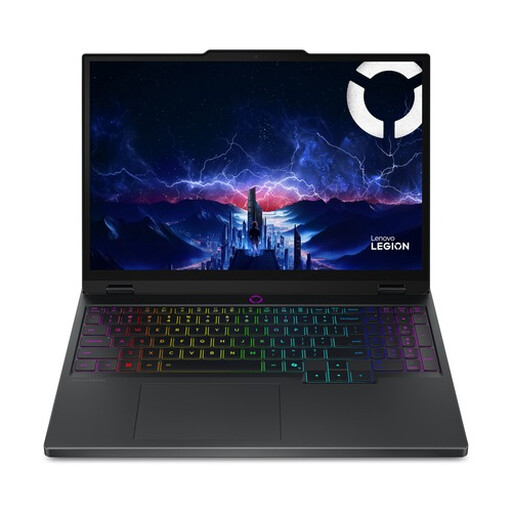
Why This Fits Their Persona: For the professional who depends on Windows-specific software for work (like certain CAD or 3D programs) or wants to game after hours. This laptop offers raw graphics power and the flexibility of the Windows platform.
This model sidesteps the 'ecosystem trap.' You aren't tied to Apple's software and hardware, which is crucial if your professional tools run better on Windows. It offers extreme graphics performance for a competitive price.
The NVIDIA GeForce RTX 5070 GPU is a powerhouse for graphically intensive tasks and gaming. The OLED screen with a high 165Hz refresh rate is excellent for both creative work and entertainment.
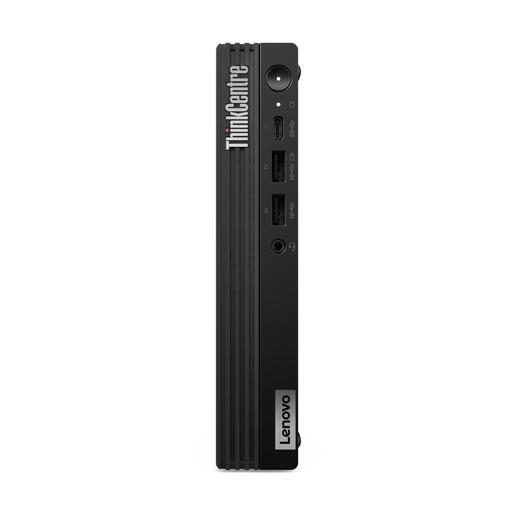
Why This Fits Their Persona: Perfect for the user who needs the computing power but primarily works from a fixed workstation and already has a good monitor, keyboard, and mouse. This mini PC delivers desktop-level performance in an extremely compact form factor.
You avoid the 'premium price' for an integrated screen and portability you don't need. You invest purely in computing power and connectivity, resulting in a much better price-to-performance ratio for a fixed setup.
A powerful Intel Core i7-14700T processor with 20 cores delivers excellent performance for heavy tasks. The extensive selection of ports and compact size make it a flexible and powerful core for any workspace.
A powerful laptop is only half the battle. Especially with video editing or working with large datasets, internal storage fills up quickly. A fast, external SSD is not a luxury, but a necessity for backups and managing active projects without slowing down your system.
We have compiled a complete, up-to-date list of fast external SSDs that meet strict selection criteria and are ideal for professional workflows.
1. What is the expected price of the MacBook Pro 14-inch M5 in the UK/US? Although Apple has not yet confirmed official pricing, for a model like the MacBook Pro 14-inch M5 with 32GB/1TB, you can expect a MacBook Pro 14-inch price that is in line with the launch prices of previous higher-end generations. Expect an investment that befits a professional-grade tool.
2. Is 32GB of RAM enough for 4K video editing on the new MacBook Pro? Yes, for most professionals, 32GB of unified memory is more than sufficient for smooth 4K video editing, even with multiple streams and color correction. The efficiency of Apple Silicon ensures that memory is used optimally, often outperforming Windows laptops with similar specs.
3. How does the M5 chip differ from the M4? According to Apple's announcements, the focus of the M5 chip is on two areas: higher efficiency (more performance-per-watt) and a significantly more powerful Neural Engine. The latter is specifically designed to accelerate the performance of Apple Intelligence and other AI tasks directly on the device, resulting in a faster and more private user experience.
